 PluginStats
Matlab Unofficial installs statistics
By Xavier Hahn (2 listings) · VS Code Marketplace · Programming Languages
MATLAB support for Visual Studio Code
Matlab Unofficial has 770,587 recorded installs on VS Code Marketplace, ranking #643 of 2,501 tracked listings.
Rating: 4.63 / 5 from 24 ratings
About Matlab Unofficial
MATLAB for Visual Studio Code
News
As I mentioned previously in GitHub's issues, managing this extension has become a challenge for me due to time constraints, despite the numerous contributions from users that have added functionalities and improved it over the years. I have been lagging to release new versions and add improvements.
A few months ago, I was contacted by a team at Mathworks who expressed interest in the extension due to its popularity. They decided to create their own version with a better architecture and easier integration with Matlab, which I believe will benefit the user community. I appreciate the Mathworks team's interest and their kind and patient communication. You can read their official announcement of this release here: https://blogs.mathworks.com/matlab/2023/04/26/do-you-use-visual-studio-code-matlab-is-now-there-too/
For those who have been using this extension, I regret to inform you that I will not be able to continue maintaining it due to my limited availability and will mark it as deprecated. I suggest that you migrate to the MathWorks official extension, which is now available and provides a better solution (see https://marketplace.visualstudio.com/items?itemName=MathWorks.language-matlab).
Finally, I would like to express my sincere gratitude to everyone who has contributed to this extension over the years. I am humbled by its popularity and recognize that it would not have been possible without your valuable contributions. The MathWorks extension continues to be open source and welcomes contributions on their GitHub repository.
Description
This extension adds language support for MATLAB to Visual Studio Code.
Main features
Colorization
(imported from MathWorks TextMate grammar)
Snippets
(Translated from TextMate's snippets)
Code Checking
Uses mlint for checking the MATLAB code for problems on save.
Usage
Install the extension in VS Code
• Open the command palette using Ctrl+Shift+P • Type ext install Matlab in the command palette
Select MATLAB as a language
• On the bottom-right corner, click on the select language mode button, if you have created a new file it should display Plain Text • Select MATLAB in the list of languages.
Alternatively, saving the file with a .m extension, will allow VS Code to understand that it is a MATLAB file, and automatically select the language correctly.
Using snippets
• Bring-up the autocomplete menu by hitting the Ctrl+Shift key combination • Select the snippet that you want to use in the list • Use tab to navigate through the snippet's variables
Setting-up linter
• Open the User Settings by going to File>Preferences>User Settings • On the right pane, where you have the settings.json file open, add to the json file.
"matlab.mlintpath" : "path to your mlint.exe file"
For example, on a PC : "matlab.mlintpath": "C:\Program Files (x86)\MATLAB\R20XXY\bin\win32\mlint.exe" And on a Mac : "matlab.mlintpath": "/Applications/MATLAB_R20XXY.app/bin/maci64/mlint" And on Linux: "matlab.mlintpath": "/usr/local/MATLAB/R20XXY/bin/glnxa64/mlint" • Save your settings.json file • Now, when you open a Matlab document (.m), VS Code displays warnings and errors. Remark: If you don't want the lint on save option and you want to remove the error message being displayed when the extension activates, change the matlab.lintOnSave option in the settings file to False.
Setting the linter configuration
By adding "matlab.linterConfig" : "path-to-linter-config-file" to your VSCode configuration file, you can pass a configuration file to the mlint call. Check Matlab's documentation to create this configuration file.
Setting the linter encoding
For some languages, like Chinese, the return of the linter is not using the default utf-8 encoding, but a different encoding (gb2312 for Chinese). If the linting doesn't show correctly, change the matlab.linterEncoding to the encoding used by your Windows console. For example, if your Windows is installed in Chinese, add "matlab.linterEncoding" : "gb2312" to your settings.json.
Changing the default file association
Visual Studio Code's default file association for .m files is Objective-C, if you want to set up the default file association to be Matlab go to the Users preference (File>Preferences>User Settings) and add the following line:
Changing the default file encoding
MATLAB default file encoding is not utf-8, but Visual Studio Code is using utf-8 as default. The following setting specifies the default encoding for MATLAB files in Visual Studio Code: `
Description from the VS Code Marketplace listing.
- markdown
- matlab
- snippet
README badge
Show your rank in a README or on your website. The badge updates automatically.
Charts
Images: 30d · 1y · all time · 1600×900 dark


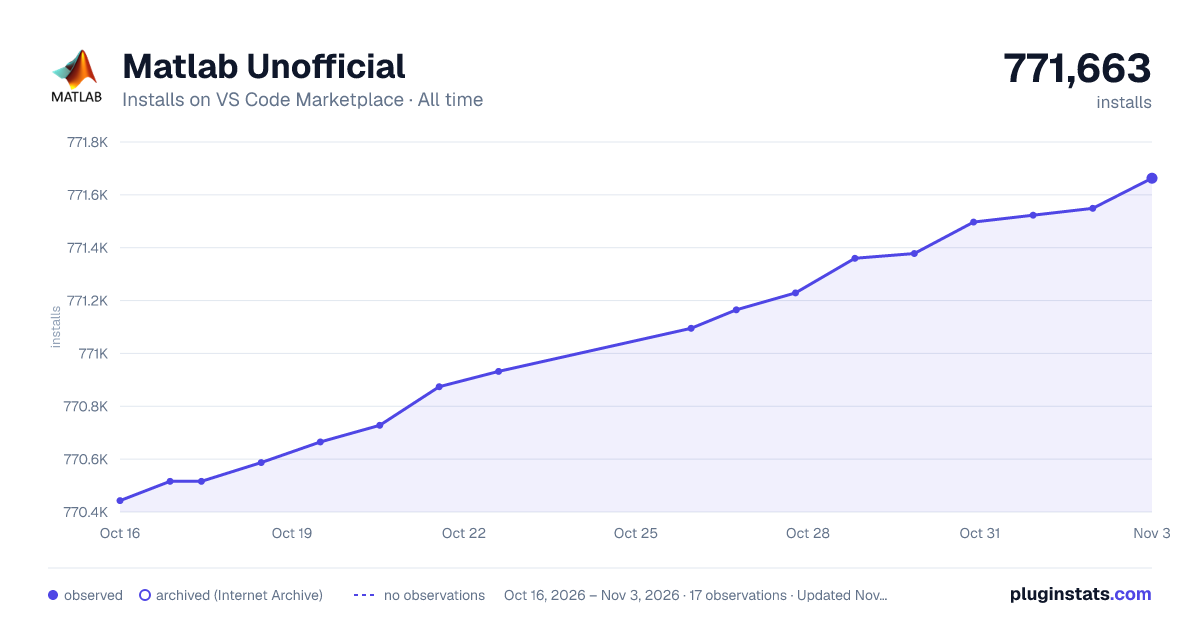

Adoption over time
7/30/90-day growth
Ranking history
Ratings over time
Listing placement
Listing placement
Listing placement
Listing placement
Filled points are observed values; hollow points come from Internet Archive snapshots of the listing page. Dashed segments span periods with no observations — values between points are not interpolated.
Each band is one page of 20. Installs on a linear scale. Placement is projected from installs, so it can differ from the marketplace's own sort order. Hover a dot to see the listing.
Recent observations
Full history (4)Similar VS Code Marketplace Programming Languages plugins
All 20 Matlab Unofficial alternativesData source
Install counts, average rating, and rating counts come from the public Visual Studio Marketplace gallery API. Installs are cumulative and exclude updates.
Listing: https://marketplace.visualstudio.com/items?itemName=Gimly81.matlab. First seen Oct 16, 2026; last successful collection Oct 19, 2026. See the methodology.