 PluginStats
sort-imports installs statistics
By VSC Sort Import · VS Code Marketplace · Programming Languages
Sort ES6 imports automatically.
sort-imports has 204,403 recorded installs on VS Code Marketplace, ranking #1486 of 2,502 tracked listings.
Rating: 3.46 / 5 from 13 ratings
About sort-imports
sort-imports
Sort ES6 imports for JavaScript and TypeScript automatically. Ported from the atom-import-sort package by Renke Grunwald.

Features
Automatically sorts imports on save. You can disable this behavior in the settings and sort imports manually:
- Launch the Command Palette (
Ctrl/Cmd + Shift + P); - Enter Sort imports
You can also save the document without saving imports. This could become handy when you have auto saving enabled, but don't want to sort the imports in a particular file:
- Launch the Command Palette (
Ctrl/Cmd + Shift + P); - Enter Save file without sorting imports
Extension Settings
This extension has the following settings:
sort-imports.default-sort-style: sorting style ifpackage.jsondoesn't haveimport-sortkey (default:eslint).sort-imports.on-save: enable/disable auto sorting on save (default:true).sort-imports.ignore-type-defs: will not sort.d.tsfiles by default since import-sort doesn't handle them well (default:true).sort-imports.languages: selectively choose the languages which should be sorted (default:['javascript', 'typescript']).sort-imports.cache-package-json-config-checks: The sort config is only checked when config files change as a performance optimization, disable if necessary (default:true).
Obsolete settings
See release notes for version 4
Use a different style or parser
Styles (and parsers) can be configured on a per-project basis including support for different types of files (currently JavaScript and TypeScript).
Just add the following to your package.json and adapt it to your liking:
"importSort": {
  ".js, .jsx, .es6, .es": {
    "parser": "babylon",
    "style": "eslint",
    "options": {}
  },
  ".ts, .tsx": {
    "parser": "typescript",
    "style": "eslint",
    "options": {}
  }
}
The keys are a list of file extensions that map to the parser and style that should be used for files that have any of the listed file extensions.
By default, sort-imports comes with these styles:
-
import-sort-style-eslint(default): A style that that is compatible with ESLint's sort-imports rule. -
import-sort-style-module: A style that groups and sorts by module. -
import-sort-style-module-compact: Similar to modules but with fewer groups. -
import-sort-style-module-scoped: A style for import-sort that is focused on modules but with scope support. -
import-sort-style-renke: Renke's personal style.
PRs with more styles are welcome.
Troubleshooting
parser.parseImports is not a function
This happens when using Typescript parser (import-sort#72). The solution is to install it manually:
npm i -D import-sort-parser-typescript
Release Notes
6.2.6
- Make package.json prevail over extension configuration
6.2.5
- Ensure current workspace folder can be resolved as an import-sort styles path
6.2.4
- Fix extension loading issue by forcing cosmiconfig version to 5.0.7
6.2.3
- Security upgrade on dependencies
- Safe types checking
6.2.2
- Fix current document workspace folder initialization
6.2.1
- Add missing parsers and styles dependencies
6.2.0
- Add workspace support with several folders and different configurations
6.1.0
- Improve config caching by listening for file changes on config files
- Move from an error toast to a status bar icon and panel. Click the "Sort Imports" text in the lower right to detailed errors.
- Don't sort
.d.tsfiles by default sinceimport-sorthandles them incorrectly (you can disable this feature via the newsort-imports.ignore-type-defsconfiguration option)
6.0.2
- Upgrade import-sort to v6
6.0.0
- Upgrade dependencies
5.1.0
- Add support to importSort additional options (thanks @fsmaia)
5.0.0
- Breaking change moving to module-compact v2
4.1.0
- Implemented by @cliffkoh
- Introduced
sort-imports.default-sort-style, which defaults toeslint. Other possible values aremodule,module-compactandmodule-scoped. - Introduced
sort-imports.cache-package-json-config-checkswhich defaults totrue. When true, will cache calls toimport-sort-configthereby improving performance (avoids repeated non-trivial disk lookups and parsing). - Fixed bug in
Save file without sorting importwhich caused it to not work.
- Introduced
4.0.0
Update to ease transition from @peterjuras' extension.
sort-imports.blank-lines-after: removed until a valid implementation is providedsort-imports.sort-type: you can now configure your sorting type following with a key in yourpackage.json. Documentationby-module-name: is now"style": "module-compact"by-imported-name: is removed
3.0.0
- Renamed to sort-imports. Renamed config settings to slug-case.
- Fixed blank linkes after imports feature.
2.4.0…
Description from the VS Code Marketplace listing.
- ES2015
- ES2019
- ES6
- Import
- javascript
- javascriptreact
- Sort
- Sorting
- typescript
- typescriptreact
README badge
Show your rank in a README or on your website. The badge updates automatically.
Charts
Images: 30d · 1y · all time · 1600×900 dark


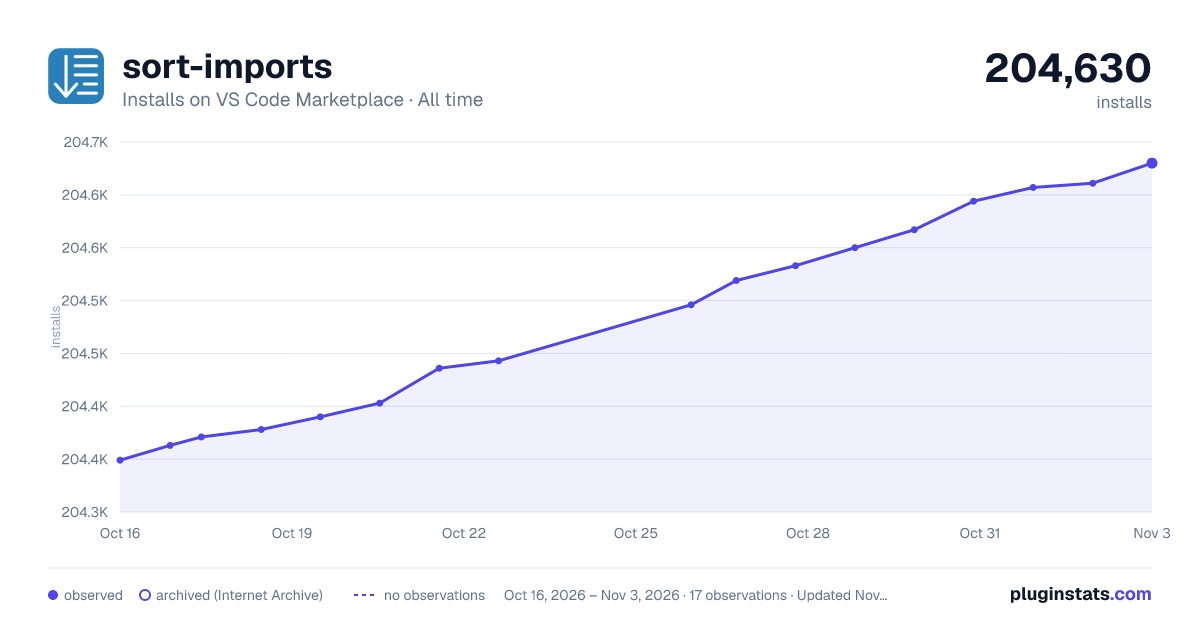

Adoption over time
7/30/90-day growth
Ranking history
Ratings over time
Listing placement
Listing placement
Filled points are observed values; hollow points come from Internet Archive snapshots of the listing page. Dashed segments span periods with no observations — values between points are not interpolated.
Each band is one page of 20. Installs on a linear scale. Placement is projected from installs, so it can differ from the marketplace's own sort order. Hover a dot to see the listing.
Recent observations
Full history (6)Similar VS Code Marketplace Programming Languages plugins
All 20 sort-imports alternativesData source
Install counts, average rating, and rating counts come from the public Visual Studio Marketplace gallery API. Installs are cumulative and exclude updates.
Listing: https://marketplace.visualstudio.com/items?itemName=amatiasq.sort-imports. First seen Oct 16, 2026; last successful collection Oct 21, 2026. See the methodology.