 PluginStats
shfmt installs statistics
By Martin Kühl (2 listings) · VS Code Marketplace · Formatters
format shell programs
shfmt has 133,775 recorded installs on VS Code Marketplace, ranking #1994 of 2,501 tracked listings.
Rating: 4.27 / 5 from 11 ratings
About shfmt
shfmt for Visual Studio Code
[shfmt] formats shell programs.
This extension uses it to provide a [formatter][vscode-formatter] for shell script documents.
Features
Format your shell script documents with the "Format Document" command.
Customize the formatting options with an [editorconfig] file. See the [shfmt documentation][shfmt-man] for details.
Requirements
This extension requires [shfmt] to be installed.
It is highly recommended that you also install the [EditorConfig extension][editorconfig-extension].
If you want to respect the ignore marker in [EditorConfig], you need either the EditorConfig extension or shfmt version 3.8.0 or newer.
Extension Settings
This extension contributes the following settings:
• shfmt.executablePath: Path to or name of the shfmt executable. • shfmt.executableArgs: Additional arguments to pass to the shfmt executable. • shfmt.formatIgnored: Format files marked ignore with [EditorConfig]. By default, shfmt itself only ignores those files when scanning directories, but version 3.8.0 added the flag --apply-ignore to always apply ignore rules.
Changing this setting to false requires either shfmt 3.8.0 or later, or the EditorConfig extension.
Contributed Default Settings
• "[shellscript].editor.detectIndentation": false • "[shellscript].editor.insertSpaces": false
These are set to match the default settings of shfmt. Override them in your settings, or use EditorConfig.
Known Issues
• shfmt supports a limited number of shells, and Visual Studio Code cannot determine the shell used to interpret script.
If you use an unsupported shell (like zsh, or descendants of csh or ksh), consider using editorconfig to let shfmt ignore their scripts.
See the [shfmt documentation][shfmt-man] for details.
• shfmt does not support formatting partial documents.
This means this extension cannot not support "Format Selection" or "Format Modified Lines".
• If you see an error like this:
shfmt error: flag provided but not defined: -apply-ignore [...]
then you turned off the shfmt.formatIgnored setting but have neither the EditorConfig extension nor the required shfmt version 3.8.0 installed.
You can work around this by turning the setting on, installing the EditorConfig extension, or upgrading shfmt.
What's Up With That Icon?
It's shells, laid out in the form of a heart! Made with [Emoji Kitchen][emoji-kitchen].
Description from the VS Code Marketplace listing.
- shellscript
README badge
Show your rank in a README or on your website. The badge updates automatically.
Charts
Images: 30d · 1y · all time · 1600×900 dark


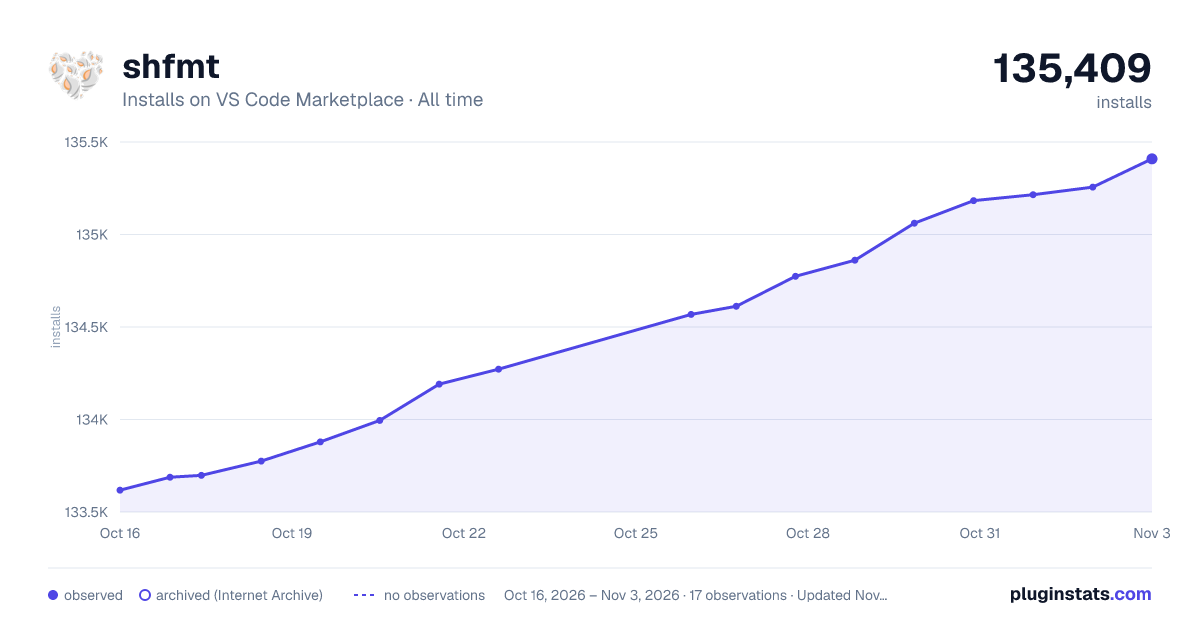

Adoption over time
7/30/90-day growth
Ranking history
Ratings over time
Listing placement
Listing placement
Filled points are observed values; hollow points come from Internet Archive snapshots of the listing page. Dashed segments span periods with no observations — values between points are not interpolated.
Each band is one page of 20. Installs on a linear scale. Placement is projected from installs, so it can differ from the marketplace's own sort order. Hover a dot to see the listing.
Recent observations
Full history (4)Similar VS Code Marketplace Formatters plugins
All 20 shfmt alternativesData source
Install counts, average rating, and rating counts come from the public Visual Studio Marketplace gallery API. Installs are cumulative and exclude updates.
Listing: https://marketplace.visualstudio.com/items?itemName=mkhl.shfmt. First seen Oct 16, 2026; last successful collection Oct 19, 2026. See the methodology.