 PluginStats
SAP Fiori Tools - Application Modeler installs statistics
By SAP SE (17 listings) · VS Code Marketplace · Programming Languages
Allows you to access a visualization of the application's pages, navigation, and service entities. You can add new navigation targets and pages, delete pages, and navigate to corresponding editing tools. The following features are part of this extension: Page Editor and Page Map.
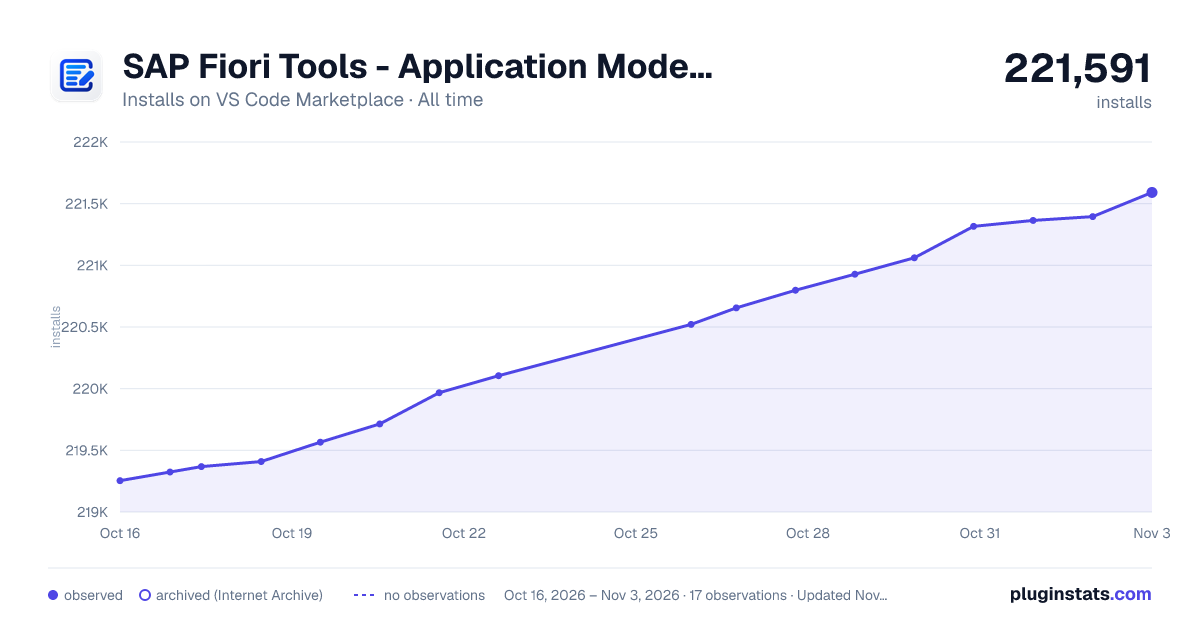
SAP Fiori Tools - Application Modeler has 219,714 recorded installs on VS Code Marketplace, ranking #1420 of 2,502 tracked listings.
Rating: 5.00 / 5 from 3 ratings
About SAP Fiori Tools - Application Modeler
Application Modeler
The application modeler extension allows you to visualize and change the page routing of SAP Fiori elements applications (Page Map), and to configure individual pages using manifest.json file settings, annotation properties, and UI flexibility changes (Page Editor). The Page Editor also supports adding and maintaining properties of SAP Fiori elements building blocks for OData V4-based applications.
When installed on VS Code, the extension additionally provides the MCP server for SAP Fiori, which can be used directly by the GitHub Copilot AI assistant. When using SAP Business Application Studio with a Full-Stack or SAP Fiori dev space, the MCP server is available automatically.
Migration
Applications created with SAP Fiori tools (see the "Integration with the Fiori: Application Generator" topic below) are automatically enabled for application modeler. To migrate an existing project, which is already present in your workspace, execute the Fiori: Migrate Project for Use in SAP Fiori Tools command from the Command Palette.
Supported project types:
- SAP Fiori elements for V2
- SAP Fiori elements for V4
- SAPUI5 freestyle
- SAPUI5 Adaptation Project (only on SAP Business Application Studio)
- Extension Project (only on SAP Business Application Studio)
Usage
- The SAP Fiori project cloned from a repository or filesystem has to be in your workspace.
- Execute the
Fiori: Migrate Project for Use in SAP Fiori Toolscommand from the Command Palette. - Select your project in the project list.
- Select an SAP System for your project's service (and reuse libraries if applicable) from the dropdown list or select "Manual Input" to enter the back end "Hostname URL" and "SAP Client" manually.
- If the application has no back-end service, no input is needed.
- Click "Start Migration" to upgrade the selected project.
The migration updates the package.json, ui5*.yaml, and test\*.html files in your project folder.
Page Map
Features
The SAP Fiori Tools - Page Map provides a visual representation of the application's pages, navigations, and the service entities that it uses. The developer can add new navigations and pages, delete pages, and navigate to corresponding editing tools.
The Page Map extension reads and updates the app.json file containing the navigation and pages information in a compact and technology-independent notation. The file also serves as a simple text-based interface. It is generated on demand and can be accessed from the application modeler tree view from the SAP Fiori sidebar view. Then, select the Show Source Code option from the Map node's right-click context menu. The application descriptor (webapp/manifest.json) of the application is updated automatically when the app.json is saved, and changes to the webapp/manifest.json are converted to app.json. The app.json file is virtual and is not written to the project folder.
Supported Templates of SAP Fiori Elements
- List Report Page with OData V2 and OData V4
- Worklist Page with OData V2 and OData V4
- Analytical List Page with OData V2 and OData V4
- Overview Page with OData V2 and OData V4
- From Entry Object Page with OData V4
- Custom Page with OData V4
How to use Page Map
Select the root folder of your app or any folder in your workspace within Explorer, right-click and select Show Page Map. If the project can't be determined from your selection, you are presented with a quick pick to select the project.
OR
Left-click on the Map node in the application modeler tree view for the project from the SAP Fiori sidebar view.
OR
In the text editor of the virtual app.json file, click the Show Page Map icon in the Editor Title menu.
OR
From the Command Palette, execute the Fiori: Show Page Map command.
Notes
- Undo/redo using menu options is not supported in SAP Business Application Studio.
Prerequisites
The generated application requires the following software to be installed:
- Node.js version 20.19.2 or higher.
Page Editor
Features
The SAP Fiori Tools - Page Editor provides an outline view of the configurable elements on the selected page. Settings can be changed within a property panel which opens on clicking an element. The property panel displays the editable properties, provides a search filter option and info texts for properties. Use the Edit in Source Code option to see and edit the property directly in the associated file.
The Page Editor reads and writes pages/*.json files containing the applicable manifest.json file and SAPUI5 flexibility-based settings in a compact and technology-independent notation. The files also serve as a simple text-based interface. They are generated on demand and can be accessed from the application modeler tree view from the SAP Fiori sidebar view. Then, select the Show Source Code option from the respective page node's right-click context menu. Each page in your app has its own json file. The virtual files are automatically synchronized with the webapp/manifest.json and SAPUI5 flex changes in the webapp/changes folder.
Annotation Support
As of version 1.4.1 of the application modeler and @sap/ux-specification versions 1.84.25, 1.90.14, or higher, the Page Editor allows the creation and maintenance of the most common annotation-based UI elements for OData V4-based list report object page and form entry page applications. With this addition, the application modeler further strengthens the goal of SAP Fiori tools to ease and speed up application development.
Building Block Support…
Description from the VS Code Marketplace listing.
- Page Map
- Pages
- SAP
- SAP Fiori Elements
- Story Board
README badge
Show your rank in a README or on your website. The badge updates automatically.
Charts
Images: 30d · 1y · all time · 1600×900 dark



Adoption over time
7/30/90-day growth
Ranking history
Ratings over time
Listing placement
Listing placement
Listing placement
Filled points are observed values; hollow points come from Internet Archive snapshots of the listing page. Dashed segments span periods with no observations — values between points are not interpolated.
Each band is one page of 20. Installs on a linear scale. Placement is projected from installs, so it can differ from the marketplace's own sort order. Hover a dot to see the listing.
Recent observations
Full history (6)Similar VS Code Marketplace Programming Languages plugins
All 20 SAP Fiori Tools - Application Modeler alternativesData source
Install counts, average rating, and rating counts come from the public Visual Studio Marketplace gallery API. Installs are cumulative and exclude updates.
Listing: https://marketplace.visualstudio.com/items?itemName=SAPSE.sap-ux-application-modeler-extension. First seen Oct 16, 2026; last successful collection Oct 21, 2026. See the methodology.