 PluginStats
AL Object Designer installs statistics
By Márton Sági · VS Code Marketplace · Other
Object Designer optimized for (Dynamics 365 Business Central) AL Language development.
AL Object Designer has 196,087 recorded installs on VS Code Marketplace, ranking #1538 of 2,501 tracked listings.
Rating: 4.59 / 5 from 22 ratings
About AL Object Designer
AL Object Designer
C/Side Object Designer was something that the new AL development environment lacks of very much. The idea behind this extension is to provide a main hub for daily development by giving back the ability of overview.
Main Features
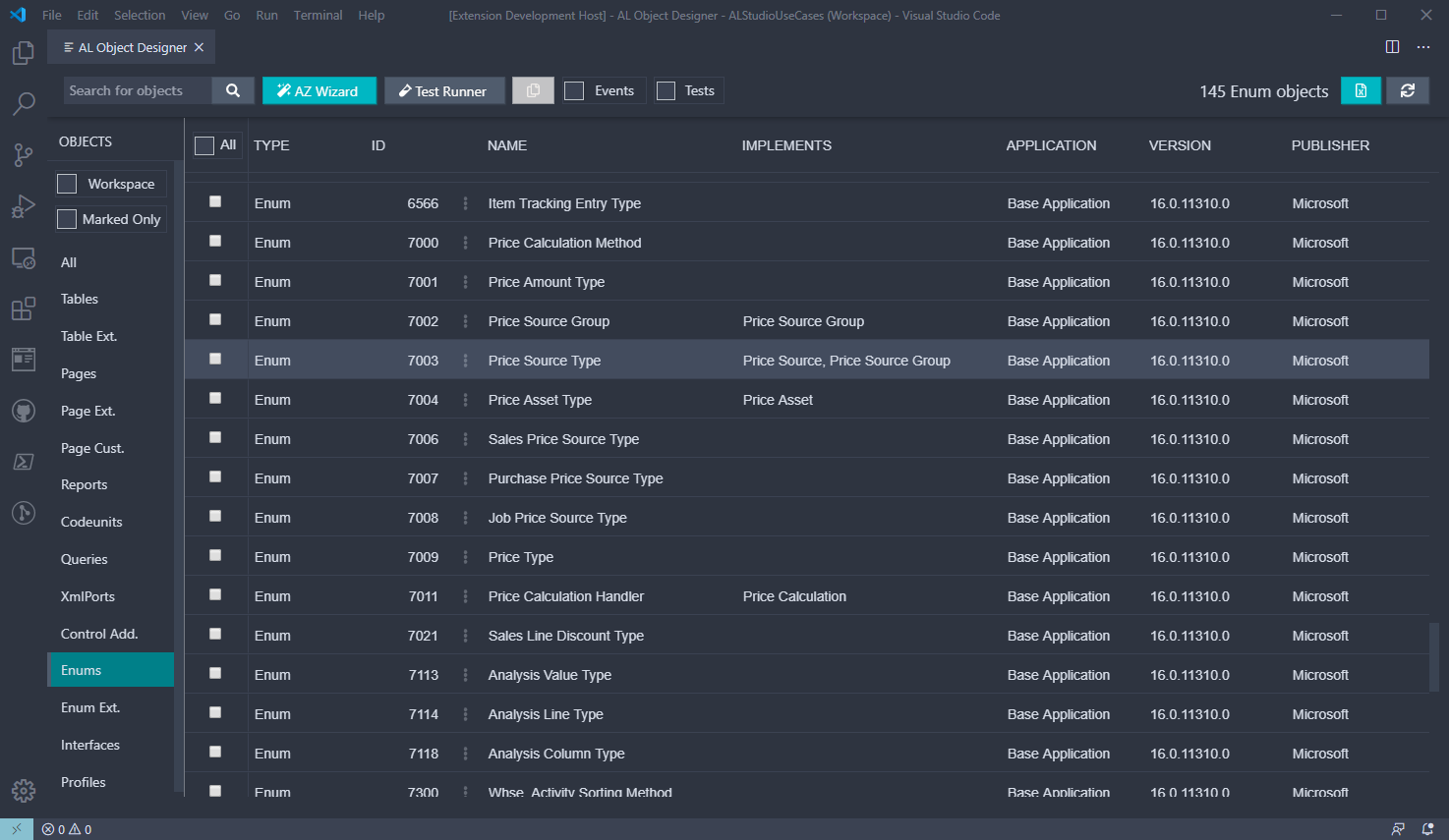
- List Overview of all AL objects in your project: based on symbols (*.app) and your local .al files.
- List Event Publishers from symbol objects and local files, browse them in the same way as objects.
- List Event Subscribers from symbol objects and local files, browse them in the same way as objects.
- Event List view: browse Event publishers of a specific object. Standard events are shown for tables and pages.
- List Unit Tests available in your own workspace files.
- Export list to CSV: current view (objects/events/subscriptions) including all records and visible columns - respecting filters - is exported.
- Live Update: object list is automatically maintained as you create/change/delete objects or download symbols.
- Multi-Folder workspaces are supported: e.g. a workspace with MainApp/TestApp folders.
- Visual Studio Code Online / Remote platform support
- Go To Definition support within application Symbol
- Object Search: filter by Object Type, Name or ID.
- Event Search: filter by Object Type, Name, ID or Event Name.
- Copy/Paste Events: copy event subscription definition to clipboard by clicking on Event Name.
- Object/Event Name filtering: works with partial matches as well. Just like the Windows RTC Client's search field.
- Run selected objects.
- Run table/page extentions.
- View definition of Symbols: original file is opened for local files.
- Generate new objects from tables: card/list pages, report, query.
- Built-in snippets: generate new dictionary or entry tables using a single click.
- Custom snippets: use your own snippets placed in
<project root>/.vscode/.altemplatesfolder - Design view for Pages (alpha): card/list layout is rendered for local pages. Card/Document Symbols are also supported.
Optional integration with AZ AL Dev Tools
- AZ AL Wizard button: launch AL objects wizards
Optional integration with AL Test Runner
- AL Test Runner button: launch AL Test Runner
Requirements
There are no hard dependencies as of v0.1.0.
Optional dependencies:
- CRS AL Language Extension
- If installed,
Run Objectfunction uses commands from this extension
- If installed,
- AZ AL Dev Tools
- If installed,
AZ AL Wizardbutton appears at the top left corner.
- If installed,
- AL Test Runner
- If installed,
AL Test Runnerbutton appears at the top left corner.
- If installed,
VS Commands
Prefix: alObjectDesigner.
- AL Object Designer: opens Object Overview
- AL Page Designer: opens up Page Designer for currently edited AL Object (Page)
- Clear Cache: deletes
.alcachefolder - Generate AL Tables: create table objects by importing custom CSV format

VSCode Hyperlink support
Open objects using VSCode hyperlinks. This is useful for integration scenarios with external applications.
Format:
vscode://martonsagi.al-object-designer/?Command=[Custom command name]&Type=[Object Type]&Id=[Object ID]&Name=[Object Name]
Example:
vscode://martonsagi.al-object-designer/?Command=Definition&Type=table&Name=Currency
Available commands (case-sensitive!):
- Definition - open AL definition or local file
- Design - open Page designer
Page Designer
This extension has a limited ability to view a rendered page layout without deployment, or move existing fields/actions on screen using drag&drop. Supported page types:
- Card types: Card, Document
- List types: types other than Card/Document are regarded as List
Rendered layout is very similar to Business Central pages, although not an exact copy as I'm not using Office Fabric UI.
Generate AL Tables using custom CSV format
Well, this command has been laying in an internal alpha version for months, it's time to publish it! :) Functional requirement documents often contain table definitions that developers have to re-type into AL files once more. This simple CSV format helps speeding up the typing. One CSV file can contain more table definitions separated by empty lines.
Why CSV? Functional documents usually have AL Table defintion in Word tables that are easy to copy to Excel and transfrom that to this custom format.
Template format:
- Field Start/End delimiter:
None - Field separator:
semi-colon; - Line separator:
carriage return - Object separator:
empty line
[Object Type] [Object Id] [Object Name]:[Object Caption] [Fieldname]:[Caption] [Field Type] [Length or Option Members] [Description]
Example:
Table;79001;Customer Header Table
No.;Code;20;Test Field Desc
Description;Text;50
Selection;Option; ,First,Second

Table;79002;Custom Line Table
Document No.;Code;20;Test Field Desc
Line No.;Integer
Description;Text;50
Amount;Decimal
Selection;Option; ,First,Second
Extension Settings…
Description from the VS Code Marketplace listing.
- AL
- AL Extensions
- Business Central
- CSIDE
- Dynamics NAV
README badge
Show your rank in a README or on your website. The badge updates automatically.
Charts
Images: 30d · 1y · all time · 1600×900 dark


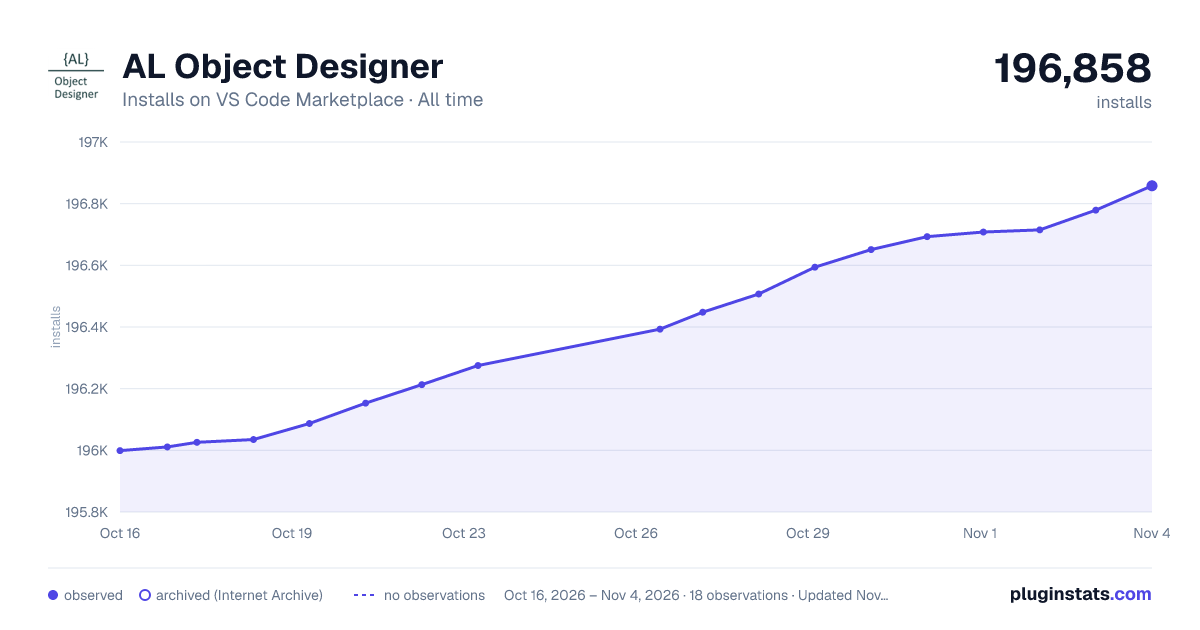

Adoption over time
7/30/90-day growth
Ranking history
Ratings over time
Listing placement
Listing placement
Filled points are observed values; hollow points come from Internet Archive snapshots of the listing page. Dashed segments span periods with no observations — values between points are not interpolated.
Each band is one page of 20. Installs on a linear scale. Placement is projected from installs, so it can differ from the marketplace's own sort order. Hover a dot to see the listing.
Recent observations
Full history (5)Similar VS Code Marketplace Other plugins
All 20 AL Object Designer alternativesData source
Install counts, average rating, and rating counts come from the public Visual Studio Marketplace gallery API. Installs are cumulative and exclude updates.
Listing: https://marketplace.visualstudio.com/items?itemName=martonsagi.al-object-designer. First seen Oct 16, 2026; last successful collection Oct 20, 2026. See the methodology.