 PluginStats
stylelint-plus installs statistics
By Hex (4 listings) · VS Code Marketplace · Linters
Lint CSS, SCSS, Less and more with Stylelint — auto-fix on save, supports v14-v17, Vue, Svelte, and styled-components.
stylelint-plus has 315,285 recorded installs on VS Code Marketplace.
It ranks #1112 of 2,501 tracked VS Code Marketplace listings by installs.
It is rated 4.4 out of 5 from 7 ratings.
PluginStats has 4 daily observations since Oct 16, 2026; the latest is from Oct 19, 2026.
Rating: 4.43 / 5 from 7 ratings
About stylelint-plus
vscode-stylelint-plus
English | 简体中文
A Visual Studio Code extension to lint CSS/SCSS/Less with Stylelint.
Ships with Stylelint v15 built-in — install the extension and start linting immediately, no extra setup required.
Quick Start
1. Install the extension from the VS Code Marketplace. 2. Open any CSS, SCSS, or Less file — linting works out of the box using the bundled Stylelint v15. 3. (Optional) Add a Stylelint configuration file to your project to customize rules. 4. (Optional) To use your project's own Stylelint version (v14–v17), set "stylelint.useLocal": true.
Tip: To avoid duplicate diagnostics from VS Code's built-in CSS/SCSS/Less validators, disable them:
Features
Zero-Config Linting
The extension bundles Stylelint v15.11.0, so it works immediately after installation — no need to install Stylelint separately or create a config file. Without a config file, the extension still performs CSS syntax validation to catch basic syntax errors.
Auto-Fix on Save
Enable stylelint.autoFixOnSave to automatically fix all auto-fixable problems whenever you save a file. This uses the native onWillSaveWaitUntil mechanism, so fixes are applied before the file is written to disk — no need to configure editor.codeActionsOnSave.
Quick Fix (Code Actions)
Hover over any Stylelint diagnostic and click the light bulb icon, or press Ctrl+. (Cmd+. on Mac):
• Fix: \ — Fix the specific auto-fixable problem at the cursor (available only for rules that support auto-fix) • Disable \ for this line — Insert a /* stylelint-disable-next-line */ or /* stylelint-disable-line */ comment to suppress the diagnostic
You can also fix all auto-fixable problems at once using the Stylelint: Fix all auto-fixable problems command from the Command Palette.
Validation Trigger Modes
Control when linting runs via the stylelint.run setting:
| Mode | Behavior |
| "onType" (default) | Validates as you type, with a 150ms debounce | | "onSave" | Validates only when the file is saved | | "manual" | Validates only when you run Stylelint: Validate current file |
Workspace Linting
Lint all style files across the entire workspace at once:
1. Open the Command Palette (Ctrl+Shift+P / Cmd+Shift+P) 2. Run Stylelint: Lint entire workspace
Scans files with these extensions: .css, .scss, .less, .sass, .sss, .vue, .svelte, .html, .xml, .xsl, .md, .markdown.
Automatically skips node_modules, .git, dist, build, coverage, .next, .nuxt directories. Files larger than 5MB are skipped.
Stylelint Version Support
The extension supports Stylelint v14, v15, v16, and v17 with automatic version detection.
Bundled version (default): • Stylelint v15.11.0 (CommonJS), works with Node.js >= 18.0.0 • Used when stylelint.useLocal is false (default)
Local version (user-installed): • Set "stylelint.useLocal": true to use your project's Stylelint • v14–v16 are loaded via CommonJS; v17+ is loaded via ESM (dynamic import()) • If local Stylelint is not found, the extension falls back to the bundled version and shows a warning
Migrating to Stylelint v17
Stylelint v17 requires Node.js >= 20.19.0 and uses ESM exclusively.
1. Upgrade Node.js:
2. Install Stylelint v17 locally:
3. Enable local version:
4. Reload VS Code
Supported Languages
The extension activates for the following 21 language identifiers:
• CSS (css) • HTML (html) • JavaScript (javascript) • JavaScript React (javascriptreact) • Less (less) • Markdown (markdown) • Markdown+MathML (source.markdown.math) • PostCSS (postcss) • Sass (sass) • SCSS (scss) • styled-components • Official (source.css.styled) • Userland (styled-css) • Sugarss (sugarss) • Svelte (svelte) • TypeScript (typescript) • TypeScript React (typescriptreact) • Vue (vue, vue-html, vue-postcss) • XML (xml) • XSL (xsl)
Commands
All commands are available from the Command Palette (Ctrl+Shift+P / Cmd+Shift+P):
| Command | Description |
| Stylelint: Fix all auto-fixable problems | Fix all auto-fixable issues in the current file | | Stylelint: Validate current file | Manually trigger validation (useful in manual mode) | | Stylelint: Lint entire workspace | Lint all style files in the workspace | | Stylelint: Retry local search | Re-scan for local Stylelint installation (clears cache) | | Stylelint: Show output channel | Open the Stylelint+ output panel for debugging |
Settings
All settings are under the stylelint. prefix. Though it's recommended to use a Stylelint configuration file in your workspace, the following VS Code settings are also available.
stylelint.enable
Type: boolean · Default: true
Controls whether this extension is enabled.
stylelint.autoFixOnSave
Type: boolean · Default: false
Automatically fix all auto-fixable Stylelint issues when saving a file. Fixes are applied before the file is written to disk via onWillSaveWaitUntil.
stylelint.run
Type: "onType" | "onSave" | "manual" · Default: "onType"
Controls when Stylelint validation is triggered. See Validation Trigger Modes for details.
stylelint.useLocal
Type: boolean · Default: false
Use the locally installed version of Stylelint from your project's node_modules instead of the bundled version. The extension searches upward from the current file's directory for node_modules/stylelint. If not found, it falls back to the bundled version.
stylelint.config
Type: Object · Default: null
Set the Stylelint config option. When this is set, Stylelint will not load configuration files (.stylelintrc, stylelint.config.js, etc.).
stylelint.configFile
Type: string · Default: ""
Path to a Stylelint configuration file. Relative paths are resolved from the package root (the nearest directory containing package.json, found by walking up from the current file). When set, this takes precedence over stylelint.config.
stylelint.ignorePath
Type: string · Default: ""…
Description from the VS Code Marketplace listing.
- autofix
- css
- html
- ignore
- javascript
- javascriptreact
- json
- less
- linters
- markdown
- postcss
- sass
- scss
- source.css.styled
- source.markdown.math
- styled-css
- stylelint
- sugarss
- svelte
- typescript
Charts
Images: 30d · 1y · all time · 1600×900 dark


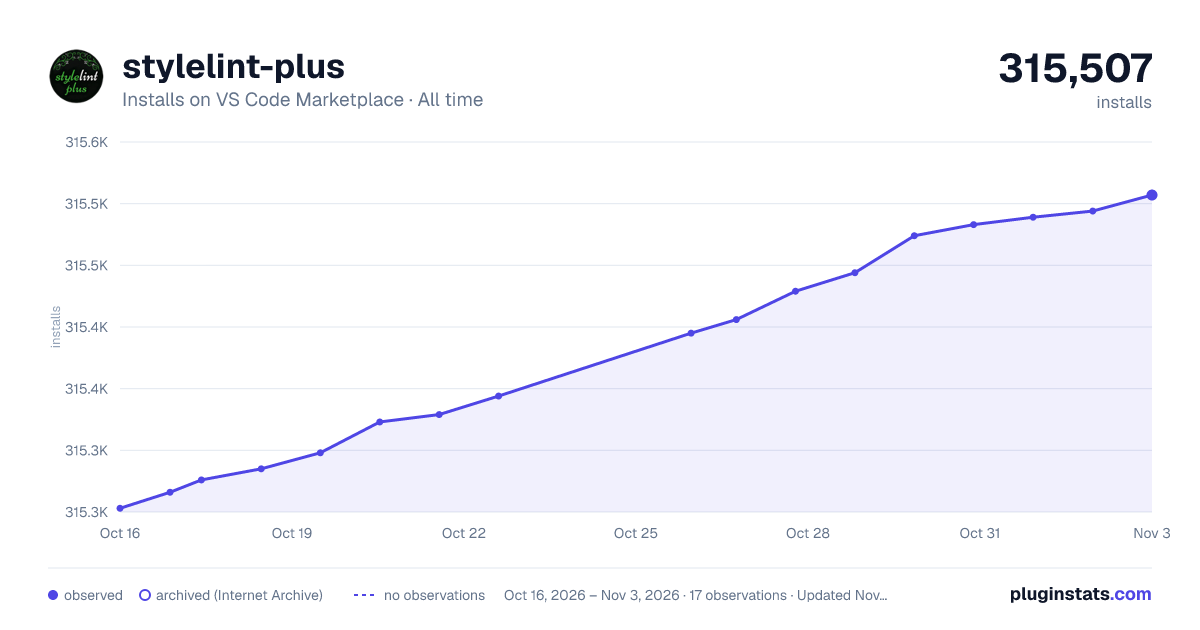

Adoption over time


7/30/90-day growth


Ranking history


Ratings over time


Listing placement


Listing placement


Filled points are observed values; hollow points come from Internet Archive snapshots of the listing page. Dashed segments span periods with no observations — values between points are not interpolated.
Each band is one page of 20. Installs on a log scale. Placement is projected from installs, so it can differ from the marketplace's own sort order. Hover a dot to see the listing.
Recent observations
Full history (4)Similar VS Code Marketplace Linters plugins
All 20 stylelint-plus alternativesData source
Install counts, average rating, and rating counts come from the public Visual Studio Marketplace gallery API. Installs are cumulative and exclude updates.
Listing: https://marketplace.visualstudio.com/items?itemName=hex-ci.stylelint-plus. First seen Oct 16, 2026; last successful collection Oct 19, 2026. See the methodology.