 PluginStats
WindiCSS IntelliSense installs statistics
By voorjaar · VS Code Marketplace · Other
Intelligent WindiCSS tooling for VS Code
WindiCSS IntelliSense has 206,912 recorded installs on VS Code Marketplace, ranking #1470 of 2,502 tracked listings.
Rating: 4.83 / 5 from 6 ratings
About WindiCSS IntelliSense
Windi CSS Intellisense
Windi CSS IntelliSense enhances the Windi development experience by providing Visual Studio Code users with advanced features such as autocomplete, syntax highlighting, code folding, and building.
Installation
Install via the Visual Studio Code Marketplace →
Install via the Open VSX Registry →
This plugin packs a windicss compiler, so you can use it without installing windicss, and it also supports the configuration file (tailwind|windi).config.(js|cjs|ts).
Configuration
By default VS Code will not trigger completions when editing "string" content. Updating the
editor.quickSuggestionssetting may improve your experience:
"editor.quickSuggestions": {
  "strings": true
}
Vscode css validation may display errors when using windi syntax, such as @apply. You can disable this with the `css.validate setting:
"css.validate": false
Features
Autocomplete
Intelligent suggestions for utilities and variants.
<img src="https://raw.githubusercontent.com/windicss/windicss-intellisense/main/screenshots/completion.png" alt="Auto Complete"/>Hover Preview
See the complete CSS for a class name by hovering over it.
<img src="https://raw.githubusercontent.com/windicss/windicss-intellisense/main/screenshots/hover.png" alt="Hover Preview"/>Syntax Highlighting
Highlight utilities, variants and importants.
<img src="https://raw.githubusercontent.com/windicss/windicss-intellisense/main/screenshots/highlight.png" alt="Syntax Highlighting"/>Color Preview
Preview color and spectrum.
<img src="https://raw.githubusercontent.com/windicss/windicss-intellisense/main/screenshots/color.png" alt="Color Preview"/>Code Folding
disabled by default, activate with "windicss.enableCodeFolding"
Fold overly long classes to increase readability.
<img src="https://raw.githubusercontent.com/windicss/windicss-intellisense/main/screenshots/highlight.png" alt="Code Folding"/>Compile Commands
Built-in commands, one-key operation.
<img src="https://raw.githubusercontent.com/windicss/windicss-intellisense/main/screenshots/commands.png" alt="Compile Commands"/>Visual Analyzer
Browse your utilities usages, have an overview of your design system, identify "bad practices", and more!
<img src="https://raw.githubusercontent.com/windicss/windicss-intellisense/main/screenshots/analyzer.png" alt="Visual Analyzer"/>Extension Settings
| Settings | type | default | description |
|---|---|---|---|
windicss.enableColorDecorators | boolean | true | Enable Color Decorators. |
windicss.enableHoverPreview | boolean | true | Enable hover className to show preview of CSS. |
windicss.enableCodeCompletion | boolean | true | Enable/Disable all code completions. |
windicss.enableUtilityCompletion | boolean | true | Enable Utility Completion. |
windicss.enableVariantCompletion | boolean | true | Enable Variant Completion. |
windicss.enableDynamicCompletion | boolean | true | Enable Dynamic Utilities Completion like p-{int}. |
windicss.enableBracketCompletion | boolean | true | Enable Square Bracket Utilities Completion like bg-[#ff0]. |
windicss.enableAttrUtilityCompletion | boolean | true | Enable Utility Completion For Attributify Mode. |
windicss.enableAttrVariantCompletion | boolean | true | Enable Variant Completion For Attributify Mode. |
windicss.enableRemToPxPreview | boolean | true | Enable Rem to Px Preview. |
windicss.rootFontSize | number | 16 | Used to convert rem CSS values to their px equivalents. |
windicss.enableEmmetCompletion | boolean | false | Enable . trigger for emmet. |
windicss.enableCodeFolding | boolean | false | Enable ClassNames Code Folding. |
windicss.colorDecoratorsType | string | 'cube' | Configure the type of color decorations, optional ['border', 'bg', 'cube', 'picker'], default is 'cube'. |
windicss.foldByLength | boolean | false | Folding code by length. Default option is false, will fold by utility count. |
windicss.foldCount | number | 3 | Used by foldByCount. |
windicss.foldLength | number | 25 | Used by foldByLength |
windicss.hiddenText | string | ... | Placeholder used when folding code. |
windicss.hiddenTextColor | string | #AED0A4 | Placeholder Color. |
windicss.sortOnSave | boolean | false | Runs class sorting on file save. |
windicss.includeLanguages | object | {} | Add additional file types. |
Give an example of windicss.includeLanguages
"windicss.includeLanguages": {
  "abc": "html", // css, js
  "def": {
    "type": "css"
  },
  "ghi": {
    "type": "js",
    "patterns": ["@apply\s+\S+$", "..." ],
  },
}
For more information
Description from the VS Code Marketplace listing.
- autocomplete
- css
- intellisense
- snippet
- tailwind
- tailwindcss
- vscode
- windi
- windicss
README badge
Show your rank in a README or on your website. The badge updates automatically.
Charts
Images: 30d · 1y · all time · 1600×900 dark


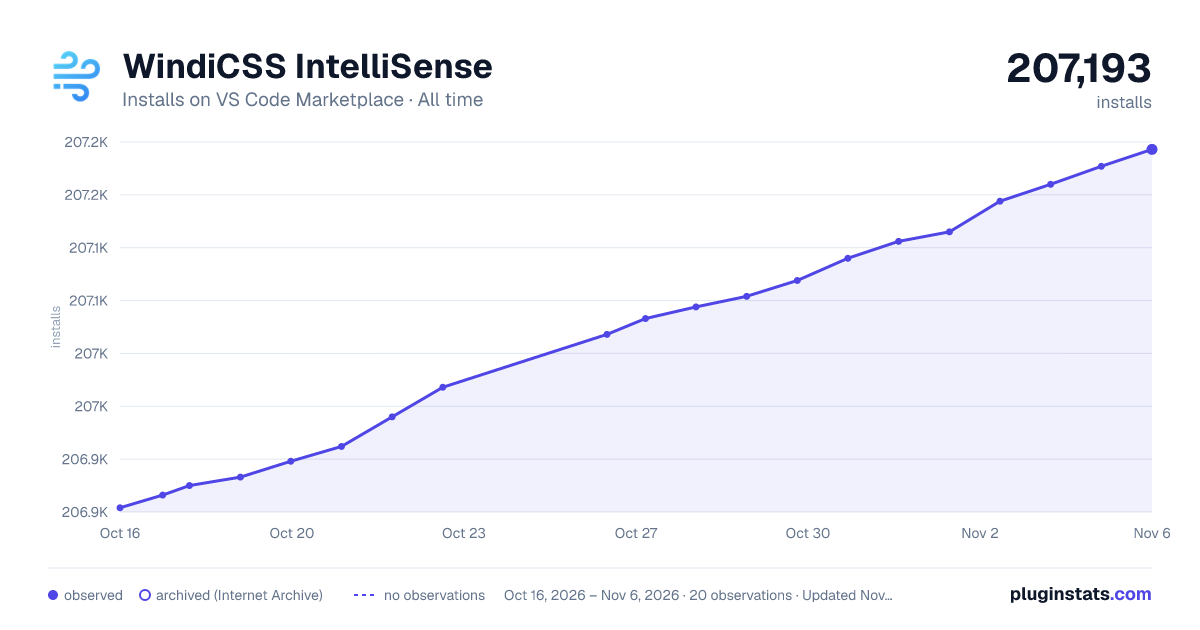

Adoption over time
7/30/90-day growth
Ranking history
Ratings over time
Listing placement
Listing placement
Filled points are observed values; hollow points come from Internet Archive snapshots of the listing page. Dashed segments span periods with no observations — values between points are not interpolated.
Each band is one page of 20. Installs on a linear scale. Placement is projected from installs, so it can differ from the marketplace's own sort order. Hover a dot to see the listing.
Recent observations
Full history (6)Similar VS Code Marketplace Other plugins
All 20 WindiCSS IntelliSense alternativesData source
Install counts, average rating, and rating counts come from the public Visual Studio Marketplace gallery API. Installs are cumulative and exclude updates.
Listing: https://marketplace.visualstudio.com/items?itemName=voorjaar.windicss-intellisense. First seen Oct 16, 2026; last successful collection Oct 21, 2026. See the methodology.