 PluginStats
Apex PMD installs statistics
By Charlie Jonas · VS Code Marketplace · Linters
PMD static analysis for Salesforce Apex
Apex PMD has 732,878 recorded installs on VS Code Marketplace, ranking #669 of 2,501 tracked listings.
Rating: 4.75 / 5 from 4 ratings
About Apex PMD
vscode Apex Pmd
Allows you to run Apex Static Analysis directly in vscode on Apex, VisualForce & other XML metadata files.
Features
To start the command you can click in the menu on Help/Show All Commands or press the hotkey Ctrl+Shift+P and type Apex.
Current actions Supported
• Run analysis on file open • Run analysis on file save • Run analysis on file change (new!) • Run analysis on entire workspace • Run analysis on single file • Ability to define your own ruleset
System Requirements
• Must have JRE >= 1.8 installed and in path • See PMD System Requirements for more details
Configuration
• rulesets (optional): set to override default ruleset (see "Defining your own ruleset" for more details) • runOnFileOpen: run every time a file is opened in vscode • runOnFileSave: run every time a file is saved • runOnFileChange: Run when a file is changed. NOTE: this is "debounced" to prevent performance issues. Delay can be adjusted via onFileChangeDebounce. • priorityErrorThreshold: Determines at what priority level 'errors' will be added. Anything less will be a warning or hint • priorityWarnThreshold: Determines at what priority level 'warnings' will be added. Anything less will be a hint • enableCache: Creates a cache file for PMD to run faster. Will create a .pmdCache file in your workspace • pmdBinPath (prev. pmdPath) (optional): set to override the default pmd binaries. This should point to the PMD folder which contains folders lib and bin. Most likely it is called libexec. WARNING: Since v0.6.0, this extension no longer supports PMD 6x. If you receive an error, please clear this setting! • additionalClassPaths (optional): set of paths to be appended to classpath. Used to find jar files containing custom rule definitions. Can be absolute or relative to workspace. • commandBufferSize Size of buffer used to collect PMD command output (MB), may need to be increased for very large projects • jrePath (Optional) Path to JRE (Folder that contains which contains bin/java) • apexRootDirectory (optional, since 0.9.0): Whether and how to set PMD_APEX_ROOT_DIRECTORY env variable. This variable should point to the sfdx project directory, which contains the file sfdx-project.json.
This is needed for the rule UnusedMethod which utilizes Apex Language Server which needs a well-formed sfdx project. • off = Do not set PMD_APEX_ROOT_DIRECTORY at all • automatic = (default) Automatically find the nearest sfdx-project.json file in a parent directory and use that directory • custom = Use a custom location for PMD_APEX_ROOT_DIRECTORY provided by "customValue". It should point to the directory where the sfdx-project.json file is located. This is only used, if the "mode"=="custom". • enableDebugOutput: Logs PMD's debug messages to help troubleshooting.
Defining your own "Ruleset"
I recommend you use the default ruleset as a starting point.
Set apexPMD.rulesets string array to reference your custom rulesets. You can either use the absolute paths, or a relative paths from your workspace (EG my-apex-rules.xml).
You can also mention the default ruleset in apexPMD.rulesets. To do this add default value to the array.
Apex Ruleset Reference
NOTE: If you move away from the default ruleset in an sfdx project, make sure to exclude the .sfdx and .sf generated classes by keeping these lines:
./.sfdx/.
./.sf/.
Using custom rules written in Java
If you want to use your own custom rules from a jar file, then the jar file must be on the classpath. By default, the PMD folder and the workspace root folder are included in the classpath. You can add further folders using the additionalClassPaths setting. This "Hello world" example is a good starting place for beginners.
Troubleshooting
The plugin creates an own output channel "Apex PMD" in the output view. This shows the output of the PMD command that is executed in the background. In case of any problem, this output channel might contain the underlying error. When reporting an issue, please include any error messages from this output channel.
Developing/Contributing
Prerequisites
• node • bash: npm calls shell scripts and therefore bash is needed. Under Windows, make sure to run npm from within git-bash. • java: needs to be installed already. It is needed for executing PMD later on.
Setup & Run
- git clone 1. npm install 1. debug -> run extension
Creating a installable vsix package
npm run vscode:package
This will create a file "apex-pmd-.vsix", which can be directly installed in VS Code.
Executing automated tests
npm run test
Upgrading PMD
npm run update-pmd
This will check for the latest PMD version on github and update config.pmdVersion in package.json.
Legal Stuff
Copyright (c) 2020 Charles Jonas and Contributors
PMD License
Contains Distribution of PMD library.
The full license (BSD-style) can be found in the PMD repo
Description from the VS Code Marketplace listing.
- Apex
- PMD
- Salesforce
- Static Analysis
- visualforce
README badge
Show your rank in a README or on your website. The badge updates automatically.
Charts
Images: 30d · 1y · all time · 1600×900 dark


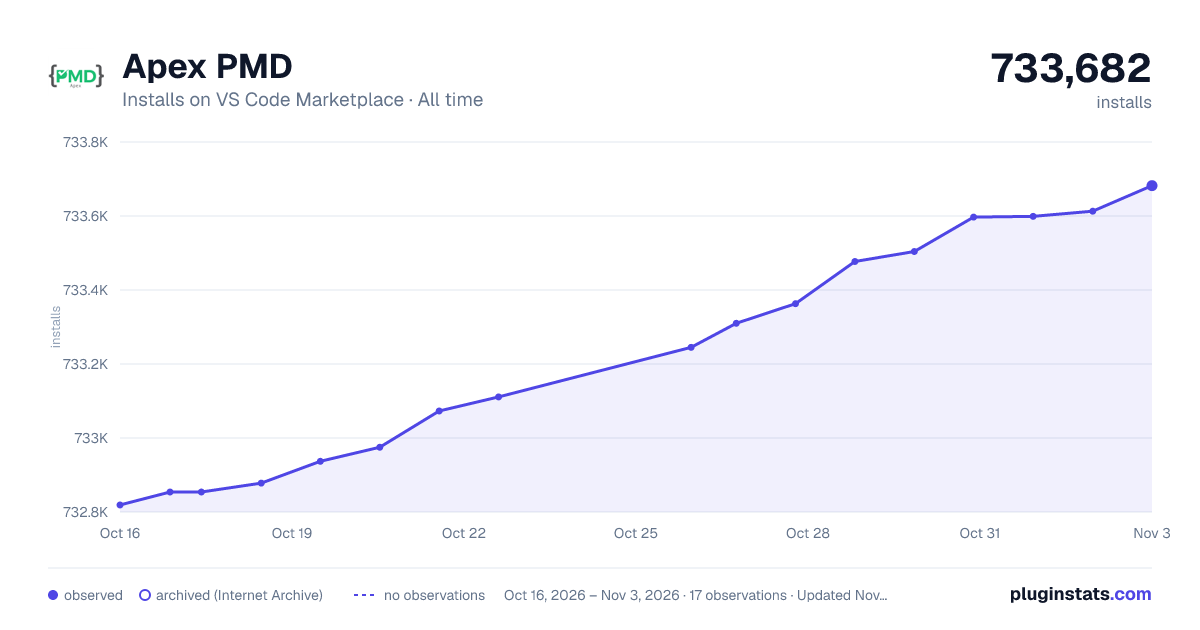

Adoption over time
7/30/90-day growth
Ranking history
Ratings over time
Listing placement
Listing placement
Filled points are observed values; hollow points come from Internet Archive snapshots of the listing page. Dashed segments span periods with no observations — values between points are not interpolated.
Each band is one page of 20. Installs on a linear scale. Placement is projected from installs, so it can differ from the marketplace's own sort order. Hover a dot to see the listing.
Recent observations
Full history (4)Similar VS Code Marketplace Linters plugins
All 20 Apex PMD alternativesData source
Install counts, average rating, and rating counts come from the public Visual Studio Marketplace gallery API. Installs are cumulative and exclude updates.
Listing: https://marketplace.visualstudio.com/items?itemName=chuckjonas.apex-pmd. First seen Oct 16, 2026; last successful collection Oct 19, 2026. See the methodology.