 PluginStats
Shortcut Menu Bar installs statistics
By GorvGoyl · VS Code Marketplace · Programming Languages
Add handy buttons like beautify, show opened files, save, toggle terminal, activity bar etc to editor menu bar. User-defined buttons are also possible.
Shortcut Menu Bar has 111,709 recorded installs on VS Code Marketplace, ranking #2218 of 2,502 tracked listings.
Rating: 4.91 / 5 from 35 ratings
About Shortcut Menu Bar

Shortcut Menu Bar - VSCode Extension
Add 35+ handy buttons like beautify, show opened files, save, toggle terminal, activity bar, Find replace etc to the editor menu bar in VSCode. You can also create your own buttons with custom commands.
<sub> <i> - Made by Gourav Goyal</i></sub>
See on VSCode Marketplace
See on Open-VSX
📷 Screenshot

⚙ Enable/Disable buttons from VSCode settings
Go to VSCode settings (CTRL+, or CMD+,) and search for shortcut menu bar. Toggle buttons from there.

✅ Currently added buttons

✔ Save active file
✔ Navigate back
✔ Navigate forward
✔ Beautify/format document or selection
✔ Beautify/format document or selection with multiple formatters
✔ Undo/Redo buttons
✔ Open files list
✔ Save all
✔ show/hide terminal
✔ show/hide render whitespace
✔ Quick open (Ctrl+P)
✔ show/hide activity bar
✔ Find & replace in active file (Ctrl+H)
✔ Switch header source (for .cpp files)
✔ Toggle line comment
✔ Open file, New file
✔ Go to definition
✔ Cut, Copy, Paste
✔ Start Debugging
✔ User-defined buttons (0-9)
Create buttons with custom commands
You can create upto 10 user-defined buttons.
Buttons will be shown as numbers as shown in below image.

Note: To add custom icons for commands, see this hack.
You can also trigger a button by using corresponding hotkey combination (Windows: Ctrl+Alt+0, Ctrl+Alt+1, Ctrl+Alt+2, etc, Mac: Shift+Cmd+0, Shift+Cmd+1, Shift+Cmd+2, etc)
-
Got to extension settings (
Ctrl+,orCmd+,). -
Look for
Shortcut Menu Bar: User Button -
Add any VSCode command or any other extension command in the input field. Button icon will be visible only when you add a command.

Optionally, you can also:
- Pass command arguments: add command arguments separated by pipe (e.g.
workbench.action.tasks.runTask|My Task) - Run multiple commands: add comma-separated list of commands and those will get executed sequentially.
❤ Support continuous development Buy me a Coffee
<p align="center"> <a href="https://ko-fi.com/gorvgoyl"> <img src="https://github.com/GorvGoyl/Notion-Boost-browser-extension/raw/master/src/images/readme/bmc.png" width="200" alt="Buy me a Coffee"/> </a> </p>👨💻 Follow the maker @GorvGoyl behind this extension
<p align="center"> <a href="https://twitter.com/intent/follow?user_id=325435736"> <img src="https://img.shields.io/badge/@GorvGoyl-1da1f2?style=for-the-badge&labelColor=1da1f2&color=1da1f2&logo=twitter&logoColor=white&label=Follow" alt="Follow on Twitter"/> </a> </p>👍 Liked the extension? Express your love by rating it ⭐⭐⭐⭐⭐ (clickable stars)
FAQ 🙋
I found a bug, where to report?
Please create a new issue on Github.
How can I add my own/custom buttons?
Follow above section.
Can I contribute new buttons to the extension repo?
Sure. To add buttons see "Adding new buttons" section of help.md file in repo.
Go through the repo, it's fairly simple to understand code and add a button. Send me a PR!
How can I disable/Enable a button?
Follow above section.
Description from the VS Code Marketplace listing.
- bar
- button
- editor
- keybindings
- menu
- menubar
- shortcut
- shortcut menu bar
- shortcuts
- status
- terminal
- tool
- toolbar
README badge
Show your rank in a README or on your website. The badge updates automatically.
Charts
Images: 30d · 1y · all time · 1600×900 dark


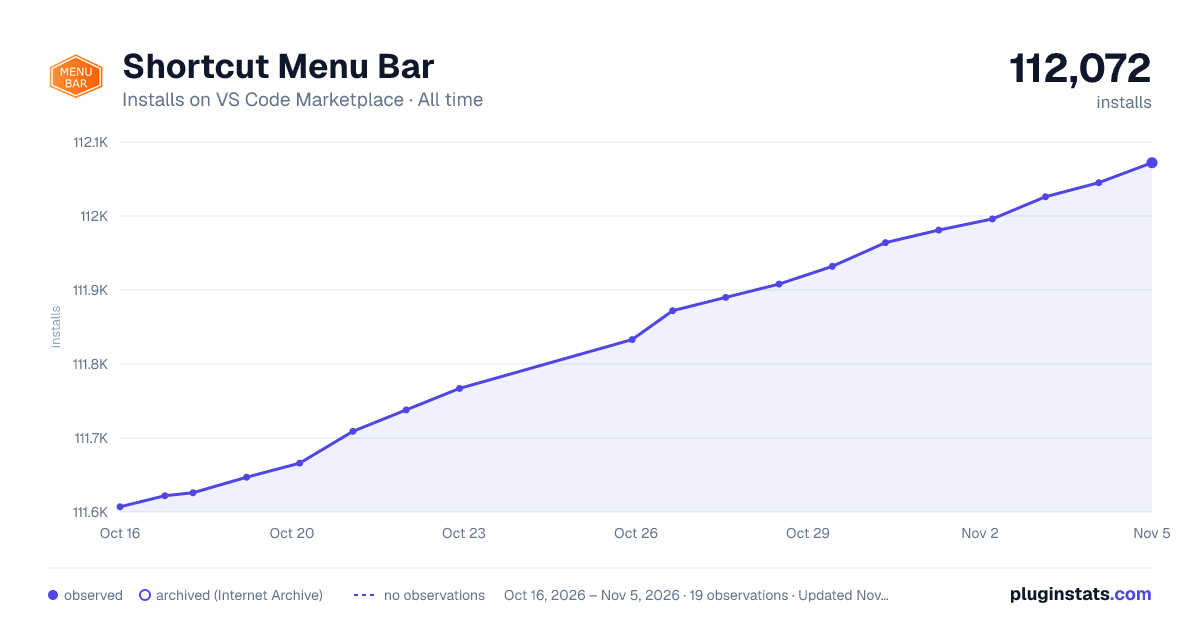

Adoption over time
7/30/90-day growth
Ranking history
Ratings over time
Listing placement
Listing placement
Listing placement
Filled points are observed values; hollow points come from Internet Archive snapshots of the listing page. Dashed segments span periods with no observations — values between points are not interpolated.
Each band is one page of 20. Installs on a linear scale. Placement is projected from installs, so it can differ from the marketplace's own sort order. Hover a dot to see the listing.
Recent observations
Full history (6)Similar VS Code Marketplace Programming Languages plugins
All 20 Shortcut Menu Bar alternativesData source
Install counts, average rating, and rating counts come from the public Visual Studio Marketplace gallery API. Installs are cumulative and exclude updates.
Listing: https://marketplace.visualstudio.com/items?itemName=jerrygoyal.shortcut-menu-bar. First seen Oct 16, 2026; last successful collection Oct 21, 2026. See the methodology.