 PluginStats
TODO Highlight v2 installs statistics
By Jonathan Clark · VS Code Marketplace · Other
highlight TODOs, FIXMEs, and any keywords, annotations...
TODO Highlight v2 has 279,684 recorded installs on VS Code Marketplace, ranking #1206 of 2,501 tracked listings.
Rating: 4.05 / 5 from 21 ratings
About TODO Highlight v2
TODO Highlight v2




Highlight TODO:, FIXME: and any other annotations you wish within your code in VSCode.
Sometimes you forget to review the TODOs and NOTEs you've added while coding before you publish the code to production. This extension highlights them, making them harder to forget. They're shown in the file, in the output channel, and optionally as decorations in the 'overview ruler' too.
They can also be set on a per-language basis.
NB: This extension was started and maintained by wayou until 2018, when it appears to have been abandoned. I, (jgclark) then picked it up in mid-2020, using the significant PR from vonEdfa to add regexes, and also dealt with some other issues in the original repository. See CHANGELOG.md for more details.
Preview
-
with
material nightcolor theme:
-
with
material night eightiescolor theme:
Commands
This extension contributes the following commands to the Command palette.
Toggle highlight: turn on/off the highlight
List highlighted annotations: list annotations to the Output tab (when you have a folder and/or workspace open; when you are working on individual files in one or more editors, the command returns 0 results). Keywords are coloured to match your configured highlight styles.
Installing
You can install the latest version of the extension from the Visual Studio Marketplace.
The source code is available on GitHub.
Top-level Configuration
TODO: and FIXME: are built-in keywords. To add or change keywords and other settings, <kbd>command</kbd> + <kbd>,</kbd> (or on Windows / Linux: File -> Preferences -> User Settings) to open the VSCode file settings.json.
Alternatively, you can keep settings in a workspace config file at the project root. The extension auto-detects .todohighlight.json or .todohighlight.jsonc, or you can point to a custom file with todohighlight.configFile. Keys in the config file override the same keys in settings.json; both sources work together. Example .todohighlight.json:
{
    "keywords": [
        "TODO:",
        "FIXME:",
        {
            "text": "HACK:",
            "color": "#fff",
            "backgroundColor": "#9b59b6"
        }
    ],
    "include": ["**/*.js", "**/*.ts", "**/*.md"],
    "wholeWordMatch": true
}
For .js config files, export a plain object: module.exports = { keywords: [...] }.…
Description from the VS Code Marketplace listing.
- annotation
- fixme
- highlight
- keyword
- todo
README badge
Show your rank in a README or on your website. The badge updates automatically.
Charts
Images: 30d · 1y · all time · 1600×900 dark


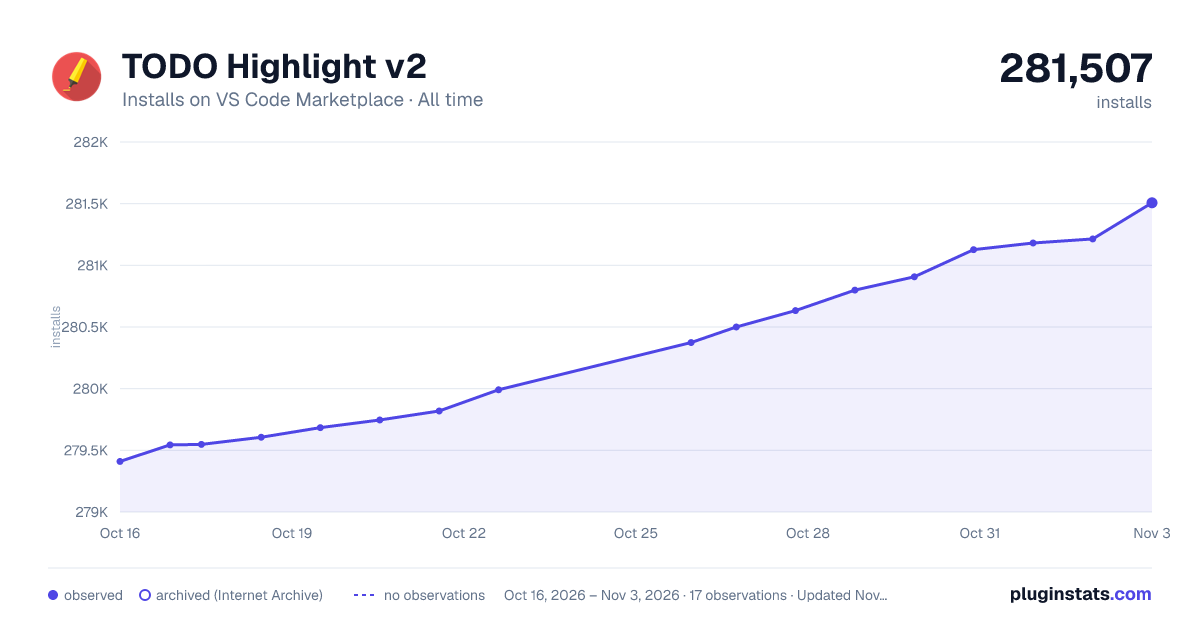

Adoption over time
7/30/90-day growth
Ranking history
Ratings over time
Listing placement
Listing placement
Filled points are observed values; hollow points come from Internet Archive snapshots of the listing page. Dashed segments span periods with no observations — values between points are not interpolated.
Each band is one page of 20. Installs on a linear scale. Placement is projected from installs, so it can differ from the marketplace's own sort order. Hover a dot to see the listing.
Recent observations
Full history (5)Similar VS Code Marketplace Other plugins
All 20 TODO Highlight v2 alternativesData source
Install counts, average rating, and rating counts come from the public Visual Studio Marketplace gallery API. Installs are cumulative and exclude updates.
Listing: https://marketplace.visualstudio.com/items?itemName=jgclark.vscode-todo-highlight. First seen Oct 16, 2026; last successful collection Oct 20, 2026. See the methodology.