 PluginStats
Web Template Studio (Preview) installs statistics
By Microsoft (224 listings) · VS Code Marketplace · Other
Web Template Studio enables developers to quickly scaffold full-stack web applications with cloud services.
Web Template Studio (Preview) has 135,846 recorded installs on VS Code Marketplace, ranking #1972 of 2,502 tracked listings.
Rating: 4.60 / 5 from 20 ratings
About Web Template Studio (Preview)
Web Template Studio (Preview)
Microsoft Web Template Studio (aka WebTS) is a Visual Studio Code Extension that accelerates the creation of a new Web or React Native application using a wizard-based experience.
WebTS enables developers to generate boilerplate code for a Web or React Native application by choosing between different project types, frontend and backend frameworks, pages and cloud services. The resulting app is well-formed, readable code. The web application incorporates cloud services on Azure while implementing proven patterns and best practices. Sprinkled throughout the generated code we have links to Docs to provide useful insights. WebTS was created using TypeScript and React. Different combinations of generated code are merged together by Core Template Studio, which was made using .NET Core.
Instructions To Use
Create a new project
- Open VSCode
- Press
Ctrl + Shift ⇧ + Pin Windows/Linux orCommand ⌘ + Shift ⇧ + Pin Mac to open VSCode's extension launcher - Type/Select
Web Template Studio: Create Web Appfor a full-stack web application orWeb Template Studio: Create React Native Appfor a React Native one, and pressEnterto launch the extension
Note: React Native is still in Preview and we appreciate any feedback on GitHub.
Deploy the generated project
- Open VSCode
- Open the generated project
- Press
Ctrl + Shift ⇧ + Pin Windows/Linux orCommand ⌘ + Shift ⇧ + Pin Mac to open VSCode's extension launcher - Type/Select
Web Template Studio: Deploy Web Appand pressEnterto begin the deployment
Note: Just available for web applications.
Features
Full-stack web app
Web Template Studio approaches full-stack web app creation using the following three attribute sets:
- Frameworks: First, which frameworks do you want to use for your frontend and backend? We currently support three frameworks for frontend: React, Angular, Vue.js and four frameworks for backend: Node, Flask, Moleculer and ASP.NET. We also provide a dependency checker to make sure you have the required version of Node and/or Python installed.
- App pages: Next, to accelerate app creation, we provide a number of app page templates that you can use to add common UI pages into your new app. The current page templates include: blank page, common layouts (*e.g., master detail) and pages that implement common patterns (*e.g., grid, list). Using the wizard, add as many of the pages as you need, providing a name for each one, and we'll generate them for you.
- Cloud Services: Lastly, you specify which Azure cloud services you want to use, and we'll build out the framework for the services into your app. Currently supported services cover storage (Azure Cosmos DB), and hosting (Azure App Service).
Once you make the selections you want and click generate, you can quickly extend the generated code.
React Native app
Web Template Studio approaches React Native app creation using the following two attribute sets:
- Project Type: Currently we only provide Tabbed Navigation as this is possibly the most common style of navigation in mobile apps. If you prefer a different navigation pattern you can replace TabNavigation with the navigation pattern that best fits your app. For instruction on adding Drawer navigation see the Drawer Navigation docs.
- App pages: Next, to accelerate app creation, we provide a number of app page templates that you can use to add common UI pages into your new app. The current page templates include: blank page, master detail and a settings page that comes with basic Theme Support, allowing the user to choose between Light, Dark or Default. Using the wizard, add as many of the pages as you need, providing a name for each one, and we'll generate them for you.
Feedback, Requests and Roadmap
Please use GitHub issues for feedback, questions or comments.
If you have specific feature requests or would like to vote on what others are recommending, please go to the GitHub issues section as well. We would love to hear your thoughts.
We are still early in development and are looking for feedback for the roadmap. We're still working on polishing our Web Templates and in our latest version we've also added an initial version of React Native templates.
Contributing
Do you want to contribute? We would love to have you help out. Here are our contribution guidelines.
Reporting Security Issues
Security issues and bugs should be reported privately, via email, to the Microsoft Security Response Center (MSRC) at secure@microsoft.com. You should receive a response within 24 hours. If for some reason you do not, please follow up via email to ensure we received your original message. Further information, including the MSRC PGP key, can be found in the Security TechCenter.
License
This code is distributed under the terms and conditions of the MIT license.
Privacy Statement…
Description from the VS Code Marketplace listing.
- Angular
- ASP.NET
- Azure App Service
- Azure Cosmos DB
- Azure Services
- Boilerplate
- Express
- Flask
- Full Stack
- Moleculer
- MoleculerJS
- Node
- Open Source
- React
- React Native
- React Native Windows
- Scaffolding
- Templates
- Vue.js
- Web Application
README badge
Show your rank in a README or on your website. The badge updates automatically.
Charts
Images: 30d · 1y · all time · 1600×900 dark


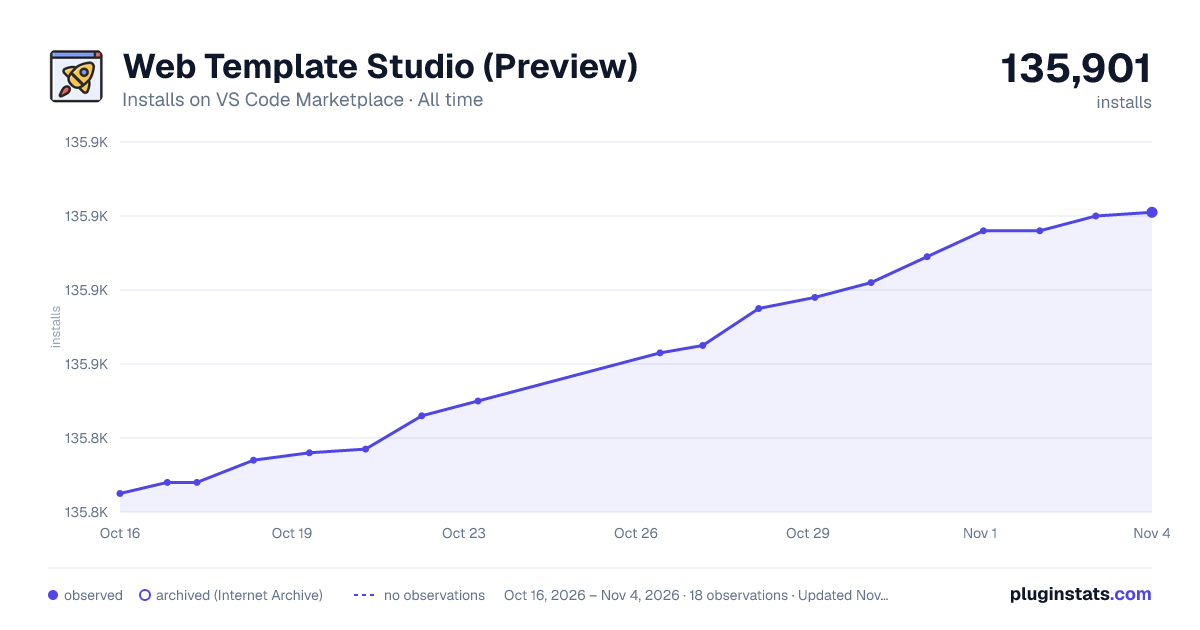

Adoption over time
7/30/90-day growth
Ranking history
Ratings over time
Listing placement
Listing placement
Filled points are observed values; hollow points come from Internet Archive snapshots of the listing page. Dashed segments span periods with no observations — values between points are not interpolated.
Each band is one page of 20. Installs on a linear scale. Placement is projected from installs, so it can differ from the marketplace's own sort order. Hover a dot to see the listing.
Recent observations
Full history (7)Similar VS Code Marketplace Other plugins
All 20 Web Template Studio (Preview) alternativesData source
Install counts, average rating, and rating counts come from the public Visual Studio Marketplace gallery API. Installs are cumulative and exclude updates.
Listing: https://marketplace.visualstudio.com/items?itemName=WASTeamAccount.WebTemplateStudio-dev-nightly. First seen Oct 16, 2026; last successful collection Oct 22, 2026. See the methodology.