 PluginStats
GitHub Copilot upgrade installs statistics
By Microsoft (224 listings) · VS Code Marketplace · AI
Upgrade your projects with GitHub Copilot. Analyzes your code and drives framework upgrades, dependency migrations, and other upgrade tasks with AI assistance.
GitHub Copilot upgrade has 225,573 recorded installs on VS Code Marketplace, ranking #1390 of 2,501 tracked listings.
About GitHub Copilot upgrade
GitHub Copilot upgrade
Upgrade and migrate your projects with GitHub Copilot in Visual Studio Code. The GitHub Copilot upgrade extension adds an Upgrade agent to Copilot Chat that can inspect your workspace, recommend an upgrade path, guide required choices, and help you work through upgrade tasks step by step.
This release includes built-in support for .NET and JavaScript/TypeScript upgrade and migration scenarios. The GitHub Copilot upgrade plugin is also available from microsoft/upgrade-agent-plugins.
Getting started
- Install GitHub Copilot Chat and sign in with an account that can use Copilot. 2. Install GitHub Copilot upgrade. 3. Open the project or solution you want to upgrade in VS Code. 4. Open Copilot Chat and select the Upgrade agent. 5. Ask for the upgrade you want, such as: • Upgrade my solution to .NET 10 • Upgrade my project to TypeScript 7 • Migrate this .NET Framework app to modern .NET • Move this Web Forms app to Blazor Server • Upgrade my Azure Functions project to the isolated worker model • Replace Newtonsoft.Json with System.Text.Json 6. Follow the agent's prompts, review proposed changes, and run the validation steps it recommends.
You can also start from the @upgrade chat participant. It forwards your prompt to the Upgrade agent.
What it can help with
This release includes built-in support for these upgrade scenarios:
| Scenario | Use it when you want to... | Example prompt |
| .NET version upgrade | Move .NET Framework, .NET Core, or older .NET projects to a current supported .NET version such as .NET 8, .NET 9, .NET 10, or later targets as they become available. | Upgrade my solution to .NET 10 | | .NET Framework version upgrade | Stay on full .NET Framework while moving projects to .NET Framework 4.8.1. | Upgrade this app to .NET Framework 4.8.1 | | ASP.NET Web Forms to Blazor | Modernize ASP.NET Web Forms applications by moving pages and UI patterns toward Blazor Server. | Move this Web Forms app to Blazor Server | | Azure Functions upgrade | Move Azure Functions projects from the in-process model to the isolated worker model. | Upgrade my Azure Functions project to isolated worker | | Aspire integration | Add Aspire orchestration to an existing .NET solution for local development and optional Azure readiness. | Add Aspire to this solution | | Aspire version upgrade | Upgrade projects that already use Aspire to a newer Aspire version, including required .NET target framework and package updates. | Upgrade my Aspire project to the latest version | | SDK-style project conversion | Convert older C# or Visual Basic project files to modern SDK-style format. | Convert these projects to SDK-style | | Visual Studio extension project conversion | Modernize Visual Studio extension projects that use legacy VSIX or VSSDK project formats. | Convert this VSIX project to SDK-style | | Newtonsoft.Json migration | Replace Newtonsoft.Json usage with System.Text.Json where appropriate. | Replace Newtonsoft.Json with System.Text.Json | | SqlClient migration | Move SQL Server data access from System.Data.SqlClient to Microsoft.Data.SqlClient. | Update this app to use Microsoft.Data.SqlClient | | Semantic Kernel agents migration | Move Semantic Kernel agent code to the Microsoft Agents framework. | Migrate my Semantic Kernel agents | | PowerShell 5.1 to 7 upgrade | Move Windows PowerShell 5.1 scripts, modules, and manifests — build, deploy, and operations automation — to cross-platform PowerShell 7. | Upgrade my PowerShell scripts to PowerShell 7 |
The agent analyzes your workspace, identifies relevant upgrade work, breaks it into reviewable tasks, and helps you continue or resume progress over time. It can also work with additional language or platform extenders when they are installed.
Requirements
• Visual Studio Code with GitHub Copilot Chat installed. • A signed-in GitHub Copilot account. • A workspace containing the project or solution you want to upgrade. • Network access to acquire and run the upgrade tools from NuGet.
The extension uses the .NET Install Tool for Extension Authors to locate or acquire the .NET SDK required to run the upgrade tools. You normally do not need to install that SDK manually.
Settings
The extension contributes these settings under GitHub Copilot upgrade:
• copilotUpgrade.allowPrerelease: allow prerelease versions of the upgrade tools. Disabled by default (stable versions are used). • copilotUpgrade.version: use a specific upgrade tool version. When set, this takes precedence over copilotUpgrade.allowPrerelease. • copilotUpgrade.nugetSource: use a custom NuGet feed source for the upgrade tools.
Troubleshooting
If the Upgrade agent is not available, confirm that GitHub Copilot Chat is installed and signed in, then reload the VS Code window.
If the extension cannot start the upgrade tools, check that VS Code can access NuGet and that your configured copilotUpgrade.nugetSource, if any, is reachable.
For MCP server logs, run MCP: List Servers from the Command Palette, select Upgrade, and choose Show Output. The Copilot upgrade for .NET Output channel shows extension startup and extender discovery messages.
To file an issue, use microsoft/upgrade-agent-plugins.
Privacy
What is sent to GitHub Copilot
GitHub Copilot upgrade works through GitHub Copilot to analyze and modify code in your current workspace. To do that, the Upgrade agent and its tools include workspace content in your Copilot requests. Depending on the scenario and the step you are on, that content can include:…
Description from the VS Code Marketplace listing.
- .NET
- chat-participant
- copilot
- migration
- modernize
- upgrade
README badge
Show your rank in a README or on your website. The badge updates automatically.
Charts
Images: 30d · 1y · all time · 1600×900 dark


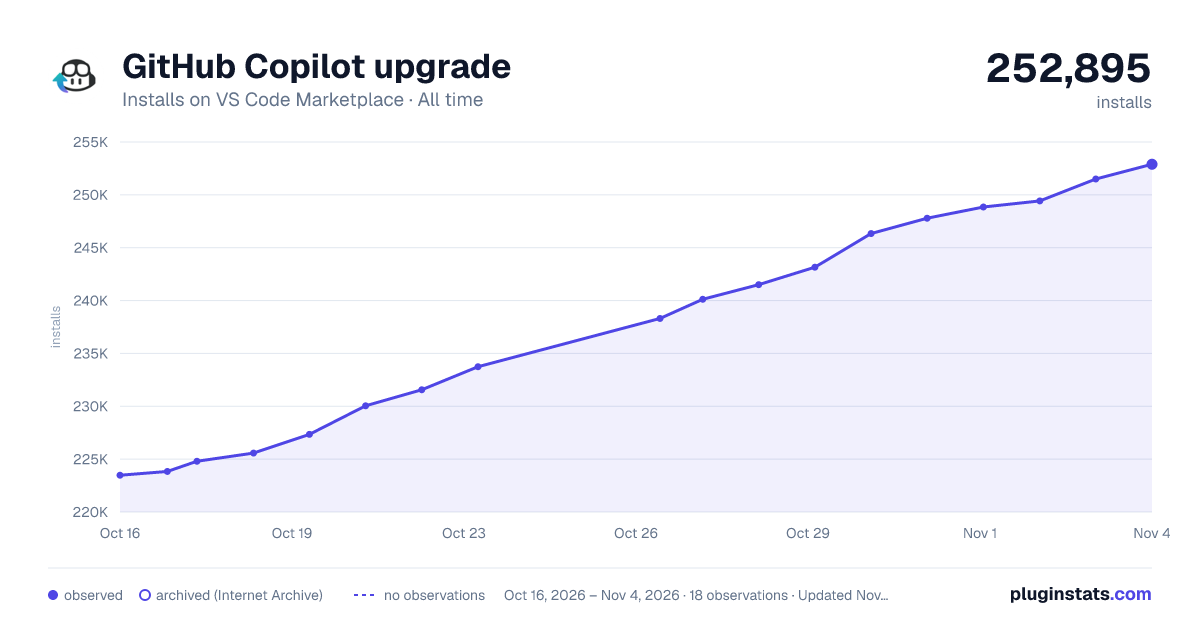

Adoption over time
7/30/90-day growth
Ranking history
Ratings over time
Listing placement
Listing placement
Listing placement
Filled points are observed values; hollow points come from Internet Archive snapshots of the listing page. Dashed segments span periods with no observations — values between points are not interpolated.
Each band is one page of 20. Installs on a linear scale. Placement is projected from installs, so it can differ from the marketplace's own sort order. Hover a dot to see the listing.
Recent observations
Full history (4)Similar VS Code Marketplace AI plugins
All 20 GitHub Copilot upgrade alternativesData source
Install counts, average rating, and rating counts come from the public Visual Studio Marketplace gallery API. Installs are cumulative and exclude updates.
Listing: https://marketplace.visualstudio.com/items?itemName=ms-dotnettools.upgrade-agent. First seen Oct 16, 2026; last successful collection Oct 19, 2026. See the methodology.