 PluginStats
Open in External App installs statistics
By YuTengjing (2 listings) · VS Code Marketplace · Other
Open file with external application in VSCode
Open in External App has 222,916 recorded installs on VS Code Marketplace, ranking #1405 of 2,502 tracked listings.
Rating: 4.95 / 5 from 20 ratings
About Open in External App
Open in External App
Open file with external application in VSCode.





💡 Motivation
VSCode is a very excellent editor, but sometime I prefer to use external application to work with some files. For example, I like to use typora to edit the markdown files. Usually, I will right click to the file, and select Reveal in File Explorer , then open the file using external application.
But, with this extension, you can do it more simply. Just right click to the file, and select Open in External App, that file would be opened by system default application. You can also use this way to open .psd files with photoshop, .html files with browser, and so on...
🔌 Installation
- Execute
Extensions: Install Extensionscommand from Command Palette. - Type
YuTengjing.open-in-external-appinto the search form and install.
Read the extension installation guide for more details.
🔧 Configuration
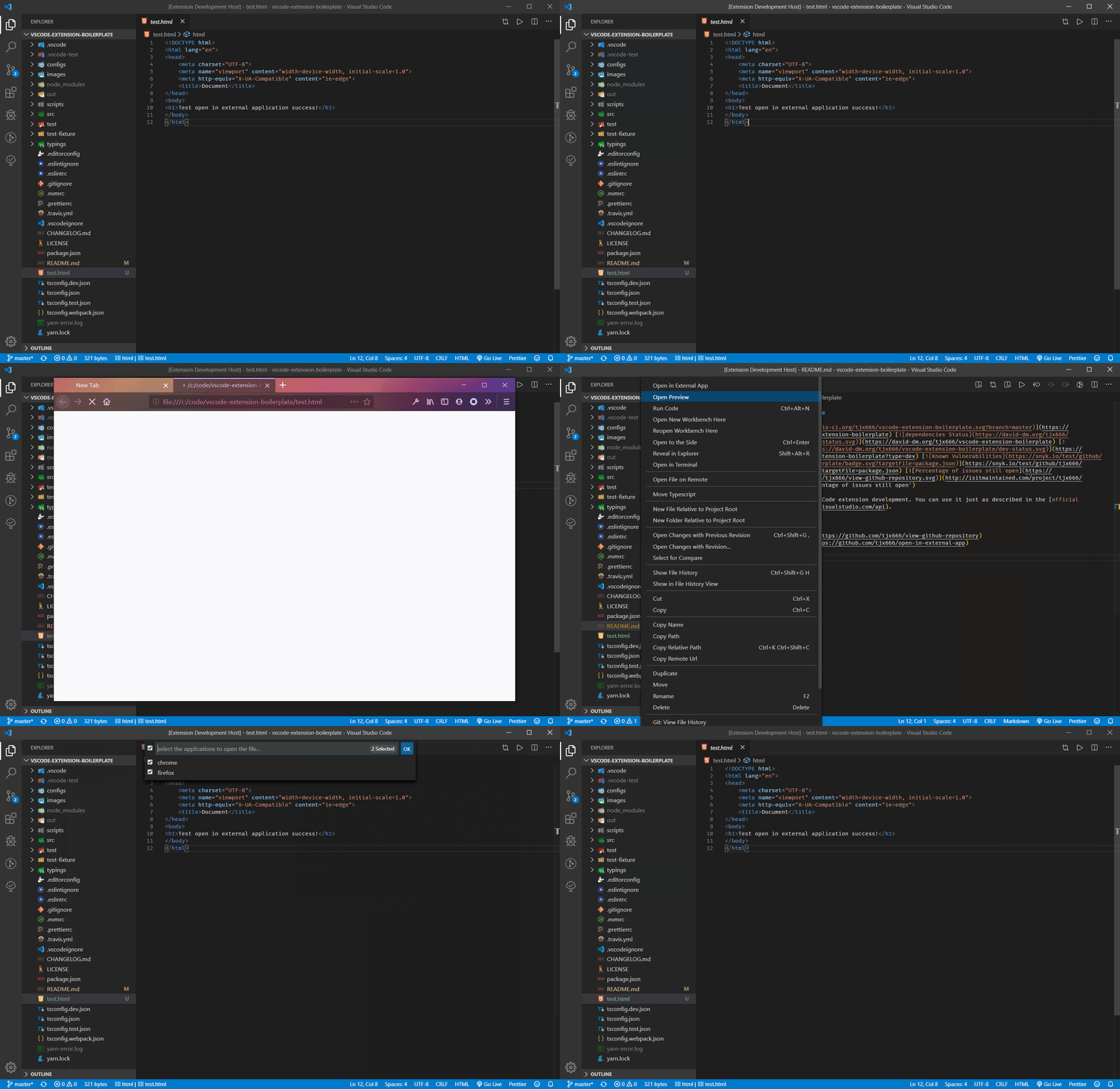
Via custom configuration, you can make extensions more powerful. For example, to see the rendering differences, You can open one HTML in chrome and Firefox at the same time.
Example configuration:
{
  "openInExternalApp.openMapper": [
    {
      // represent file extension name
      "extensionName": "html",
      // the external applications to open the file which extension name is html
      "apps": [
        // openCommand can be shell command or the complete executable application path
        // title will be shown in the drop list if there are several apps
        {
          "title": "chrome",
          // On MacOS, openCommand should be 'Google Chrome.app'
          "openCommand": "C:\\Program Files (x86)\\Google\\Chrome\\Application\\chrome.exe"
        },
        {
          "title": "firefox",
          // On MacOS, openCommand should be 'Firefox Developer Edition.app'
          "openCommand": "C:\\Program Files\\Firefox Developer Edition\\firefox.exe",
          // open in firefox under private mode
          "args": ["-private-window"]
        }
      ]
    },
    {
      "extensionName": "tsx",
      // apps can be Object array or just the command you can access from shell
      "apps": "code"
    },
    {
      // extensionName can also be an array to share one app config across multiple extensions
      "extensionName": ["pvd", "vtu", "vtk"],
      "apps": [
        {
          "title": "Paraview",
          "openCommand": "paraview.exe"
        }
      ]
    },
    {
      "extensionName": "psd",
      "apps": "/path/to/photoshop.exe"
    },
    // like code-runner, you can custom the shell command to open with file
    {
      "extensionName": "ts",
      "apps": [
        {
          "title": "run ts file",
          "shellCommand": "ts-node ${file}"
        }
      ]
    },
    {
      // shared config, details here: https://github.com/tjx666/open-in-external-app/issues/45
      "extensionName": "__ALL__",
      "apps": "MacVim"
    }
  ]
}

In VSCode, Right-clicking is different from right-clicking while holding alt key. If you just right click the file, you will see the command Open in External App, but if you right click file while holding alt key, you will see the command Open in Multiple External Apps.
:loudspeaker: Limits
This extension use two ways to open file in external applications.
1. Node package: open
This package has one limit that can't open a file which is also made by electron. For example, you can't open md file in typora using this package. The openCommand, args configuration item is also supported by this package. When isElectronApp: false(by default), extension will use this way.
2. VSCode extension API: vscode.env.openExternal(target: Uri)
This API supports open file in application which is made by electron, but has one limit that can't open file path which includes Non-ascii characters. This API can only pass one argument target, openCommand and args configuration is also not work.
If you want to open file in application which is made by electron, you can choose one of two ways:
-
don not config it in VSCode settings, and set the default application of your operation system to open that file format.
-
using
isElectronAppoption:{ "extensionName": "md", "isElectronApp": true, }multiple apps example:…
Description from the VS Code Marketplace listing.
- adobe
- app
- application
- browser
- chrome
- client
- code runner
- editor
- electron
- external
- firefox
- IDE
- IDEA
- mark text
- open
- open file
- open in
- opn
- other
- photoshop
README badge
Show your rank in a README or on your website. The badge updates automatically.
Charts
Images: 30d · 1y · all time · 1600×900 dark


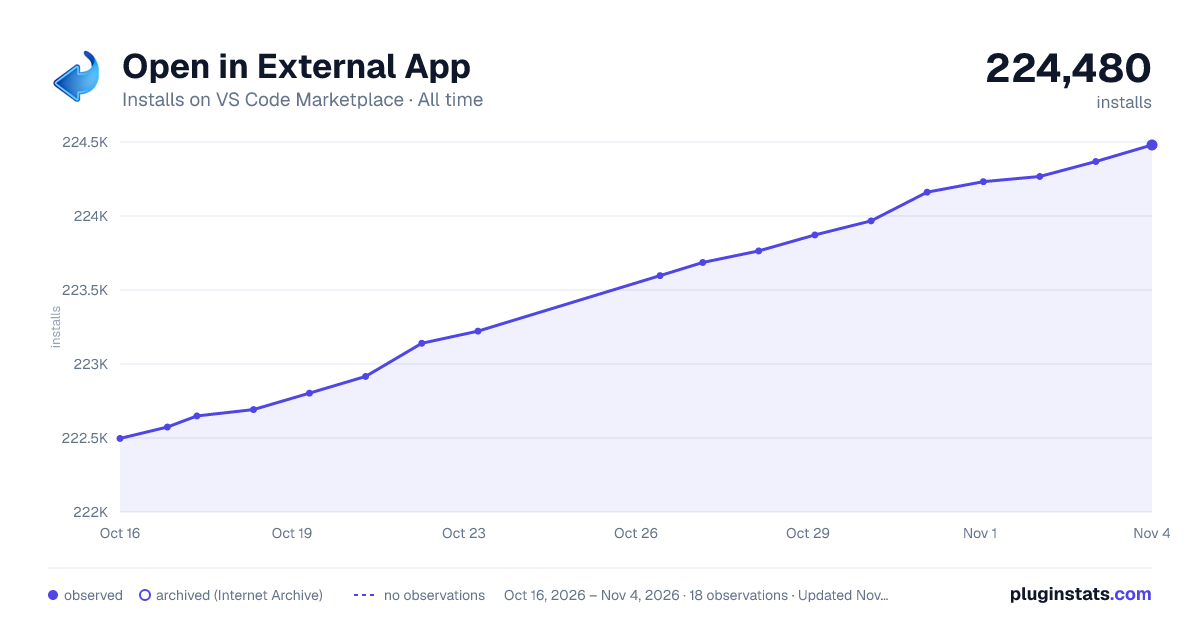

Adoption over time
7/30/90-day growth
Ranking history
Ratings over time
Listing placement
Listing placement
Filled points are observed values; hollow points come from Internet Archive snapshots of the listing page. Dashed segments span periods with no observations — values between points are not interpolated.
Each band is one page of 20. Installs on a linear scale. Placement is projected from installs, so it can differ from the marketplace's own sort order. Hover a dot to see the listing.
Recent observations
Full history (6)Similar VS Code Marketplace Other plugins
All 20 Open in External App alternativesData source
Install counts, average rating, and rating counts come from the public Visual Studio Marketplace gallery API. Installs are cumulative and exclude updates.
Listing: https://marketplace.visualstudio.com/items?itemName=YuTengjing.open-in-external-app. First seen Oct 16, 2026; last successful collection Oct 21, 2026. See the methodology.