 PluginStats
Run on Save installs statistics
By emeraldwalk · VS Code Marketplace · Other
Run commands when a file is saved in vscode.
Run on Save has 795,550 recorded installs on VS Code Marketplace.
It ranks #618 of 2,501 tracked VS Code Marketplace listings by installs.
It is rated 3.7 out of 5 from 39 ratings.
PluginStats has 4 daily observations since Oct 16, 2026; the latest is from Oct 19, 2026.
Rating: 3.74 / 5 from 39 ratings
About Run on Save
Run On Save for Visual Studio Code
This extension allows configuring commands that get run whenever a file is saved in vscode.
NOTE: Commands only get run when saving an existing file. Creating new files, and Save as... don't trigger the commands.
Features
• Configure multiple commands that run when a file is saved • Regex pattern matching for files that trigger commands running • Sync and async support
Configuration
Add "emeraldwalk.runonsave" configuration to user or workspace settings.
• shell - (optional) shell path to be used with child_process.exec options that runs commands. • autoClearConsole - (optional) clear VSCode output console every time commands run. Defaults to false. • ignoreUnchangedFiles - (optional) ignore files that have not changed since the last save. Defaults to false. • message - Message to output before all commands. • messageAfter - Message to output after all commands have finished. • showElapsed - Show total elapsed time after all commands have finished. • commands - array of commands that will be run whenever a file is saved. • match - a regex for matching which files to run commands on (see Notes on RegEx Options). • notMatch - a regex for matching which files NOT to run. Files that match this pattern take precedence over ones that match the match option (see Notes on RegEx Options). • cmd - command to run. Can include parameters that will be replaced at runtime (see Placeholder Tokens section below). • isAsync (optional) - defaults to false. If true, next command will be run before this one finishes. • message - Message to output before this command. Can also include placeholders. • messageAfter - Message to output after this command has finished. Can also include placeholders. • showElapsed - Show total elapsed time after this command. • autoShowOutputPanel - Automatically shows the output panel: • never - Never changes the output panel visibility (default). • always - Shows output panel when the first command starts. • error - Shows output panel when a command fails.
Notes on RegEx Options
The match and notMatch options expect RegEx patterns.
• The pattern will be run against the absolute file path. This means you usually don't want to start the pattern with ^ unless you are putting a full pattern to match the absolute path.
e.g. Use "match": "somefile\\.txt$" instead of "match": "^somefile\\.txt$" if you are targeting somefile.txt in your workspace.
• Since settings are defined in json, backslashes have to be double escaped.
e.g. If you were targeting a file path on a Windows system, you'd have to escape \ once because it's a RegEx and a 2nd time since you are in a json string: "match": "some\\\\folder\\\\.*"
Sample Configurations
All Files
Specific File Extensions
Exclude a File
Exclude .vscode Folder
Mix of Parallel + Sequential Commands
Messages
Output of the commands
Please see the output in Output window and then switch the right side drop down to "Run On Save" to see the output of the commands stdout
Commands
The following commands are exposed in the command palette:
• On Save: Enable • On Save: Disable • On Save: Toggle
Placeholder Tokens
Commands and messages support placeholders similar to tasks.json.
• ~~${workspaceRoot}~~: DEPRECATED use ${workspaceFolder} instead • ${workspaceFolder}: the path of the workspace folder of the saved file • ${file}: path of saved file • ${fileBasename}: saved file's basename • ${fileDirname}: directory name of saved file • ${fileExtname}: extension (including .) of saved file • ${fileBasenameNoExt}: saved file's basename without extension • ${relativeFile} - the current opened file relative to ${workspaceFolder} • ${cwd}: current working directory (this is the working directory that vscode is running in not the project directory)
Environment Variable Tokens
• ${env.Name}
Links
• Marketplace • Source Code
License
Apache
Description from the VS Code Marketplace listing.
Where Run on Save sits in the listing
Each band is one page of 20. Installs on a log scale. Placement is projected from installs, so it can differ from the marketplace's own sort order. Hover a dot to see the listing.


Charts
Images: 30d · 1y · all time · 1600×900 dark


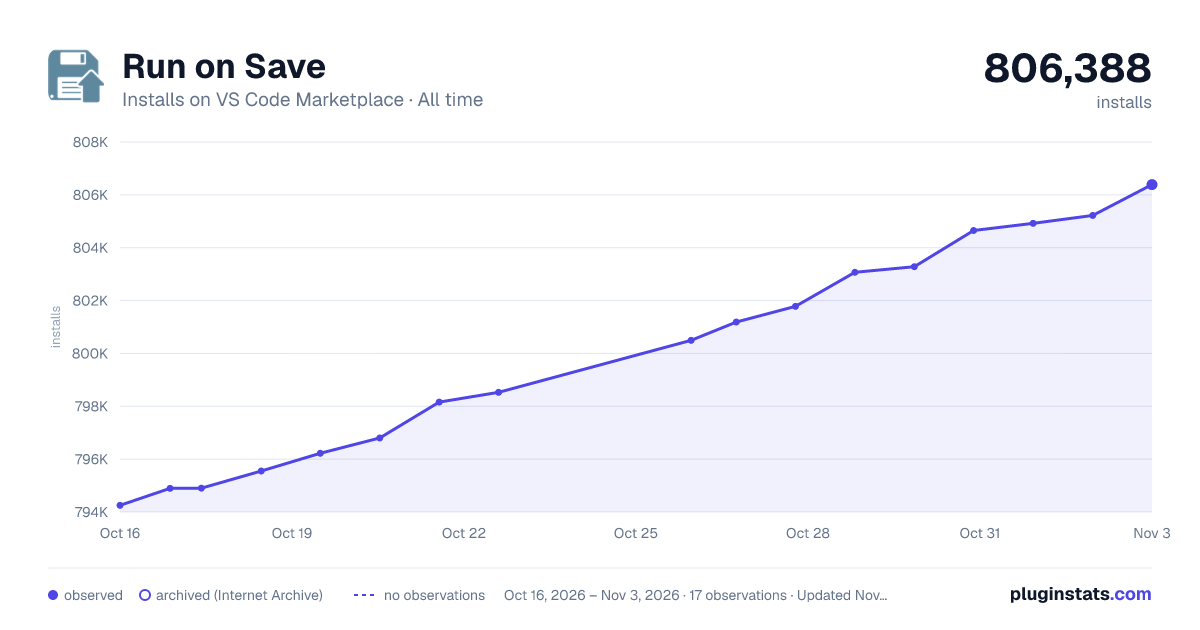

Adoption over time


7/30/90-day growth


Ranking history


Filled points are observed values; hollow points come from Internet Archive snapshots of the listing page. Dashed segments span periods with no observations — values between points are not interpolated.
Recent observations
Full history (4)Similar VS Code Marketplace Other plugins
Data source
Install counts, average rating, and rating counts come from the public Visual Studio Marketplace gallery API. Installs are cumulative and exclude updates.
Listing: https://marketplace.visualstudio.com/items?itemName=emeraldwalk.RunOnSave. First seen Oct 16, 2026; last successful collection Oct 19, 2026. See the methodology.