 PluginStats
Markdown Notes installs statistics
By kortina (2 listings) · VS Code Marketplace · Programming Languages
Navigate notes with [[wiki-links]], backlinks, #tags and @bibtex-citations (like Bear, Roam, etc). Automatically create notes from new inline [[wiki-links]]. Use Peek Definition to preview linked notes.
Markdown Notes has 100,846 recorded installs on VS Code Marketplace.
It ranks #2354 of 2,501 tracked VS Code Marketplace listings by installs.
It is rated 4.8 out of 5 from 16 ratings.
PluginStats has 4 daily observations since Oct 16, 2026; the latest is from Oct 19, 2026.
Rating: 4.75 / 5 from 16 ratings
About Markdown Notes
Markdown Notes for VS Code
Use [[wiki-links]], backlinks, #tags and @bibtex-citations for fast-navigation of markdown notes.
Automatically create notes from new inline [[wiki-links]].
Bring some of the awesome features from apps like Notational Velocity, nvalt, Bear, FSNotes, Obsidian to VS Code, where you also have (1) Vim key bindings and (2) excellent extensibility.
Install from the VSCode Marketplace. See more in the blog post: Suping Up VS Code as a Markdown Notebook.
For common issues / workarounds, please see TROUBLESHOOTING-FAQ.md
Also, take a look at the RECOMMENDED-SETTINGS.md
[[wiki-links]]
A popular feature in Roam Research and Bear is the ability to quickly reference other notes using "Cross-Note Links" in the [[wiki-link]] style.
Markdown Notes provides syntax highlighting, auto-complete, Go to Definition (editor.action.revealDefinition), and Peek Definition (editor.action.peekDefinition) support for wiki-links to notes in a workspace.
By default, the extension assumes each markdown file in a workspace has a unique name, so that note.md will resolve to the file with this name, regardless of whether or not this file exists in any subdirectory path. This tends to be a bit cleaner, but if you want support for multiple files with the same name, in settings.json set "vscodeMarkdownNotes.workspaceFilenameConvention": "relativePaths", and you'll get completions like note1/note.md and ../note2/note.md.
You can configure piped wiki-link syntax to use either [[file|description]], or [[description|file]] format (to show pretty titles instead of filenames in your rendered HTML).
#tags
Syntax highlighting for #tags.
@bibtex-citations
Use pandoc-style citations in your notes (eg @author_title_year) to get syntax highlighting, autocompletion and go to definition, if you setup a global BibTeX file with your references.
New Note Command
Provides a command for quickly creating a new note.
You can bind this to a keyboard shortcut by adding to your keybindings.json:
NB: there is also a command vscodeMarkdownNotes.newNoteFromSelection which will "cut" the selected text from the current document, prompt for a note name, create a new note with that name, and insert the new text into that note.
Screenshots
Create New Note On Missing Go To Definition
Intellisense Completion for Wiki Links, uniqueFilenames
Intellisense Completion for Wiki Links, relativePaths
Intellisense Completion for BibTeX Citations
Backlinks Explorer Panel
Syntax Highlighting for Tags and Wiki Links
Peek and Go to Definition for Wiki Links
Peek References to Wiki Links
Peek References to Tag
Peek Definition for BibTeX Citations
Find All References to Wiki Links
Find All References to Tag
cmd+shift+f to Search Workspace for Notes with Tag
Piped Wiki Link Support
New Note Command
New Note from Selection Command
dev
Run npm install first.
TODO
• Provide better support for ignore patterns, eg, don't complete file.md if it is within ignored_dir/ • Add option to complete files without extension, to [[file]] vs file.md • Should we support links to headings? eg, file.md#heading-text?
Development and Release
Test
For focused jest tests,
• install: https://marketplace.visualstudio.com/items?itemName=kortina.run-in-terminal • and https://marketplace.visualstudio.com/items?itemName=vscodevim.vim
Run a focused test with ,rl on a line in a test file, eg line 8, which will make a call to:
to run only the test at that line. NB, you will also need these bindings for ,rl
To run all tests,
All tests are headless.
Release
To create a new release,
To install the vsix locally:
1. Select Extensions (Ctrl + Shift + X) 2. Open More Action menu (ellipsis on the top) and click Install from VSIX… 3. Locate VSIX file and select. 4. Reload VSCode.
Helpful Links
• completion: https://github.com/microsoft/vscode-extension-samples/blob/master/completions-sample/src/extension.ts • syntax: https://flight-manual.atom.io/hacking-atom/sections/creating-a-legacy-textmate-grammar/ • vscode syntax: https://code.visualstudio.com/api/language-extensions/syntax-highlight-guide
Description from the VS Code Marketplace listing.
- backlinks
- markdown
- markdown-notes
- notebook
- notes
- notetaking
- tagging
- wiki links
Where Markdown Notes sits in the listing
Each band is one page of 20. Installs on a log scale. Placement is projected from installs, so it can differ from the marketplace's own sort order. Hover a dot to see the listing.


Charts
Images: 30d · 1y · all time · 1600×900 dark


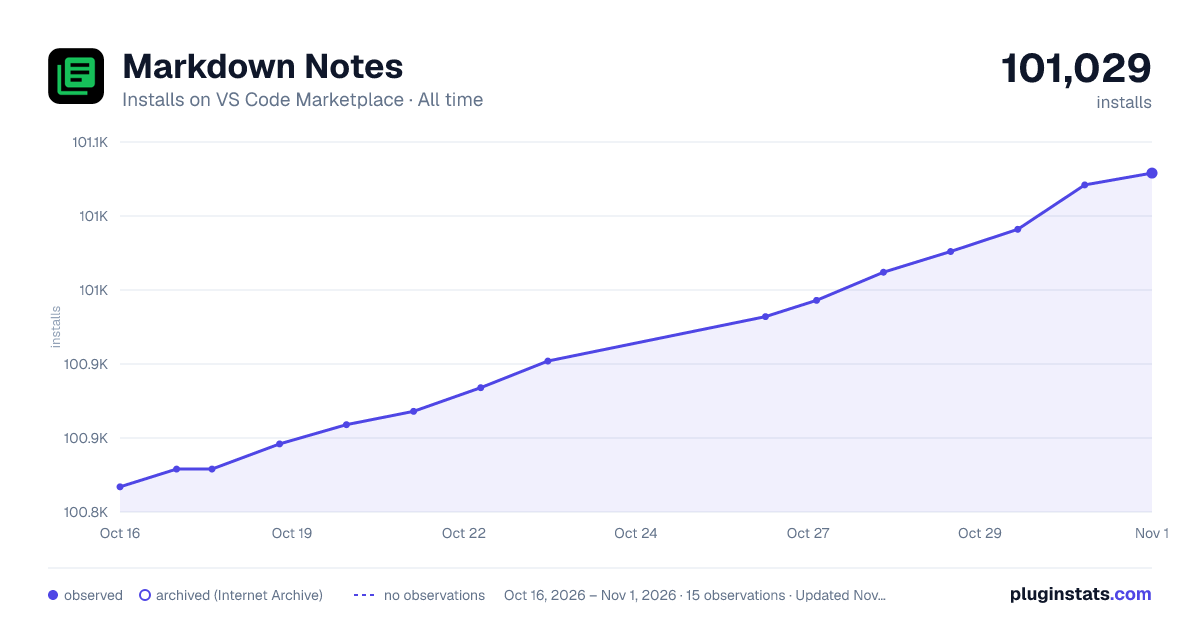

Adoption over time


7/30/90-day growth


Ranking history


Filled points are observed values; hollow points come from Internet Archive snapshots of the listing page. Dashed segments span periods with no observations — values between points are not interpolated.
Recent observations
Full history (4)Similar VS Code Marketplace Programming Languages plugins
Data source
Install counts, average rating, and rating counts come from the public Visual Studio Marketplace gallery API. Installs are cumulative and exclude updates.
Listing: https://marketplace.visualstudio.com/items?itemName=kortina.vscode-markdown-notes. First seen Oct 16, 2026; last successful collection Oct 19, 2026. See the methodology.