 PluginStats
ChatGPT - EasyCode installs statistics
By EasyCode AI · VS Code Marketplace · Other
ChatGPT with codebase understanding, web browsing, & GPT-4. No account or API key required.
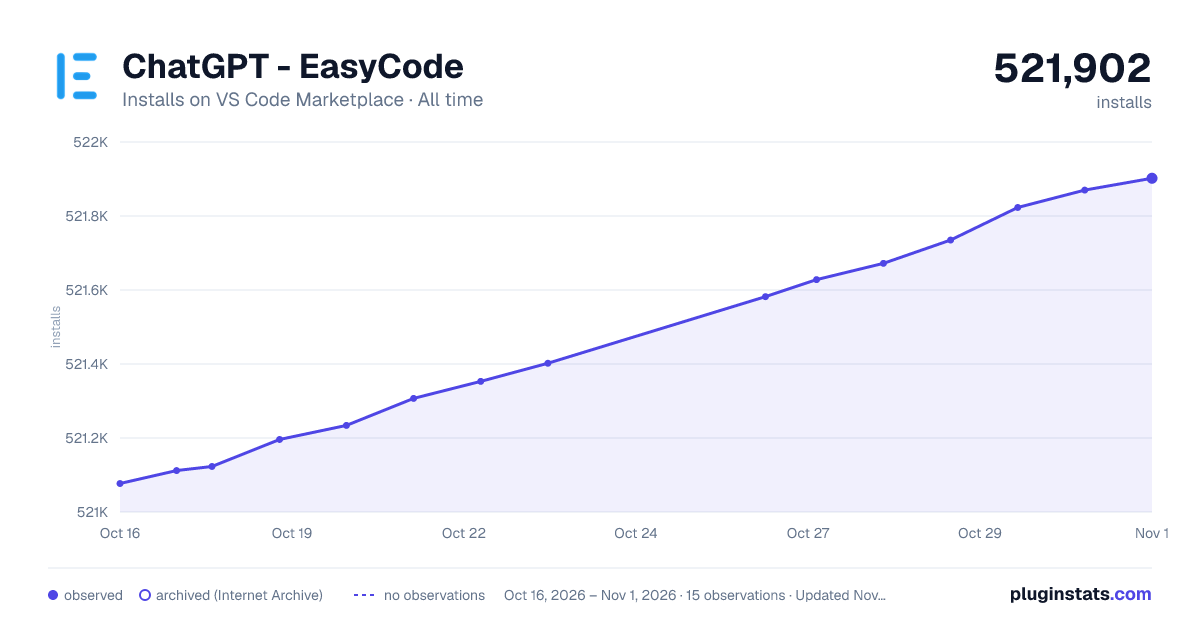
ChatGPT - EasyCode has 521,234 recorded installs on VS Code Marketplace, ranking #831 of 2,501 tracked listings.
Rating: 3.97 / 5 from 104 ratings
About ChatGPT - EasyCode
Build features, brainstorm solutions, and understand codebases 2X faster.
- Chat with specific files or entire codebase.
- Slash commands to use specialized agents.
- CMD+E for inline quick edit.
- AI quick fix for simple errors.
- Web browsing to get the most up-to-date info.
- Support for GPT-4, GPT-3.5, Claud-3-Opus, and Claude-3-Haiku.
- Free & secure, no API key required, your code not stored.
Supported Languages
- java, py, ts, js, html, cs, lua, go, php, rb, cpp, c, h, yaml, json, md, tex, swift,rs, sc, proto, rst
Build features with Multi-File code gen.
<img src="https://github.com/Personabo-Technologies/easycode-public/blob/main/walkthroughs/build_a_feature.gif?raw=true" width="80%">Brainstorm solutions with repo level context.
<img src="https://github.com/Personabo-Technologies/easycode-public/blob/main/walkthroughs/plan_a_feature.gif?raw=true" width="80%">Chat with files or entire codebase.
<img src="https://github.com/Personabo-Technologies/easycode-public/blob/main/walkthroughs/chat_with_files.gif?raw=true" width="80%">Quickly edit any codeblock.
<img src="https://github.com/Personabo-Technologies/easycode-public/blob/main/walkthroughs/quick_edit.gif?raw=true" width="80%">Slash commands for special agents.
<img src="https://github.com/Personabo-Technologies/easycode-public/blob/main/walkthroughs/slash_commands.gif?raw=true" width="80%">Other Features
<img src="https://github.com/chuangli94/easycode_assets/blob/main/context_menu.png?raw=true" width="50%">-
Ask GPT→ For open ended questions that are specific to the code you selected. Useful for questions that have a narrower scope. -
Ask GPT: What does this do?→ Explains in detail what the code is doing. Useful for code that’s hard to read for various reasons (unfamiliar language, next level regex, yaml/config files, etc). -
Ask GPT: How is this method used?→ Explains the usages of the method, ie how the method affects or is affected by other parts of codebase. -
Ask GPT: How is this file used?→ Similar to “How is this method used”, but for a file or class. -
Ask GPT: Write Code→ Get code suggestion that are specific to the code you selected. For example- “Modify a function so that it does ____”
- “Write a test case that tests _”
- “Write documentation for this function”
-
GPT: Explain Stack Trace→ Analyze stack trace errors to figure out the cause
GPT: Index Codebase → Allows for re-indexing of codebase, or indexing a different part of the codebase.
Contact
- DM us on <a href="https://www.twitter.com/EasyCodeAI" target=”_blank”><b>Twitter</b></a>.
- Join our <a href="https://discord.gg/VgE3tQuKrg" target=”_blank”><b>Discord</b></a> server.
- Email support@easycode.ai with your feedback & questions!
Additional Information About ChatGPT
What is ChatGPT?
According to OpenAI,
ChatGPT is a sibling model to InstructGPT, which is trained to follow an instruction in a prompt and provide a detailed response. ChatGPT was initially launched to get users’ feedback and learn about its strengths and weaknesses. During the research preview, usage of ChatGPT is free. A paid version of ChatGPT has since been launched with has more features.
According to ChatGPT itself,
ChatGPT is an AI program designed to understand and respond to human language in a natural way. ChatGPT has been trained on a vast amount of text data, allowing it to generate human-like responses to a wide variety of questions and prompts. ChatGPT’s purpose is to assist and provide information to users in a conversational manner.
How developers can use ChatGPT?
There are several ways a software developer can use ChatGPT to be more productive. Here are some potential use cases:
- Code-related queries: ChatGPT can help answer questions related to coding and programming languages. A developer can ask questions about syntax, debugging, and other issues they might encounter while writing code.
- Documentation assistance: Developers often need to refer to documentation to understand how to use certain libraries or frameworks. ChatGPT can help locate relevant documentation and provide guidance on how to use it effectively.
- Collaboration support: Developers often need to collaborate with other team members on projects. ChatGPT can assist with scheduling meetings, managing tasks, and coordinating workflow.
- Code generation: ChatGPT can generate code snippets based on prompts and examples provided by the developer. This can save time when writing repetitive code or working with complex algorithms.
- Technical support: Developers can use ChatGPT to seek technical support on issues they encounter while working on projects. ChatGPT can provide troubleshooting guidance and suggest solutions to common problems.
- Code optimization: ChatGPT can help identify potential areas for code optimization by analyzing code and suggesting improvements. This can help improve the performance of the code and reduce errors.
Overall, ChatGPT can be a valuable tool for software developers, helping them to be more productive and efficient in their work.
Risks and flaws of ChatGPT for dev work…
Description from the VS Code Marketplace listing.
- ai
- chatgpt
- code explanation
- code generation
- code summary
- copilot
- debugging
- explain
- gpt3
- gpt4
- keybindings
- openai
- unit testing
README badge
Show your rank in a README or on your website. The badge updates automatically.
Charts
Images: 30d · 1y · all time · 1600×900 dark
Adoption over time
7/30/90-day growth
Ranking history
Ratings over time
Listing placement
Listing placement
Filled points are observed values; hollow points come from Internet Archive snapshots of the listing page. Dashed segments span periods with no observations — values between points are not interpolated.
Each band is one page of 20. Installs on a linear scale. Placement is projected from installs, so it can differ from the marketplace's own sort order. Hover a dot to see the listing.
Recent observations
Full history (5)Similar VS Code Marketplace Other plugins
All 20 ChatGPT - EasyCode alternatives



ChatGPT - EasyCode on other marketplaces
Data source
Install counts, average rating, and rating counts come from the public Visual Studio Marketplace gallery API. Installs are cumulative and exclude updates.
Listing: https://marketplace.visualstudio.com/items?itemName=EasyCodeAI.chatgpt-gpt4-gpt3-vscode. First seen Oct 16, 2026; last successful collection Oct 20, 2026. See the methodology.