 PluginStats
HTMLHint installs statistics
By HTMLHint · VS Code Marketplace · Programming Languages
VS Code integration for HTMLHint - A Static Code Analysis Tool for HTML
HTMLHint has 745,888 recorded installs on VS Code Marketplace.
It ranks #658 of 2,501 tracked VS Code Marketplace listings by installs.
It is rated 5.0 out of 5 from 6 ratings.
PluginStats has 4 daily observations since Oct 16, 2026; the latest is from Oct 19, 2026.
Rating: 5.00 / 5 from 6 ratings
About HTMLHint
HTMLHint - VS Code Extension
Integrates the HTMLHint static analysis tool into Visual Studio Code.
Configuration
The HTMLHint extension will attempt to use the locally installed HTMLHint module (the project-specific module if present, or a globally installed HTMLHint module). If a locally installed HTMLHint isn't available, the extension will use the embedded version (current version 1.6.3).
To install a version to the local project folder, run npm install --save-dev htmlhint. To install a global version on the current machine, run npm install --global htmlhint.
Usage
The HTMLHint extension will run HTMLHint on your open HTML files and report the number of errors on the Status Bar with details in the Problems panel (View > Problems).
Errors in HTML files are highlighted with squiggles and you can hover over the squiggles to see the error message.
Many problems can now be fixed automatically by clicking on the lightbulb icon in problems panel or right-clicking on the error in the HTML file and selecting "Quick Fix".
Auto-fix Support
The extension provides automatic fixes for many common HTML issues. Currently supported auto-fixes include:
• alt-require - Adds alt attribute to images • attr-lowercase - Converts uppercase attribute names to lowercase • attr-no-duplication - Removes duplicate attributes (only when values are identical) • attr-no-unnecessary-whitespace - Removes unnecessary whitespace around attributes • attr-value-double-quotes - Converts single quotes to double quotes in attributes • attr-value-no-duplication - Removes duplicate values within attributes (e.g., class="btn btn primary" → class="btn primary") • attr-whitespace - Removes leading and trailing whitespace from attribute values • button-type-require - Adds type attribute to buttons • doctype-first - Adds DOCTYPE declaration at the beginning • doctype-html5 - Updates DOCTYPE to HTML5 • empty-tag-not-self-closed - Converts void elements to self-closing format (e.g., → ) • form-method-require - Adds empty method attribute to forms • html-lang-require - Adds lang attribute to tag • link-rel-canonical-require - Adds canonical link tag • meta-charset-require - Adds charset meta tag • meta-description-require - Adds description meta tag • meta-viewport-require - Adds viewport meta tag • spec-char-escape - Escapes special characters () • tag-no-obsolete - Converts obsolete tags to modern equivalents (e.g., to ) • tag-self-close - Converts self-closable tags to self-closing tags • tagname-lowercase - Converts uppercase tag names to lowercase • title-require - Adds tag to document
Note: HTMLHint will only analyze open HTML files and does not search for HTML files in your project folder.
Rules
The HTMLHint extension uses the default rules provided by HTMLHint.
.htmlhintrc
If you'd like to modify the rules, you can provide a .htmlhintrc file in the root of your project folder with a reduced ruleset or modified values.
You can learn more about rule configuration at the HTMLHint Usage page.
Additional file types
By default, HTMLHint will run on any files associated with the "html" language service (i.e., ".html" and ".htm" files). If you'd like to use the HTMLHint extension with additional file types, you have two options:
Option 1: Treating your file like any other HTML file
If you would like the file type to be treated as any other HTML file (including syntax highlighting, as well as HTMLHint linting), you'll need to associate the extension with the HTML language service. Add the following to your VS Code settings, replacing "*.ext" with your file extension.
Option 2: Associating HTMLHint extension with your file type
If your file type already has an associated language service other than "html", and you'd like HTMLHint to process those file types, you will need to associate the HTMLHint extension with that language service. Add the following to your VS Code settings, replacing "mylang" with your language service. For example, if you want HTMLHint to process .twig files, you would use "twig". Note that with this configuration, you need to open an HTML file first to activate the HTMLHint extension. Otherwise, you won't see any linter errors, (the extension is hard-coded to activate when the HTML language service activates).
Settings
The HTMLHint extension provides these settings:
• htmlhint.enable - disable the HTMLHint extension globally or per workspace. • htmlhint.documentSelector - specify additional language services to be linted • htmlhint.options - provide a rule set to override on disk .htmlhintrc or HTMLHint defaults. • htmlhint.configFile - specify a custom HTMLHint configuration file. Please specify either 'htmlhint.configFile' or 'htmlhint.options', but not both.
You can change settings globally (File > Preferences > User Settings) or per workspace (File > Preferences > Workspace Settings). The Preferences menu is under Code on macOS.
Here's an example using the htmlhint.documentSelector and htmlhint.options settings:
Skipping Linting for .gitignore-d Files
You can configure the extension to skip linting files and folders that are listed in your .gitignore. This is useful for ignoring generated files, dependencies, and other files you don't want to lint (like node_modules/, dist/, build/, etc).
How to Enable
1. Open VS Code settings. 2. Search for HTMLHint: Ignore Gitignore. 3. Enable the option: htmlhint.ignoreGitignore (default: false)
When enabled, any HTML files ignored by your workspace's .gitignore will not be linted by the extension.
Example
If your .gitignore contains:
Then files like dist/index.html or node_modules/foo/bar.html will be skipped by HTMLHint.
Description from the VS Code Marketplace listing.
- htm
- html
- json
Where HTMLHint sits in the listing
Each band is one page of 20. Installs on a log scale. Placement is projected from installs, so it can differ from the marketplace's own sort order. Hover a dot to see the listing.


Charts
Images: 30d · 1y · all time · 1600×900 dark


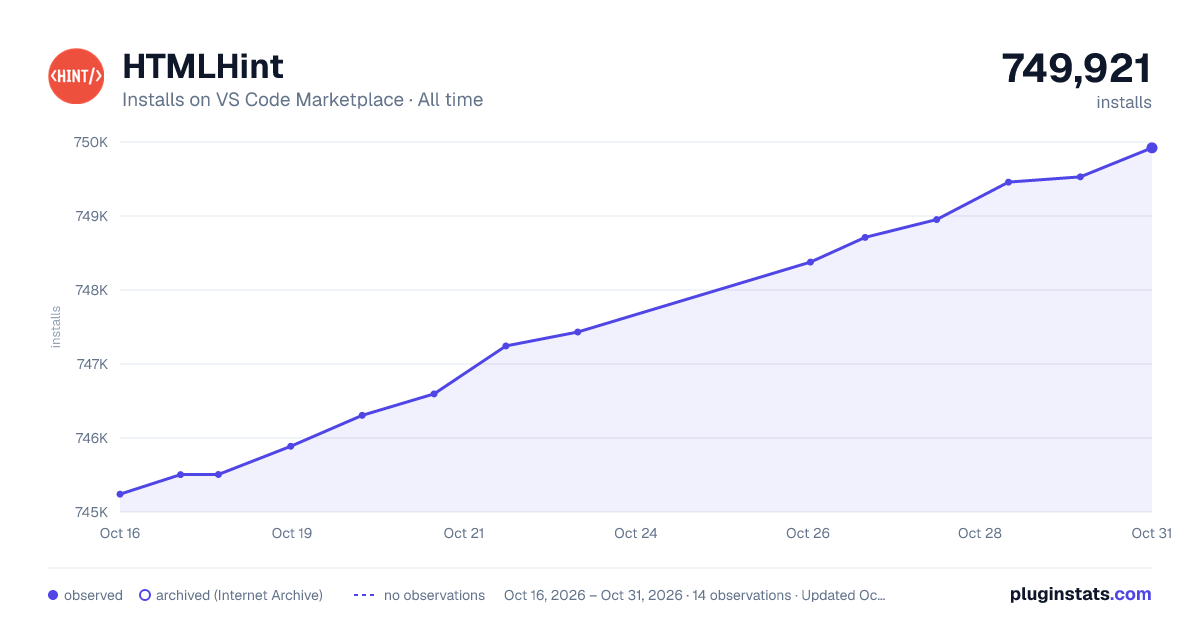

Adoption over time


7/30/90-day growth


Filled points are observed values; hollow points come from Internet Archive snapshots of the listing page. Dashed segments span periods with no observations — values between points are not interpolated.
Recent observations
Full history (4)Similar VS Code Marketplace Programming Languages plugins
Data source
Install counts, average rating, and rating counts come from the public Visual Studio Marketplace gallery API. Installs are cumulative and exclude updates.
Listing: https://marketplace.visualstudio.com/items?itemName=HTMLHint.vscode-htmlhint. First seen Oct 16, 2026; last successful collection Oct 19, 2026. See the methodology.