 PluginStats
YAML Sort installs statistics
By Pascal Reitermann · VS Code Marketplace · Programming Languages
This VS Code extension exposes the possibility to sort, format and validate yaml files.
YAML Sort has 228,300 recorded installs on VS Code Marketplace.
It ranks #1378 of 2,501 tracked VS Code Marketplace listings by installs.
It is rated 4.8 out of 5 from 21 ratings.
PluginStats has 4 daily observations since Oct 16, 2026; the latest is from Oct 19, 2026.
Rating: 4.76 / 5 from 21 ratings
About YAML Sort
YAML Sort
YAML Sort extends VS Code to sort, format and validate YAML files.
Preview
💬 Commands
This extension contributes the following commands:
| Command | Description |
| Custom Sort 1 | This command will sort a given YAML with custom order. If some of the keys of customSortKeywords_1 will be found at the top level of the YAML, these will be put at the beginning of the YAML file (in the given order). You can use this e. g. to sort Kubernetes configmaps. | | Custom Sort 2 | Same as Custom Sort 1 | | Custom Sort 3 | Same as Custom Sort 1 | | Format Document | Formats a yaml document without sorting it. Also possible using the shortcut (⇧⌥F on Mac). | | Recursively sort YAML files | Sorts all .yaml and .yml files in a directory and all its subdirectories. | | Sort YAML | Sorts a given YAML. You can either sort the whole YAML document or sort only a selection of the text. | | Validate YAML | Validates a given YAML. |
⚙️ Configuration
This extension contributes the following settings:
| Setting | Description | Default |
| emptyLinesUntilLevel | When bigger than 0, will add a new line before each keyword on level n. | 0 | | customSortKeywords_1 | List of keywords for Custom Sort 1 | ["apiVersion", "kind", "metadata", "spec", "data"]| | customSortKeywords_2 | List of keywords for Custom Sort 2 | - | | customSortKeywords_3 | List of keywords for Custom Sort 3 | - | | extensions | Extensions to be processed with command Recursively sort YAML files | ["yaml", "yml"] | | forceQuotes | When true, all non-key strings will be quoted even if they normally don't need to. | false | | indent | Indentation width in spaces | 2 | | lineWidth | Maximum line width for YAML files | 500 | | locale | Language whose sort order should be used | en | | noArrayIndent | When true, will not add an indentation level to array elements. | false | | noCompatMode | When true, don't try to be compatible with older yaml versions. Currently: don't quote "yes", "no" and so on, as required for YAML 1.1 | false | | notifySuccess | When true, will notify on successfully performed tasks. | true | | quotingType | Strings will be quoted using this quoting style. If you specify single quotes, double quotes will still be used for non-printable characters. | ' | | schema | Schema to use. Possible values are HOMEASSISTANT_SCHEMA, CLOUDFORMATION_SCHEMA, CORE_SCHEMA, DEFAULT_SCHEMA, FAILSAFE_SCHEMA, JSON_SCHEMA. | DEFAULT_SCHEMA | | sortArrays | When true, will sort arrays | false | | sortOnSave | When 0, will sort files when saving document. When 1, 2 or 3, will use customSortKeywords. Set to negative value to disable sortOnSave. Only works in combination with editor.formatOnSave set to true. | 0 | | sortOrderReverse | When true, will sort in reverse order | false | | useAsFormatter | When true, will enable default YAML formatter (requires restart). | false | | useCustomSortRecursively | When true, will use the custom sort keywords recursively on a file, when using custom sort. | false | | useLeadingDashes | When true, sorted YAML files begin with leading dashes. | true | | useArrayProcessor | When true, will activate ArrayProcessor. | true | | useBlockProcessor | When true, will activate BlockProcessor. | true | | useCommentProcessor | When true, will activate CommentProcessor. | true | | useHelmProcessor | When true, will activate HelmProcessor. | true | | useOctalProcessor | When true, will activate OctalProcessor. | true |
❓ FAQ
How to sort on save?
Register this extension as VS Code formatter. Also configure VS Code to format files on save. Caution: This setting will apply for all files. Changes will require a restart of VS Code. If you wish to also sort (not only format) the file on saving, set sortOnSave to 0. Use 1, 2 or 3 for custom sort.
.vscode/settings.json
What are the processors doing and how do I use them?
There are different types of processors. If you experience any issues with them, or just don't want to use them, you can turn them off.
ArrayProcessor
The ArrayProcessor will not add linebreaks to single-line array structures.
Original Document Sorted with useArrayProcessor: true Sorted with useArrayProcessor: false
test: [ "CMD", "pg_isready"] test: [ "CMD", "pg_isready"] test: - "CMD" - "pg_isready"
BlockProcessor
The BlockProcessor will keep block sequences.
Original Document Sorted with useBlockProcessor: true Sorted with useBlockProcessor: false
hello: |- World hello: |- World hello: World
Comment Processor
An activated Comment Processor will keep comments while sorting.
Original Document Sorted with useCommentProcessor: true Sorted with useCommentProcessor: false
# comment foo: bar # comment foo: bar foo: bar
Helm Processor
The Helm Processor makes the extension compatible with Helm charts.
Original Document Sorted with useHelmProcessor: true Sorted with useHelmProcessor: false
foo: {{ .value }} foo: {{ .value }} foo: '[object Object]': null
Spacing Processor
The Spacing Processor will add spacing between keywords.
Original Document Sorted with emptyLinesUntilLevel: 0 Sorted with emptyLinesUntilLevel: 1
foo: bar baz: bar foo: bar baz: bar foo: bar
baz: bar
Octal Processor
The Octal Processor makes the extension keeping octal value like 0744.
Original Document Sorted with useOctalProcessor: true Sorted with useOctalProcessor: false
foo: 0744 foo: 0744 foo: 484
🎉 Support
If you like YAML Sort, please feel free to rate it on the marketplace.
If you miss something or found a bug, please let me know and open an issue on this project on GitHub. Do not hesitate to open a pull request with your changes.
Check open issues on GitHub.
Known problems
Be careful with anchors and references, these don't work very well in this extension.
📝 License
YAML Sort is licensed under the MIT License.
Description from the VS Code Marketplace listing.
- formatting
- sorting
- yaml
- yml
Where YAML Sort sits in the listing
Each band is one page of 20. Installs on a log scale. Placement is projected from installs, so it can differ from the marketplace's own sort order. Hover a dot to see the listing.


Charts
Images: 30d · 1y · all time · 1600×900 dark


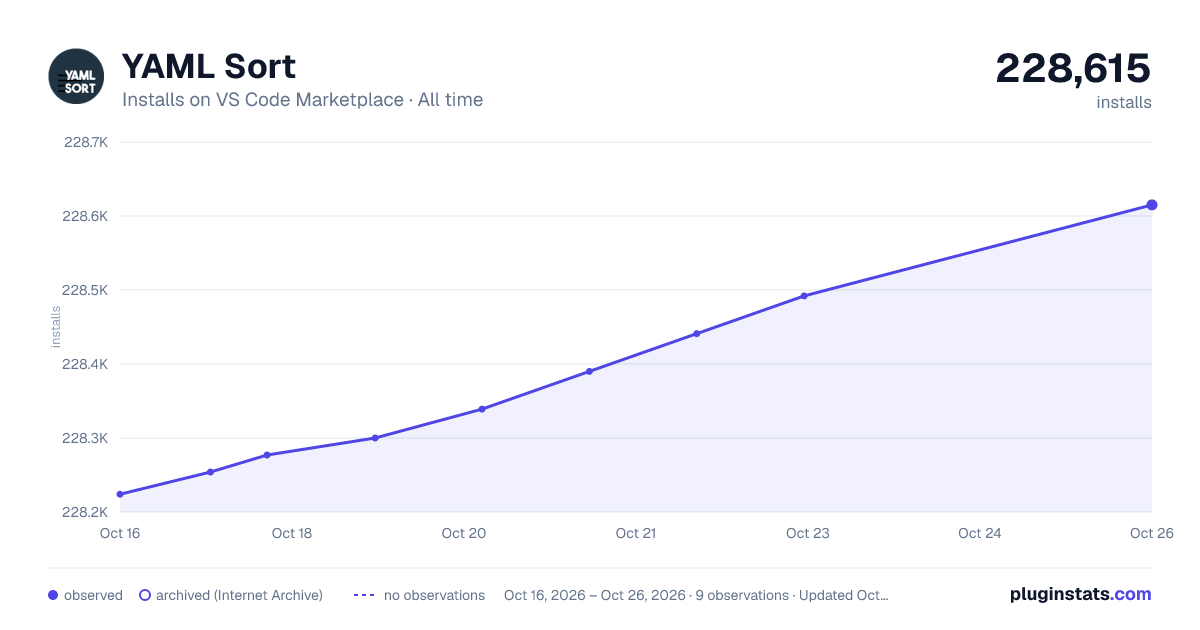

Adoption over time


7/30/90-day growth


Ranking history


Filled points are observed values; hollow points come from Internet Archive snapshots of the listing page. Dashed segments span periods with no observations — values between points are not interpolated.
Recent observations
Full history (4)Similar VS Code Marketplace Programming Languages plugins
Data source
Install counts, average rating, and rating counts come from the public Visual Studio Marketplace gallery API. Installs are cumulative and exclude updates.
Listing: https://marketplace.visualstudio.com/items?itemName=PascalReitermann93.vscode-yaml-sort. First seen Oct 16, 2026; last successful collection Oct 19, 2026. See the methodology.