 PluginStats
Presentation Mode installs statistics
By CS50 (5 listings) · VS Code Marketplace · Themes
Bring Presentation Mode to VS Code
Presentation Mode has 932,273 recorded installs on VS Code Marketplace, ranking #562 of 2,501 tracked listings.
Rating: 5.00 / 5 from 1 ratings
About Presentation Mode
Presentation Mode
Bring presentation mode to VS Code.
Keyboard Shortcut
Ctrl+Alt+P
Workspace Settings
Workspace customizations to take effect when presentation mode is on:
"presentation-mode.active": {
    "commands": [
        "workbench.action.closeSidebar"
    ],
    "editor.fontSize": 16,
    "editor.matchBrackets": "never",
    "editor.minimap.enabled": false,
    "editor.scrollbar.verticalScrollbarSize": 0,
    "workbench.activityBar.visible": false,
    "workbench.statusBar.visible": false,
    "workbench.colorTheme": "GitHub Dark Default",
    "workbench.colorCustomizations": {
        "[GitHub Dark Default]": {
            "activityBar.background": "#000",
            "editor.background": "#000",
            "editor.lineHighlightBackground": "#0000",
            "editor.lineHighlightBorder": "#0000",
            "editorWhitespace.foreground": "#59A5FC",
            "panel.background": "#000",
            "sideBar.background": "#000",
            "terminal.background": "#000"
        },
        "[GitHub Light Default]": {
            "activityBar.background": "#fff",
            "editor.background": "#fff",
            "editor.lineHighlightBackground": "#fff0",
            "editor.lineHighlightBorder": "#fff0",
            "editorWhitespace.foreground": "#1167D7",
            "panel.background": "#fff",
            "sideBar.background": "#fff",
            "terminal.background": "#fff"
        }
    },
    "window.zoomLevel": 2
}
Workspace Commands
Workspace commands to execute when presentation mode is off:
"presentation-mode.inactive": {
    "commands": [
        "workbench.action.focusSideBar"
    ]
}
This is useful and necessary because some workspace UI states/behaviors can not be easily monitored and controlled via workspace settings. Specifying commands to be executed when presentation mode is toggled ensures the workspace layout is deterministically restored.
Package Extension and Install (dev only)
If the command-line tool Visual Studio Code Extensions is not installed, run this command to install vsce globally:
npm install -g vsce
Install all npm dependencies, package extension, and install:
npm install
vsce package
code --install-extension presentation-mode-0.0.1.vsix
Description from the VS Code Marketplace listing.
- keybindings
README badge
Show your rank in a README or on your website. The badge updates automatically.
Charts
Images: 30d · 1y · all time · 1600×900 dark


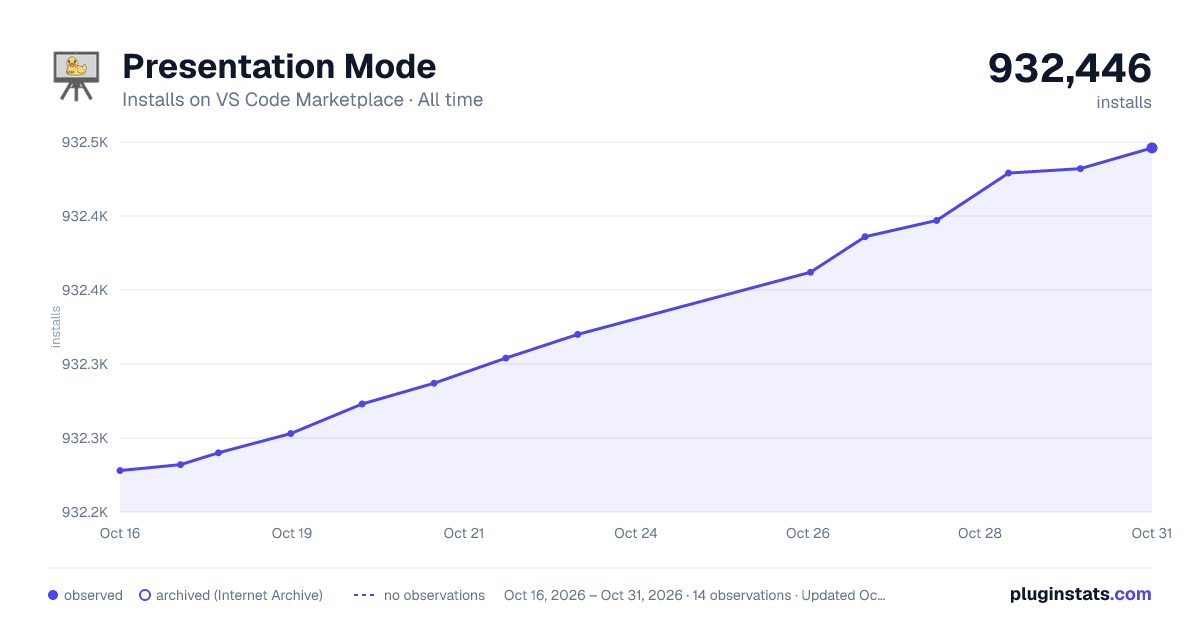

Adoption over time
7/30/90-day growth
Ranking history
Ratings over time
Listing placement
Listing placement
Listing placement
Listing placement
Filled points are observed values; hollow points come from Internet Archive snapshots of the listing page. Dashed segments span periods with no observations — values between points are not interpolated.
Each band is one page of 20. Installs on a linear scale. Placement is projected from installs, so it can differ from the marketplace's own sort order. Hover a dot to see the listing.
Recent observations
Full history (5)Similar VS Code Marketplace Themes plugins
All 20 Presentation Mode alternativesData source
Install counts, average rating, and rating counts come from the public Visual Studio Marketplace gallery API. Installs are cumulative and exclude updates.
Listing: https://marketplace.visualstudio.com/items?itemName=CS50.vscode-presentation-mode. First seen Oct 16, 2026; last successful collection Oct 20, 2026. See the methodology.