 PluginStats
Unity Tools installs statistics
By Avin Zarlez (2 listings) · VS Code Marketplace · Extension Packs
Various tools to help with Unity development
Unity Tools has 1,448,834 recorded installs on VS Code Marketplace.
It ranks #433 of 2,501 tracked VS Code Marketplace listings by installs.
It is rated 4.6 out of 5 from 8 ratings.
PluginStats has 4 daily observations since Oct 16, 2026; the latest is from Oct 19, 2026.
Rating: 4.63 / 5 from 8 ratings
About Unity Tools
Unity Tools for Visual Studio Code
What this extension is
This is an unofficial extension created by Tobiah Zarlez, and is not affiliated in any way with Unity Technologies.
The goal of this extension is to add miscellaneous functionality to Visual Studio Code for Unity developers.
This extension also acts as an extension package for another Unity related VSCode extension. Specifically, "Unity.unity-debug"
What this extension isn't
This is not a comprehensive set of tools for Unity development, nor does it provide any debugging features.
If you want to debug your Unity projects, I would recommend getting Unity's official debugger for Visual Studio Code.
Can you add XZY feature?
Possibly! Let me know, I'd love to hear your suggestions on what tools you'd like to see added to this collection.
How to install
You can install this extension directly from the Visual Studio Marketplace.
Launch VS Code Quick Open (Ctrl+P) and copy/paste the following command:
ext install unity-tools
Feature list
Command: Open Documentation for Selection
Use the pallet command "Unity Tools: Open Documentation for Selection" (Cmd+' on OSX or Ctrl+' on Windows and Linux) to open the Unity Documentation for the currently selected class.
Command: Search Documentation
Use the pallet command "Unity Tools: Search Documentation" (Shortcut: Cmd+Shift+' on OSX or Ctrl+Shift+' on Windows and Linux) where you can quickly enter whatever you want to search for.
Command: Search MSFT Documentation
Use the pallet command "Unity Tools: Search MSFT Documentation" where you can enter whatever you want to search the MSFT documentation for.
Command: Open VSCode Documentation
Added the pallet command "Unity Tools: Open VSCode Documentation" to open the Unity Development with VS Code page on the Visual Studio Code Documentation.
Command: Generate Organizational Folders
Added the pallet command "Unity Tools: Generate Organizational Folders" to create some default organizational folders to your project's Assets Folder. The list of default folders are below:
• Scenes • Scripts • Prefabs • Materials • Audio
Configuration
The Unity-Tools command Generate Organizational Folders can be configured to create a set of folders of your choosing, instead of the 5 default ones: Scenes, Scripts, Prefabs, Materials, and Audio. To do this simply open or create ./.vscode/settings.json and fill in the below fields.
You can also set which Unity version should be used when accessing online documentation. Make sure the version number you enter is valid for Unity's documentation.
You can also enable/disable the "Open Documentation" option in right-click menu by the below setting. Default value is true.
If you rather search local documentation rather than online, set a value to unity-tools.localDocumentationPath.
NOTE: unity-tools.localDocumentationPath should NOT include a trailing slash /, file:/// nor any filename like index.html or 30_search.html
Due to the nature of queries in local file paths (at least on Windows, I have not tested on Mac/Linux), you are also required to set a default browser with unity-tools.localDocumentationViewer. For example, firefox, iexplore, or chrome. You can also set the exact path, if your browser doesn't have a command. Example: C:/Program Files/Mozilla Firefox/firefox.exe
If you do not set localDocumentationViewer, localDocumentationPath will not work. This may or may not be true on Mac or Linux, I have not had the opportunity to test it! If you have, please let me know.
Other resources
Here are some other resources I recommend:
• Unity Development with VS Code • GitHub Repository for Unity's official Visual Studio Code debugger • Tobiah Zarlez Blog
Description from the VS Code Marketplace listing.
- asset store
- docs
- documentation
- keybindings
- multi-root ready
- unity
- unity3d
Where Unity Tools sits in the listing
Each band is one page of 20. Installs on a log scale. Placement is projected from installs, so it can differ from the marketplace's own sort order. Hover a dot to see the listing.


Charts
Images: 30d · 1y · all time · 1600×900 dark


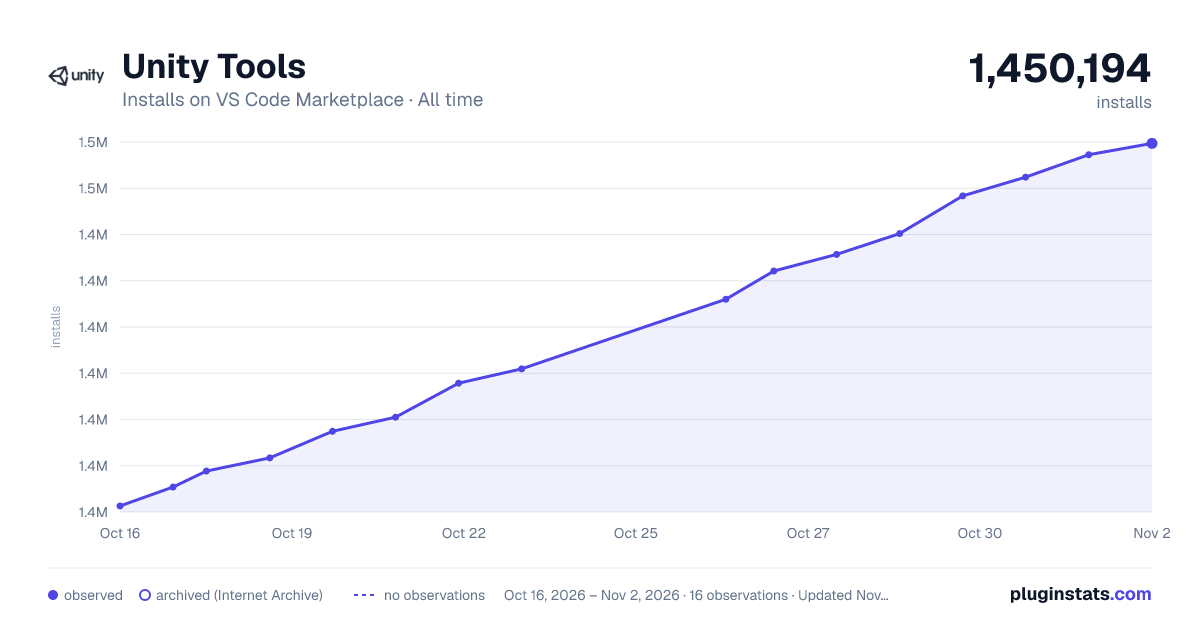

Adoption over time


7/30/90-day growth


Ranking history


Filled points are observed values; hollow points come from Internet Archive snapshots of the listing page. Dashed segments span periods with no observations — values between points are not interpolated.
Recent observations
Full history (4)Similar VS Code Marketplace Extension Packs plugins
Data source
Install counts, average rating, and rating counts come from the public Visual Studio Marketplace gallery API. Installs are cumulative and exclude updates.
Listing: https://marketplace.visualstudio.com/items?itemName=Tobiah.unity-tools. First seen Oct 16, 2026; last successful collection Oct 19, 2026. See the methodology.