 PluginStats
Docker Linter installs statistics
By Henrik Sjööh · VS Code Marketplace · Linters
Lint perl, python and/or ruby in your docker containers.
Docker Linter has 296,148 recorded installs on VS Code Marketplace, ranking #1170 of 2,501 tracked listings.
Rating: 2.67 / 5 from 3 ratings
About Docker Linter
Functionality
Run linters for perl, php, python and/or ruby in your containers.
- perl
perl -cperlcritic
- PHP
php -l
- python
flake8
- ruby
rubocop
Installation
- Install the linter you want in your development environment.
- Install docker-linter in VS Code with the "Install Extension" command.
- Enable the linter of your choise in your workspace settings.
Perl
For a more comprehensive example, follow the link: https://github.com/henriiik/vscode-docker-linter/tree/master/playground-perl
perl -c quickstart:
- Set
docker-linter.perl.enabletotruein your workspace settings. - Set
docker-linter.perl.containerto the name the container with your perl environment.
perlcritic quickstart:
- Install
perlcriticin your perl-environment container (cpanm Perl::Critic). - Set
docker-linter.perlcritic.enabletotruein your workspace settings. - Set
docker-linter.perlcritic.containerto the name the container with your perl environment.
PHP
For a more comprehensive example, follow the link: https://github.com/henriiik/vscode-docker-linter/tree/master/playground-php
php -l quickstart:
- Set
docker-linter.php.enabletotruein your workspace settings. - Set
docker-linter.php.containerto the name the container with your php environment.
Python
For a more comprehensive example, follow the link: https://github.com/henriiik/vscode-docker-linter/tree/master/playground-python
flake8 quickstart:
- Install
flake8in your python-environment container (pip install flake8). - Set
docker-linter.flake8.enabletotruein your workspace settings. - Set
docker-linter.flake8.containerto the name the container with your python environment.
Ruby
For a more comprehensive example, follow the link: https://github.com/henriiik/vscode-docker-linter/tree/master/playground-ruby
rubocop quickstart:
- Install
rubocopin your ruby-environment container (gem install rubocop). - Set
docker-linter.rubocop.enabletotruein your workspace settings. - Set
docker-linter.rubocop.containerto the name the container with your ruby environment.
docker-machine
The extension assumes you are running your containers with the Docker Toolbox default setup.
If you have use another name for your docker-machine you can use the setting docker-linter.**linter**.machine to specify that name.
Or, if you dont use docker-machine at all, you can specify an empty string.
Description from the VS Code Marketplace listing.
- linters
- perl
- perl+mojolicious
- php
- python
- ruby
README badge
Show your rank in a README or on your website. The badge updates automatically.
Charts
Images: 30d · 1y · all time · 1600×900 dark


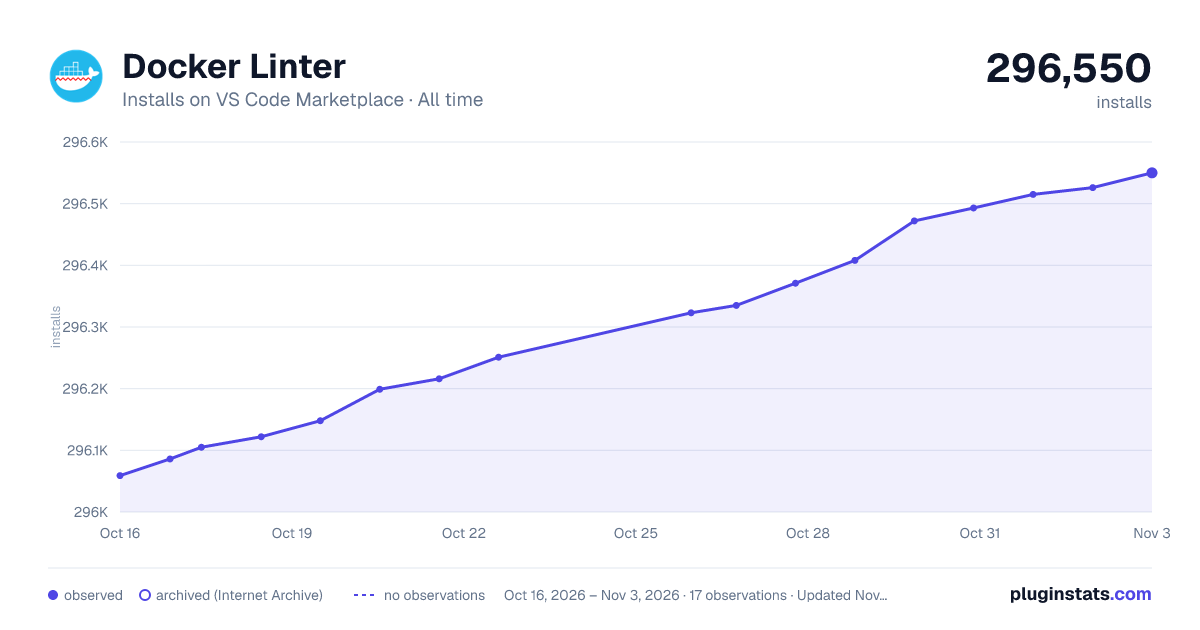

Adoption over time
7/30/90-day growth
Ranking history
Ratings over time
Listing placement
Listing placement
Filled points are observed values; hollow points come from Internet Archive snapshots of the listing page. Dashed segments span periods with no observations — values between points are not interpolated.
Each band is one page of 20. Installs on a linear scale. Placement is projected from installs, so it can differ from the marketplace's own sort order. Hover a dot to see the listing.
Recent observations
Full history (5)Similar VS Code Marketplace Linters plugins
All 20 Docker Linter alternativesData source
Install counts, average rating, and rating counts come from the public Visual Studio Marketplace gallery API. Installs are cumulative and exclude updates.
Listing: https://marketplace.visualstudio.com/items?itemName=henriiik.docker-linter. First seen Oct 16, 2026; last successful collection Oct 20, 2026. See the methodology.