 PluginStats
ChatGPT - Genie AI installs statistics
By Genie AI · VS Code Marketplace · Programming Languages
Your best AI pair programmer. Save conversations and continue any time. A Visual Studio Code - ChatGPT Integration. Supports, GPT-4o GPT-4 Turbo, GPT3.5 Turbo, GPT3 and Codex models. Create new files, view diffs with one click; your copilot to learn code, add tests, find bugs and more. Generate comm
ChatGPT - Genie AI has 1,091,944 recorded installs on VS Code Marketplace, ranking #515 of 2,501 tracked listings.
Rating: 4.38 / 5 from 148 ratings
About ChatGPT - Genie AI
Testimonials
❄️ Featured by Snowflake on Medium blogpost
🎌 Blogpost VSCode に ChatGPT の拡張機能を入れてコードレビューやバグを発見してもらう
💙 Reviews on Twitter
❤️ ChatGPT the pair programmer - VS Code on Youtube
💙 Generative AI on LinkedIn
Level up your developer experience with Genie
- ➕ Use GPT-4o and other improved models via your own OpenAI API Key.
- ✨ Use your own Azure OpenAI Service deployments
- ⚡ Generate commit messages from your git changes
- 💬 Store your conversation history on your disk and continue at any time.
- 💡 Use Genie in Problems window to explain and suggest fix for compile-time errors.
- 🔁 See diff between your code and Genie's suggestion right within editor with one click.
- 👤 Rename and personalize your assistant.
- 📃 Get streaming answers to your prompt in editor or sidebar conversation.
- 🔥 Streaming conversation support and stop the response to save your tokens.
- 📝 Create files or fix your code with one click or with keyboard shortcuts.
- ➡️ Export all your conversation history at once in Markdown format.
📣 What's new?
<details open> <summary><strong> 🌞 Custom system message & o1-mini and o1-preview models</strong></summary>- Added a new setting to customize the system message / context that starts your conversation with the AI.
- Update the
genieai.systemMessagesetting to customize your system message. - You can now use o1-mini and o1-preview models. Please note that these new models have usage tier limitations. See Usage tiers.
- You can now use gpt-4o and other 2024 models with improved maxTokens.
- New models include:
gpt-4o,gpt-4o-2024-05-13,gpt-4-turbo,gpt-4-turbo-2024,gpt-4-turbo-preview,gpt-4-0125-preview - Editor View is now fixed and uses your selected model instead of legacy models.
- Fixed Genie: Generate commit message problems due to vscode updating its APIs.
- Added new menu item to run Genie: Generate commit message command.
-
Generate commit messages right within VS Code:
<img src="https://raw.githubusercontent.com/ai-genie/chatgpt-vscode/main/images/generate-commit-messages.png" alt="Genie: Generate commit messages" style="max-width: 100%;max-height: 240px;"> -
You can update your commit message prompt from the extension settings. You may also opt-out if you prefer to use other commit message generators.
-
Genie: Generate a commit messagecommand and shortcut supports multi-folder workspaces.Misc.
-
Update your generate commit message prompt:
genieai.promptPrefix.commit-message -
Opt-out of the Quick Fix actions setting is added:
genieai.quickFix.enable -
Opt-out of the Generate Commit Message functionality:
genieai.enableGenerateCommitMessage -
All of Genie's context menu items are now wrapped under
<img src="https://raw.githubusercontent.com/ai-genie/chatgpt-vscode/main/images/genie-submenu.png" alt="Genie: submenu" style="max-width: 100%;max-height: 240px;">Geniesubmenu
- Updated model selection
- You can now use gpt-4-1106-preview (GPT-4 Turbo) and gpt-3.5-turbo-1106 (GPT-3.5 Turbo) via Genie.
- New models include:
gpt-4-1106-preview,gpt-4-0613,gpt-4-32k-0613,gpt-3.5-turbo-1106,gpt-3.5-turbo-16k,gpt-3.5-turbo-instruct - Deprecated
gpt-4-0314,gpt-4-32k-0314,gpt-3.5-turbo-0301in favor of the replacement models.
- Azure OpenAI Service
-
You can now use your Azure OpenAI deployments with Genie
-
Set your full Azure OpenAI deployment URL in setting:
genieai.azure.urlfollowing the instructions mentioned in the setting description -
Ensure to set the extension's model setting to the right base model you used for Azure deployment
<img src="https://raw.githubusercontent.com/ai-genie/chatgpt-vscode/main/images/azure-oai.png" alt="Genie: Azure OpenAI Service setting" style="max-width: 100%;max-height: 240px;">
- Rename and remove your conversations within sidebar…
Description from the VS Code Marketplace listing.
- ai
- bard
- chatgpt
- codex
- copilot
- find bugs
- gpt
- gpt3
- gpt3.5
- gpt4
- gpt4o
- keybindings
- lamda
- openai
- testing
README badge
Show your rank in a README or on your website. The badge updates automatically.
Charts
Images: 30d · 1y · all time · 1600×900 dark


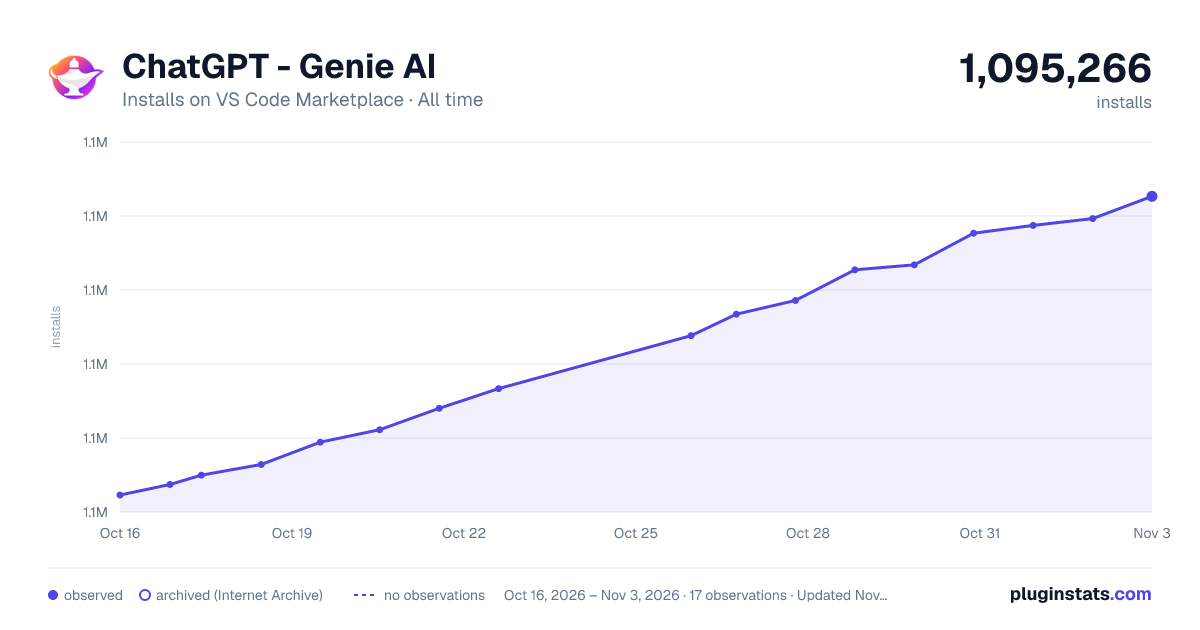

Adoption over time
7/30/90-day growth
Ranking history
Ratings over time
Listing placement
Listing placement
Listing placement
Listing placement
Filled points are observed values; hollow points come from Internet Archive snapshots of the listing page. Dashed segments span periods with no observations — values between points are not interpolated.
Each band is one page of 20. Installs on a linear scale. Placement is projected from installs, so it can differ from the marketplace's own sort order. Hover a dot to see the listing.
Recent observations
Full history (5)Similar VS Code Marketplace Programming Languages plugins
All 20 ChatGPT - Genie AI alternativesData source
Install counts, average rating, and rating counts come from the public Visual Studio Marketplace gallery API. Installs are cumulative and exclude updates.
Listing: https://marketplace.visualstudio.com/items?itemName=genieai.chatgpt-vscode. First seen Oct 16, 2026; last successful collection Oct 20, 2026. See the methodology.