 PluginStats
StandardJS - JavaScript Standard Style (old version) installs statistics
By Sam Chen (2 listings) · VS Code Marketplace · Linters
Integrates JavaScript Standard Style into VS Code.
StandardJS - JavaScript Standard Style (old version) has 471,690 recorded installs on VS Code Marketplace, ranking #874 of 2,501 tracked listings.
Rating: 4.12 / 5 from 26 ratings
About StandardJS - JavaScript Standard Style (old version)
vscode-standardjs (old version)
⚠️ Warning: This extension version is not actively being maintained. There is a new version published under the standard namespace, please install the new version: https://marketplace.visualstudio.com/items?itemName=standard.vscode-standard also available on open-vsx registry: https://open-vsx.org/extension/standard/vscode-standard
VSCode extension to integrate JavaScript Standard Style into VSCode.
We support JavaScript Semi-Standard Style too, if you prefer keeping the semicolon.
JavaScript Standard Style with custom tweaks is also supported if you want to fine-tune your ESLint config while keeping the power of Standard.
This plugin also works with [TypeScript Standard Style][https://github.com/toddbluhm/ts-standard] which has additonal rules for TypeScript based projects.
How to use
- Install the 'JavaScript Standard Style' extension
If you don't know how to install extensions in VSCode, take a look at the documentation.
You will need to reload VSCode before new extensions can be used.
- Install standard, semistandard, standardx or ts-standard
This can be done globally or locally. We recommend that you install them locally (i.e. saved in your project's devDependencies), to ensure that other developers have it installed when working on the project.
- Disable the built-in VSCode validator
To do this, set "javascript.validate.enable": false in your VSCode settings.json.
Plugin options
We give you some options to customize vscode-standardjs in your VSCode settings.json.
Option|Description|Default
standard.enable|enable or disable JavaScript Standard Style|true standard.run|run linter onSave or onType|onType standard.autoFixOnSave|enable or disable auto fix on save. It is only available when VSCode's files.autoSave is either off, onFocusChange or onWindowChange. It will not work with afterDelay.|false standard.nodePath|use this setting if an installed standard package can't be detected.|null standard.validate|an array of language identifiers specify the files to be validated|["javascript", "javascriptreact", "typescript", "typescriptreact] standard.workingDirectories|an array for working directories to be used.|[] standard.engine|You can use semistandard, standardx or ts-standard instead of standard. Just make sure you've installed the semistandard, the standardx or the ts-standard package, instead of standard.|standard standard.usePackageJson|if set to true, JavaScript Standard Style will use project's package.json settings, otherwise globally installed standard module is used |false
Configuring Standard
You can still configure standard itself with the standard.options setting, for example:
It's recommended to change these options in your package.json file on a per-project basis, rather than setting them globally in settings.json. For example:
If you've got multiple projects within a workspace (e.g. you're inside a monorepo), VSCode prevents extensions from accessing multiple package.json files.
If you want this functionality, you should add each project folder to your workspace (File -> Add folder to workspace...). If you can't see this option, download the VSCode Insiders Build to get the latest features.
Commands
When you open the Command Palette in VSCode (⇧⌘P or Ctrl+Shift+P), this plugin has the following options:
• Fix all auto-fixable problems - applies JavaScript Standard Style auto-fix resolutions to all fixable problems. • Disable JavaScript Standard Style for this Workspace - disable JavaScript Standard Style extension for this workspace. • Enable JavaScript Standard Style for this Workspace - enable JavaScript Standard Style extension for this workspace. • Show output channel - view the linter output for JavaScript Standard Style.
FAQ
- How do I lint script tags in vue or html files?
You can lint them with eslint-plugin-html. Make sure it's installed, then enable linting for those file types in your settings.json:
If you want to enable autoFix for the new languages, you should enable it yourself:
How to develop
- Fork this repo, and clone your fork locally. 2. Run npm install right under project root. 3. Open project in VSCode. The plugin should be disabled whilst developing. 4. Run the watch build task (⇧⌘B or Ctrl+Shift+B) to compile the client and server. 5. To run/debug the extension, use the Launch Extension launch configuration (from the VSCode debug panel). 6. To debug the server, use the Attach to Server launch configuration.
How to package
- Run npm install, 2. Run npm run compile, 2. Run npm run package to build a .vsix file, then you can install it with code --install-extension vscode-standardjs.vsix.
TODO
- add tests
Description from the VS Code Marketplace listing.
- javascript
- javascriptreact
- json
- typescript
- typescriptreact
- vue
README badge
Show your rank in a README or on your website. The badge updates automatically.
Charts
Images: 30d · 1y · all time · 1600×900 dark


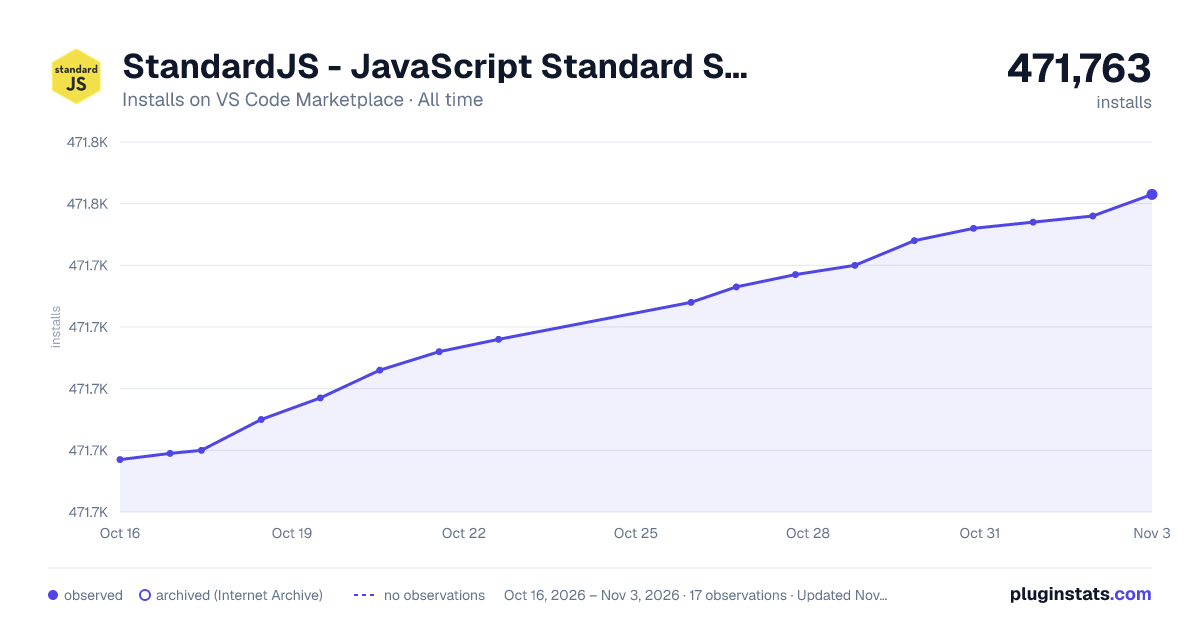

Adoption over time
7/30/90-day growth
Ranking history
Ratings over time
Listing placement
Listing placement
Listing placement
Filled points are observed values; hollow points come from Internet Archive snapshots of the listing page. Dashed segments span periods with no observations — values between points are not interpolated.
Each band is one page of 20. Installs on a linear scale. Placement is projected from installs, so it can differ from the marketplace's own sort order. Hover a dot to see the listing.
Recent observations
Full history (4)Similar VS Code Marketplace Linters plugins
All 20 StandardJS - JavaScript Standard Style (old version) alternativesData source
Install counts, average rating, and rating counts come from the public Visual Studio Marketplace gallery API. Installs are cumulative and exclude updates.
Listing: https://marketplace.visualstudio.com/items?itemName=chenxsan.vscode-standardjs. First seen Oct 16, 2026; last successful collection Oct 19, 2026. See the methodology.