 PluginStats
Git History installs statistics
By Guodong Sun · VS Code Marketplace · SCM Providers
Git history panel in your VS Code
Git History has 111,792 recorded installs on VS Code Marketplace, ranking #2216 of 2,501 tracked listings.
Rating: 5.00 / 5 from 18 ratings
About Git History
Git History
English | 简体中文
The extension provides a visual git history panel to help you browse git history easily.
It brings the following main features
🗞️ Full git history
🩺 Diff batch commits
〽️ Commit chain graph
🔍 Quick search
Usage
Git History

- Scroll once to see all commits in git history even if the amount of commits is huge
Commit Changes

- Click a commit to check the changes
- Select multiple commits with
Ctrl/⌘pressed,and then you will see the merged changes from the selected commits - Drag through the commits to quickly select them
- Select exactly two commits (any two, they need not be related) and pick
Compare Commitsfrom the commit menu to see the difference between them, which is handy for comparing two release points. The Changes view then showsComparing abc1234 ↔ def5678next to its title so a comparison is not mistaken for the changes of a commit - Right click a changed file for
Open Changes,Open File at Commit,Copy Path,Copy Relative Path,Open Containing FolderandOpen in Integrated Terminal(Ctrl/⌘-click to select several files and copy their paths at once)
Commit Actions
Right click a commit to act on it, right click a tag to manage it:
- Copy the commit hash or message
- Create a branch at the commit and switch to it
- Add a tag at the commit
- Cherry-pick / revert the commit (reverting asks for confirmation first)
- Check out the commit in a detached HEAD
- Reset the current branch to the commit (
soft/mixed/hard)
File and Selection History
These actions live under Git History in the Explorer, editor tab and editor context menus, so it is clear which extension they come from (in the Changes view they are offered directly).
Show File Historynarrows the History panel to the file you right clicked. The filter is shown next to the view title and cleared with the button thereShow Selection Historynarrows the History panel to the commits that changed the lines you selected (git log -L), so you can pick one there to see the changes it made. The filter is shown assrc/a.ts:20-24next to the view title and cleared with the button there. It also works inside the file-changes (diff) editor opened from the Changes view, tracing the lines from the revision that side shows
Commit Chain Graph

Others
- Search for hash in all commits and navigate to the location
- Filter the commits by authors/message
- Switch to another branch or repo in your workspace; the current repository is shown next to the view title, your choice is remembered the next time you open the view, and resetting the filters keeps the repository on screen
- Drag the header to set a comfortable size for columns
- And more,coming soon..
Release History
See CHANGELOG.md.
Description from the VS Code Marketplace listing.
- branch
- commit
- diff
- flow
- git
- graph
- history
- log
- scm
- tag
README badge
Show your rank in a README or on your website. The badge updates automatically.
Charts
Images: 30d · 1y · all time · 1600×900 dark


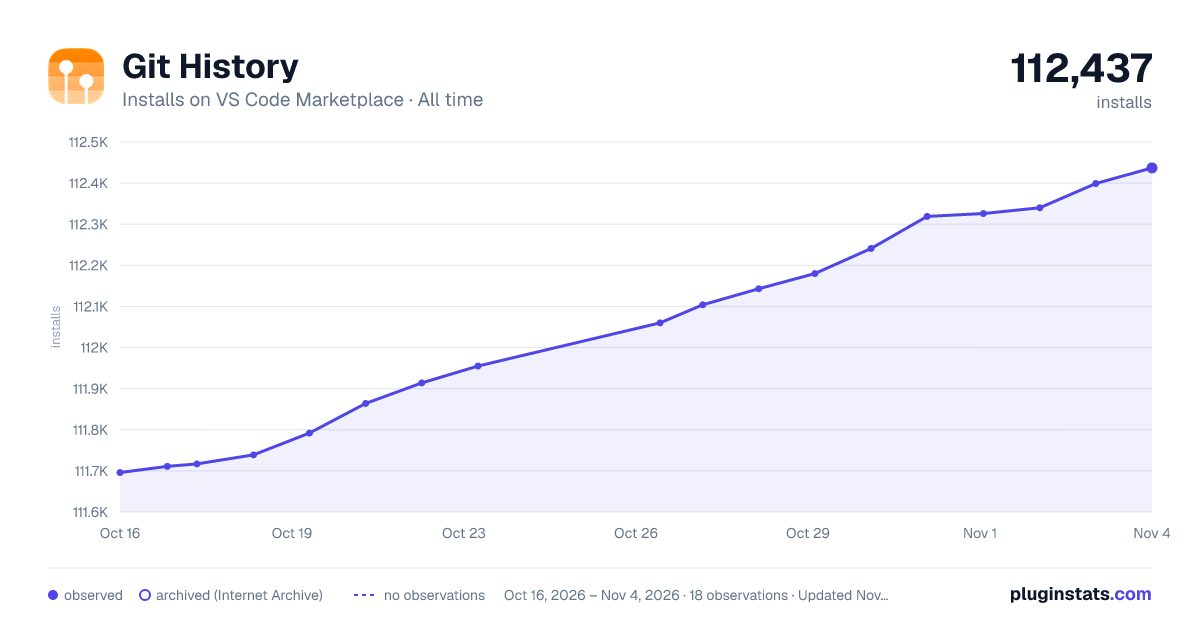

Adoption over time
7/30/90-day growth
Ranking history
Ratings over time
Listing placement
Listing placement
Filled points are observed values; hollow points come from Internet Archive snapshots of the listing page. Dashed segments span periods with no observations — values between points are not interpolated.
Each band is one page of 20. Installs on a linear scale. Placement is projected from installs, so it can differ from the marketplace's own sort order. Hover a dot to see the listing.
Recent observations
Full history (5)Similar VS Code Marketplace SCM Providers plugins
All 20 Git History alternativesData source
Install counts, average rating, and rating counts come from the public Visual Studio Marketplace gallery API. Installs are cumulative and exclude updates.
Listing: https://marketplace.visualstudio.com/items?itemName=GuodongSun.vscode-git-cruise. First seen Oct 16, 2026; last successful collection Oct 20, 2026. See the methodology.