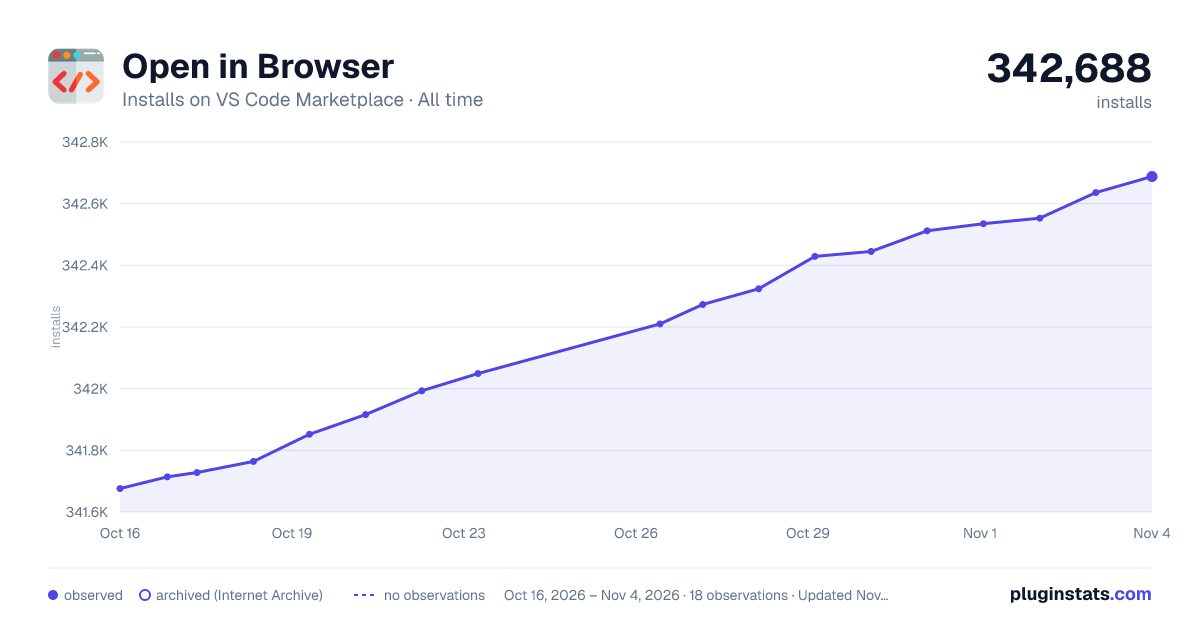
Open in Browser has 341,852 recorded installs on VS Code Marketplace, ranking #1064 of 2,501 tracked listings.
Rating: 4.40 / 5 from 10 ratings
About Open in Browser
Open in Browser
A cross platform Visual Studio Code extension that opens HTML files in a browser of user's choice, which can be any browser installed on your computer.
This is a cross platform version of the extension, developed on Linux and not fully tested on MacOS. If you find any bugs or you have any questions, please report/ask them before leaving a bad review.
Thank you. 🙏
Usage
open a file,
open the command palette and choose "Open in Browser...",
or
simply press CTRL + SHIFT + F9,
choose a browser.
How to run locally
npm install
npm run compile to start the compiler in watch mode
open this folder in Visual Studio Code and press F5
Description from the VS Code Marketplace listing.
browser
code
html
keybindings
preview
tool
README badge
Show your rank in a README or on your website. The badge updates automatically.
Filled points are observed values; hollow points come from Internet Archive snapshots of the listing page. Dashed segments span periods with no observations — values between points are not interpolated.
Each band is one page of 20. Installs on a linear scale. Placement is projected from installs, so it can differ from the marketplace's own sort order. Hover a dot to see the listing.
Install counts, average rating, and rating counts come from the public Visual Studio Marketplace gallery API. Installs are cumulative and exclude updates.
 PluginStats