 PluginStats
Render Line Endings installs statistics
By Josip Medved · VS Code Marketplace · Other
Renders end of line characters (`CR`, `LF`, `CRLF`) when whitespace rendering is on
Render Line Endings has 212,007 recorded installs on VS Code Marketplace, ranking #1447 of 2,501 tracked listings.
Rating: 4.64 / 5 from 11 ratings
About Render Line Endings
Render Line Endings
This extension renders end of line characters (CR, LF, CRLF) when whitespace rendering is on.
Installation
• Press CTRL P or COMMAND P • Write ext install medo64.render-crlf • Press Enter
Features
• Renders end of line characters: CR, LF, CRLF Note: CR files are not supported by VS Code. See Upstream Issues • Only renders visible portions of text, which makes it very fast even for huge documents • The characters used to render EOL can be customized • Respects the value of editor.renderWhitespace • The option can be toggled with View > Appearance > Render Whitespace or from the Command Palette • An example with editor.renderWhitespace: selection: • Can be configured to highlight non-standard EOL only: • Can be configured to highlight trailing whitespace only: • Configuration options can be set per language • Uses colors from the current theme: • "editorWhitespace.foreground": Rendered characters • "errorForeground": Non-standard EOL and trailing whitespace, if configured
Settings
This extension contributes the following settings (compatible with code-eol extension):
| Setting | Default | Description |
| "code-eol.newlineCharacter" | "↓" | Character used to display LF, Linux and Mac's line ending. | | "code-eol.returnCharacter" | "←" | Character used to display CR, old Macintosh' line ending. Note: CR files are not supported by VS Code: see microsoft/vscode#35797. | | "code-eol.crlfCharacter" | "↵" | Character used to display CRLF, Windows' line ending. | | "code-eol.highlightNonDefault" | false | If set, non-standard line endings will be highlighted as errors. The standard EOL is taken from files.eol. | | "code-eol.highlightExtraWhitespace" | false | If set, trailing whitespace will be highlighted as errors. | | "code-eol.decorateBeforeEol" | false | If set, rendered characters will come before the end of the line. Note: If set, line endings will not be rendered on empty lines. | | "code-eol.forceShowOnWordWrap" | false | If set, rendered characters will always be shown when word wrap is on, regardless of the other settings. | | "code-eol.forceShowOnBoundary" | false | If set, rendered characters will always be shown when in boundary mode. | | "code-eol.colors.default.foreground" | (theme) | If set, used instead of theme default for coloring EOL characters | | "code-eol.colors.error.foreground" | (theme) | If set, used instead of theme default for highlighting different EOL characters and extra whitespace |
Configuration Examples
Here are examples of a few most common adjustments.
Render All Whitespace
It's perfectly fine to use View -> Appearance -> View whitespace and for that you don't need to edit any settings. However, if you want to permanently turn whitespace on, you can do so:
Custom colors
You can override theme defaults, if so desired.
Alternate EOL Characters
If you don't like default characters, you can select any unicode character you like. For example, if you want it to look similar to Atom, you can use something like this:
(default characters are ↓, ←, and ↵).
Highlight Non-standard EOL:
If you want to highlight files that have different ending than defined in files.eol, you can set code-eol.highlightNonDefault:
Highlight Trailing Whitespace Only:
If you want to highlight trailing whitespace (either spaces or tab), there's a setting for that:
Upstream Issues
Please upvote the following VS Code issues:
Mixed Line Endings Are Not Supported (microsoft/vscode#127)
VS Code normalizes line endings of mixed files upon load, and thus this extension will always show one kind of EOL character.
CR Line Ending Is Not Supported (microsoft/vscode#35797)
VS Code does not support the CR line ending. Therefore, while you can configure it, you will never see CR as a line ending.
Not Rendering Glyphs For Large Files (microsoft/vscode#27100)
For performance reasons VS Code doesn't synchronize files that are over 5MB in size. Therefore, no line-ending characters will be visible on large files.
To avoid this you can set:
Description from the VS Code Marketplace listing.
- crlf
- end-of-line
- eol
- lf
- line ending
README badge
Show your rank in a README or on your website. The badge updates automatically.
Charts
Images: 30d · 1y · all time · 1600×900 dark


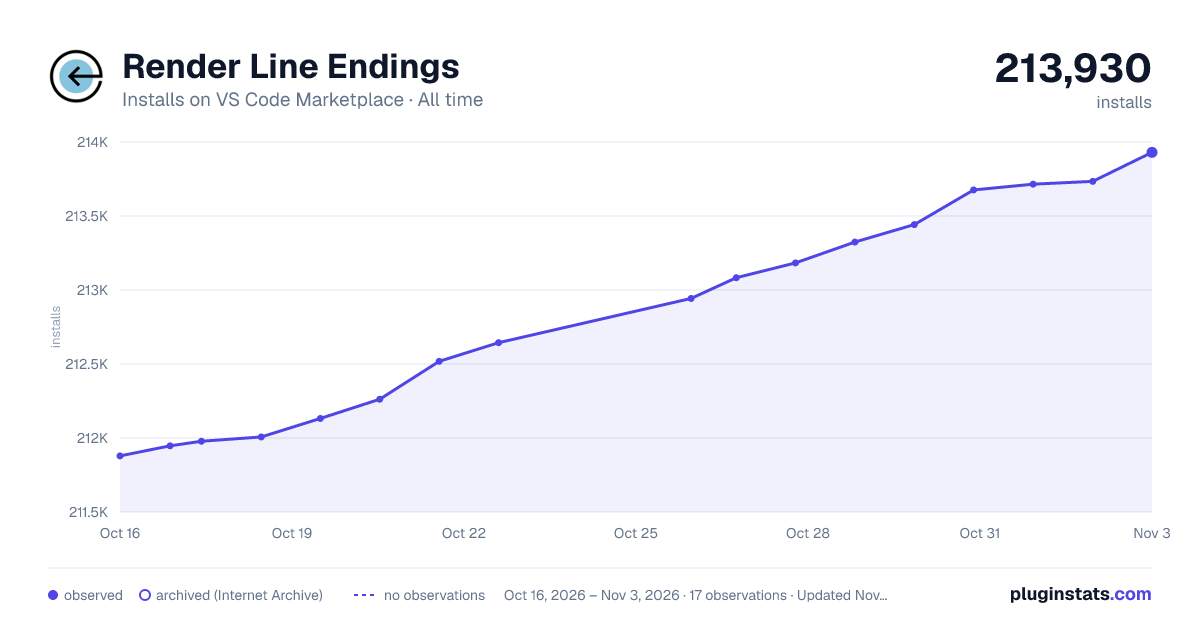

Adoption over time
7/30/90-day growth
Ranking history
Ratings over time
Listing placement
Listing placement
Filled points are observed values; hollow points come from Internet Archive snapshots of the listing page. Dashed segments span periods with no observations — values between points are not interpolated.
Each band is one page of 20. Installs on a linear scale. Placement is projected from installs, so it can differ from the marketplace's own sort order. Hover a dot to see the listing.
Recent observations
Full history (4)Similar VS Code Marketplace Other plugins
All 20 Render Line Endings alternativesData source
Install counts, average rating, and rating counts come from the public Visual Studio Marketplace gallery API. Installs are cumulative and exclude updates.
Listing: https://marketplace.visualstudio.com/items?itemName=medo64.render-crlf. First seen Oct 16, 2026; last successful collection Oct 19, 2026. See the methodology.