 PluginStats
htmltagwrap installs statistics
By Brad Gashler · VS Code Marketplace · Other
Wraps selected code with HTML tags
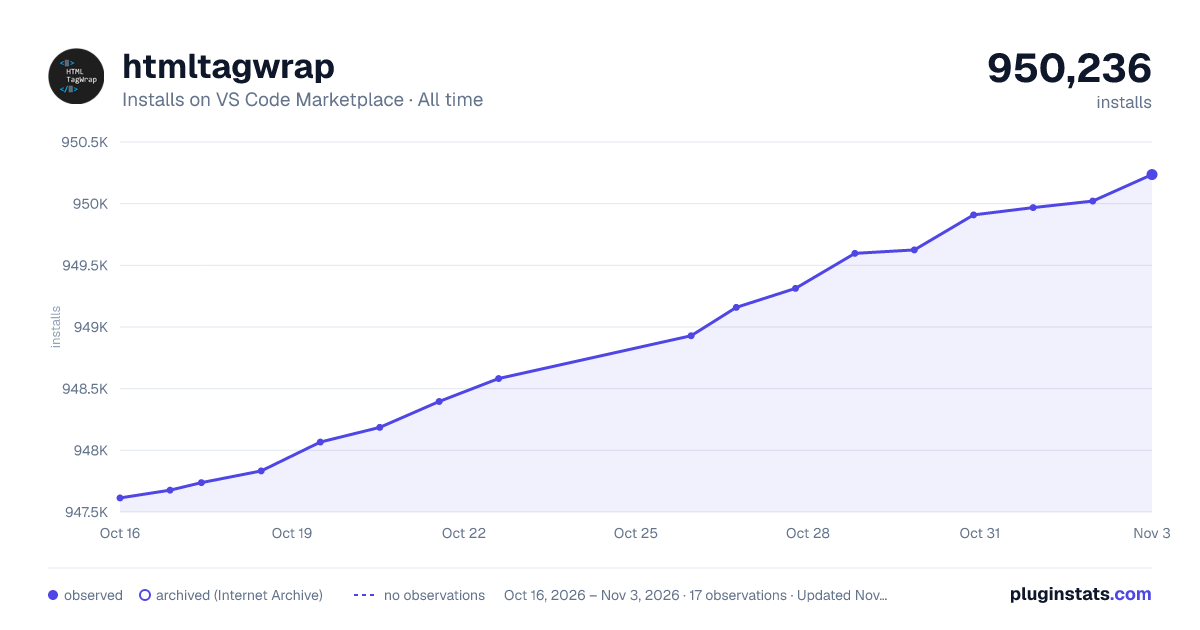
htmltagwrap has 948,067 recorded installs on VS Code Marketplace, ranking #556 of 2,501 tracked listings.
Rating: 4.53 / 5 from 66 ratings
About htmltagwrap
htmltagwrap
This VS Code extension wraps your text selection in HTML tags. It can wrap inline selections and selections that span multiple lines (works with both single selections and multiple selections at once).
To use, select one or many chunks of code and press "Alt + W" ("Option + W" for Mac).

Download it on the Visual Studio Marketplace
How to Use It
- Select one or more blocks of text or strings of text.
- Press <kbd>Alt</kbd> + <kbd>W</kbd> or <kbd>Option</kbd> + <kbd>W</kbd> for Mac.
- Type the tag name you want.
By default, pressing spacebar will deselect the closing tags, so you can add attributes to the opening tags (you can turn this feature off, see below). If nothing is selected when you run htmltagwrap, it will add an opening and closing tag at the cursor position.
NOTE: This extension works best in files that either use tabs or spaces for indentation. It may not work as well with mixed tabs/spaces.
Settings
You can change the default behavior of htmltagwrap with the following settings.
To open VS Code settings, click the "gear" icon  > then "Settings"
Available settings
htmltagwrap.tag- The default HTML tag to insert.htmltagwrap.autoDeselectClosingTag- Automatically deselect the closing tag after inserting a space.
Defaults
{
   "htmltagwrap.tag": "p",
   "htmltagwrap.autoDeselectClosingTag": true
}
Keyboard shortcut
If htmltagwrap's keyboard shortcut conflicts with another command (i.e. toggleFindWholeWord on Windows/Linux or a command from another extension), here are 2 ways to resolve it...

1) Change htmltagwrap's keyboard shortcut
- Click on the gear icon on the bottom-left of VS Code and then on "Keyboard Shortcuts" (or find "Keyboard Shortcuts" from the command palette).
- In the "Search Keybindings" text field, type "htmltagwrap" to see its current keybinding assignment.
- Click on the pencil icon to edit this assignment.
- Type whatever key or key combination you want (e.g. the
F7key)
OR...
2) Change the other keyboard shortcut(s)
Do the same as above, except in the "Search Keybindings" text field copy and paste in Alt+W (Windows, Linux) or ⌥ w (Mac) to find all the commands that conflict and make changes to their assignments.
See VS Code's Keybindings doc for more info.
Known Issues
When using the default setting "htmltagwrap.autoDeselectClosingTag": true:
- If you undo and then redo wrapping, entering a space will not remove the selection on the closing tag as it normally would.
- After wrapping, if you press space (removes the closing tag cursor) and then backspace to the tag element name, you won't get your closing tag cursor back.
I haven't found good solutions to these issues using the current extension API.
Contributing
Please create an issue on GitHub if you experience a bug. I also welcome pull requests.
Description from the VS Code Marketplace listing.
- keybindings
- wrap code
- wrap html
- wrap tags
- wrap text
README badge
Show your rank in a README or on your website. The badge updates automatically.
Charts
Images: 30d · 1y · all time · 1600×900 dark



Adoption over time
7/30/90-day growth
Ranking history
Ratings over time
Listing placement
Listing placement
Filled points are observed values; hollow points come from Internet Archive snapshots of the listing page. Dashed segments span periods with no observations — values between points are not interpolated.
Each band is one page of 20. Installs on a linear scale. Placement is projected from installs, so it can differ from the marketplace's own sort order. Hover a dot to see the listing.
Recent observations
Full history (5)Similar VS Code Marketplace Other plugins
All 20 htmltagwrap alternativesData source
Install counts, average rating, and rating counts come from the public Visual Studio Marketplace gallery API. Installs are cumulative and exclude updates.
Listing: https://marketplace.visualstudio.com/items?itemName=bradgashler.htmltagwrap. First seen Oct 16, 2026; last successful collection Oct 20, 2026. See the methodology.