 PluginStats
ERB Formatter/Beautify installs statistics
By Ali Ariff (2 listings) · VS Code Marketplace · Formatters
Format/Beautify ERB files
ERB Formatter/Beautify has 277,642 recorded installs on VS Code Marketplace, ranking #1215 of 2,501 tracked listings.
Rating: 4.90 / 5 from 10 ratings
About ERB Formatter/Beautify
ERB Formatter/Beautify


Overview
The ERB Formatter/Beautify extension for Visual Studio Code uses the htmlbeautifier gem to format ERB files, providing a seamless experience with the VS Code Formatter API. Unlike other solutions that require setting up tasks or manual formatting, this extension integrates directly with VS Code to format your ERB files automatically.
Features
- Formats ERB files using
htmlbeautifier. - Works with the VS Code Formatter API for a native experience.
- Supports custom configuration options for indentation, blank lines, and error handling.
- Ability to ignore specific files or patterns.

Installation
Requirements
To use this extension, you must have htmlbeautifier installed on your system. You can install it globally or add it to your project's Gemfile.
Install Globally
gem install htmlbeautifier
Install with Bundler
Add the following to your Gemfile:
gem 'htmlbeautifier'
Then run:
bundle install
Configuration
Resolving File Recognition Issues
If .html.erb files are recognized as HTML instead of ERB, add the following to your settings.json to associate .html.erb files with the ERB language:
"files.associations": {
  "*.html.erb": "erb"
}
Setting Default Formatter and Enabling Format-on-Save
To set the default formatter for ERB files and enable format-on-save, add the following to your settings.json:
"[erb]": {
  "editor.defaultFormatter": "aliariff.vscode-erb-beautify",
  "editor.formatOnSave": true
}
This ensures that the extension formats ERB files automatically whenever they are saved.
Disabling Formatting for Specific Files
To disable formatting for specific ERB files, such as email templates, use the ignoreFormatFilePatterns setting. Add the following to your settings.json:
"vscode-erb-beautify.ignoreFormatFilePatterns": ["**/email_templates/**/*.erb"]
This configuration ignores all .erb files inside the email_templates directory.
Fixing Encoding Issues
If you encounter the Invalid byte sequence in US-ASCII error, add the following setting to your settings.json to set the correct locale:
"vscode-erb-beautify.customEnvVar": {
  "LC_ALL": "en_US.UTF-8"
}
For more details, see the related issue.
Settings
Below is a list of settings you can configure in your settings.json file:
| Setting | Description | Default |
|---|---|---|
vscode-erb-beautify.executePath | Path to the htmlbeautifier executable. Set this to an absolute path if htmlbeautifier is installed in a non-standard location. | htmlbeautifier |
vscode-erb-beautify.useBundler | Execute htmlbeautifier using Bundler (e.g., bundle exec htmlbeautifier). If true, vscode-erb-beautify.executePath is ignored. | false |
vscode-erb-beautify.bundlerPath | Path to the Bundler executable. Set this to an absolute path if Bundler is installed in a non-standard location. | bundle |
vscode-erb-beautify.tabStops | Number of spaces per indent. | 2 |
vscode-erb-beautify.tab | Indent using tabs instead of spaces. | false |
vscode-erb-beautify.indentBy | Indent the output by a specified number of steps. | 0 |
vscode-erb-beautify.stopOnErrors | Stop formatting when invalid nesting is encountered in the input. | false |
vscode-erb-beautify.keepBlankLines | Number of consecutive blank lines to keep in the formatted output. | 0 |
vscode-erb-beautify.customEnvVar | Custom environment variables to pass to htmlbeautifier. | {} |
vscode-erb-beautify.ignoreFormatFilePatterns | Glob patterns for files to ignore during formatting. | [] |
References
Credits
- Icon made by rootedbox
Description from the VS Code Marketplace listing.
- erb
README badge
Show your rank in a README or on your website. The badge updates automatically.
Charts
Images: 30d · 1y · all time · 1600×900 dark


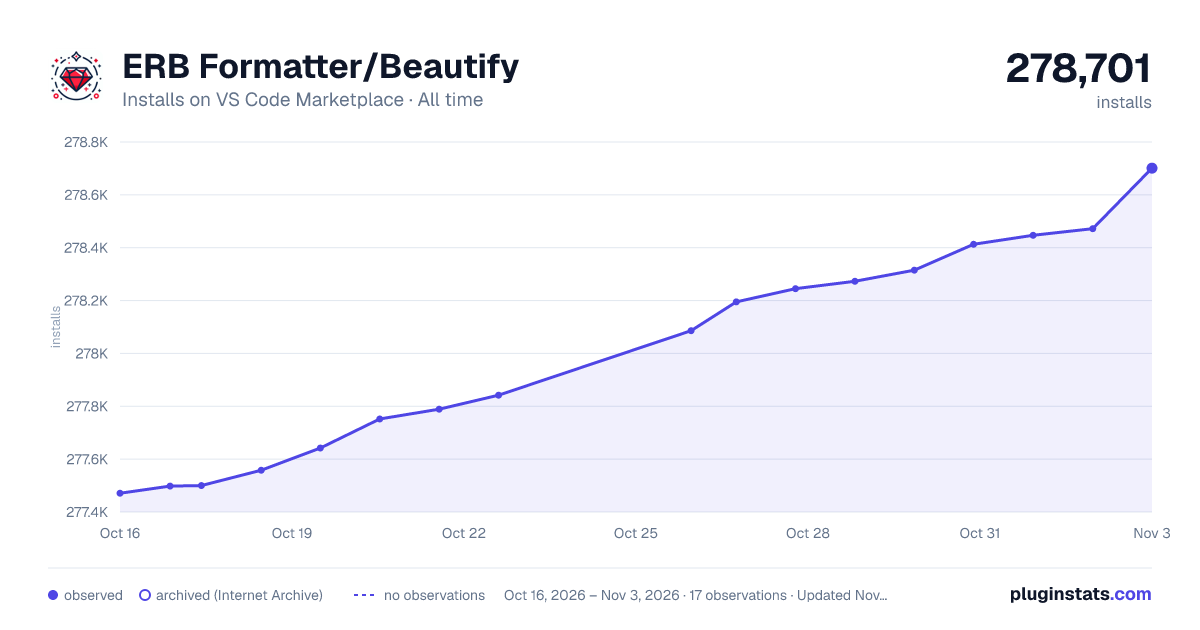

Adoption over time
7/30/90-day growth
Ranking history
Ratings over time
Listing placement
Listing placement
Filled points are observed values; hollow points come from Internet Archive snapshots of the listing page. Dashed segments span periods with no observations — values between points are not interpolated.
Each band is one page of 20. Installs on a linear scale. Placement is projected from installs, so it can differ from the marketplace's own sort order. Hover a dot to see the listing.
Recent observations
Full history (5)Similar VS Code Marketplace Formatters plugins
All 20 ERB Formatter/Beautify alternativesData source
Install counts, average rating, and rating counts come from the public Visual Studio Marketplace gallery API. Installs are cumulative and exclude updates.
Listing: https://marketplace.visualstudio.com/items?itemName=aliariff.vscode-erb-beautify. First seen Oct 16, 2026; last successful collection Oct 20, 2026. See the methodology.