 PluginStats
Code Runner installs statistics
By Jun Han (13 listings) · VS Code Marketplace · Programming Languages
Run C, C++, Java, JS, PHP, Python, Perl, Ruby, Go, Lua, Groovy, PowerShell, CMD, BASH, F#, C#, VBScript, TypeScript, CoffeeScript, Scala, Swift, Julia, Crystal, OCaml, R, AppleScript, Elixir, VB.NET, Clojure, Haxe, Obj-C, Rust, Racket, Scheme, AutoHotkey, AutoIt, Kotlin, Dart, Pascal, Haskell, Nim,
Code Runner has 42,451,140 recorded installs on VS Code Marketplace.
It ranks #32 of 2,501 tracked VS Code Marketplace listings by installs.
It is rated 4.4 out of 5 from 286 ratings.
PluginStats has 4 daily observations since Oct 16, 2026; the latest is from Oct 19, 2026.
Rating: 4.40 / 5 from 286 ratings
About Code Runner
Code Runner
Run code snippet or code file for multiple languages: C, C++, Java, JavaScript, PHP, Python, Perl, Perl 6, Ruby, Go, Lua, Groovy, PowerShell, BAT/CMD, BASH/SH, F# Script, F# (.NET Core), C# Script, C# (.NET Core), VBScript, TypeScript, CoffeeScript, Scala, Swift, Julia, Crystal, OCaml Script, R, AppleScript, Elixir, Visual Basic .NET, Clojure, Haxe, Objective-C, Rust, Racket, Scheme, AutoHotkey, AutoIt, Kotlin, Dart, Free Pascal, Haskell, Nim, D, Lisp, Kit, V, SCSS, Sass, CUDA, Less, Fortran, Ring, Standard ML, Zig, Mojo, Erlang, SPWN, Pkl, Gleam, and custom command
Book for VS Code
《Visual Studio Code 权威指南》:带你深入浅出 VS Code!
WeChat Official Account
VS Code 的热门文章、使用技巧、插件推荐、插件开发攻略等,请关注“玩转VS Code”公众号!
Donation
If you like this extension, you could become a backer or sponsor via Patreon, donate via PayPal, or scan below QR code to donate via Alipay. Any amount is welcome. It will encourage me to make this extension better and better!
Features
• Run code file of current active Text Editor • Run code file through context menu of file explorer • Run selected code snippet in Text Editor • Run code per Shebang • Run code per filename glob • Run custom command • Stop code running • View output in Output Window • Set default language to run • Select language to run • Support REPL by running code in Integrated Terminal
Usages
• To run code: • use shortcut Ctrl+Alt+N • or press F1 and then select/type Run Code, • or right click the Text Editor and then click Run Code in editor context menu • or click Run Code button in editor title menu • or click Run Code button in context menu of file explorer • To stop the running code: • use shortcut Ctrl+Alt+M • or press F1 and then select/type Stop Code Run • or click Stop Code Run button in editor title menu • or right click the Output Channel and then click Stop Code Run in context menu • To select language to run, use shortcut Ctrl+Alt+J, or press F1 and then select/type Run By Language, then type or select the language to run: e.g php, javascript, bat, shellscript... • To run custom command, then use shortcut Ctrl+Alt+K, or press F1 and then select/type Run Custom Command
Configuration
Make sure the executor PATH of each language is set in the environment variable. You could also add entry into code-runner.executorMap to set the executor PATH. e.g. To set the executor PATH for ruby, php and html:
Supported customized parameters • $workspaceRoot: The path of the folder opened in VS Code • $dir: The directory of the code file being run • $dirWithoutTrailingSlash: The directory of the code file being run without a trailing slash • $fullFileName: The full name of the code file being run • $fileName: The base name of the code file being run, that is the file without the directory • $fileNameWithoutExt: The base name of the code file being run without its extension • $driveLetter: The drive letter of the code file being run (Windows only) • $pythonPath: The path of Python interpreter (set by Python: Select Interpreter command)
Please take care of the back slash and the space in file path of the executor • Back slash: please use \\ • If there ares spaces in file path, please use \" to surround your file path
You could set the executor per filename glob):
Besides, you could set the default language to run:
For the default language: It should be set with language id defined in VS Code. The languages you could set are java, c, cpp, javascript, php, python, perl, ruby, go, lua, groovy, powershell, bat, shellscript, fsharp, csharp, vbscript, typescript, coffeescript, swift, r, clojure, haxe, objective-c, rust, racket, ahk, autoit, kotlin, dart, pascal, haskell, nim, d, lisp
Also, you could set the executor per file extension:
To set the custom command to run:
To set the the working directory:
To set whether to clear previous output before each run (default is false):
To set whether to save all files before running (default is false):
To set whether to save the current file before running (default is false):
To set whether to show extra execution message like [Running] ... and [Done] ... (default is true):
[REPL support] To set whether to run code in Integrated Terminal (only support to run whole file in Integrated Terminal, neither untitled file nor code snippet) (default is false):
To set whether to preserve focus on code editor after code run is triggered (default is true, the code editor will keep focus; when it is false, Terminal or Output Channel will take focus):
code-runner.ignoreSelection: Whether to ignore selection to always run entire file. (Default is false)
code-runner.showRunIconInEditorTitleMenu: Whether to show 'Run Code' icon in editor title menu. (Default is true)
code-runner.showRunCommandInEditorContextMenu: Whether to show 'Run Code' command in editor context menu. (Default is true)
code-runner.showRunCommandInExplorerContextMenu: Whether to show 'Run Code' command in explorer context menu. (Default is true)
code-runner.showStopIconInEditorTitleMenu: Whether to show 'Stop Code Run' icon in editor title menu when code is running. (Default is true)
code-runner.terminalRoot: For Windows system, replaces the Windows style drive letter in the command with a Unix style root when using a custom shell as the terminal, like Bash or Cgywin. Example: Setting this to /mnt/ will replace C:\path with /mnt/c/path (Default is "")
code-runner.temporaryFileName: Temporary file name used in running selected code snippet. When it is set as empty, the file name will be random. (Default is "tempCodeRunnerFile")
code-runner.respectShebang: Whether to respect Shebang to run code. (Default is true)
About CWD Setting (current working directory)…
Description from the VS Code Marketplace listing.
- c#
- c++
- code-runner-output
- erlang
- haskell
- java
- javascript
- keybindings
- multi-root ready
- perl
- php
- powershell
- python
- ruby
- rust
Charts
Images: 30d · 1y · all time · 1600×900 dark


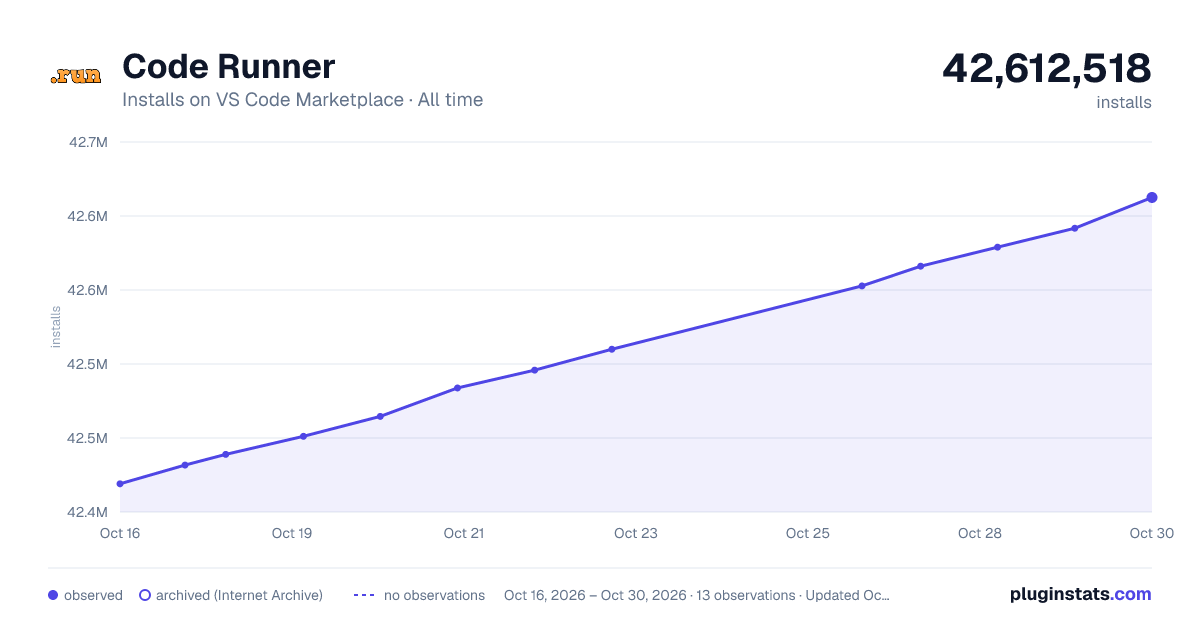

Adoption over time


7/30/90-day growth


Ranking history


Ratings over time


Listing placement


Filled points are observed values; hollow points come from Internet Archive snapshots of the listing page. Dashed segments span periods with no observations — values between points are not interpolated.
Each band is one page of 20. Installs on a log scale. Placement is projected from installs, so it can differ from the marketplace's own sort order. Hover a dot to see the listing.
Recent observations
Full history (4)Similar VS Code Marketplace Programming Languages plugins
All 20 Code Runner alternativesData source
Install counts, average rating, and rating counts come from the public Visual Studio Marketplace gallery API. Installs are cumulative and exclude updates.
Listing: https://marketplace.visualstudio.com/items?itemName=formulahendry.code-runner. First seen Oct 16, 2026; last successful collection Oct 19, 2026. See the methodology.