 PluginStats
Google Antigravity installs statistics
By Google (38 listings) · VS Code Marketplace · Programming Languages
Bring Google's agent-first development platform to Visual Studio Code.
Google Antigravity has 650,810 recorded installs on VS Code Marketplace, ranking #727 of 2,501 tracked listings.
Rating: 2.89 / 5 from 117 ratings
About Google Antigravity
Antigravity for Visual Studio Code
Bring Google's agent-first development platform to Visual Studio Code.
Antigravity pairs Google's latest Gemini models with the Shared Agent Harness to work as an active, context-aware development partner inside your editor. Rather than a passive chat window, Antigravity plans and executes multi-step work: it spins up specialized, sandboxed subagents, runs terminal tests, connects to databases through the Model Context Protocol (MCP), and carries out complex refactorings end to end, all under your supervision.
Key features
- Autonomous agent orchestration: Delegate complex engineering tasks to a hierarchy of specialized subagents that run in secure, ephemeral sandboxes.
- Implementation plans: Ask Antigravity to generate a plan before it makes multi-file changes, so you can review the approach before any code is written.
- Agent Manager: Manage and monitor your agents and subagents, and review their artifacts before changes land.
- Model Context Protocol (MCP) integration: Connect external databases and third-party tools by configuring MCP servers, including curated Build with Google bundles.
- Enterprise-grade security: When you sign in with your business account, your data is protected under Google Cloud Terms of Service: it is not used to train foundation models, and you can run within your Google Cloud VPC Service Controls (VPC-SC) perimeter.
Highlights
1. Agent orchestration and the Shared Agent Harness
Antigravity coordinates background work in private, secure environments, so it does not crowd your editor or fill your prompt context.
- Dynamic parent-child subagents: For complex projects, the parent agent
uses the
invoke_subagenttool to spawn child agents. Each child agent starts with a clean, isolated context window for higher accuracy and lower token use. - Flexible workspace modes: Choose how subagents work with your code:
inherit: Work directly in the parent's current folder.branch: Spin up a dedicated, isolated Git worktree.share: Run multiple subagents in a synchronized shared directory for collaborative work.
- Context-lean handoffs: Child agents complete their work, return a structured summary to the parent, and then stop. The parent's context stays small and focused.
- Specialized subagents out of the box:
research: Crawls large repositories, indexes dependencies, and diagrams architecture.browser: Launches an interactive, headless Chrome instance (with/browser) to run web integration tests and verify UI changes.self: Clones the parent agent to parallelize search or code generation.- Custom subagents: Define your own workflows with Markdown files and YAML frontmatter.
2. In your IDE
Antigravity works with the context already open in your editor.
- IDE context awareness: The agent understands the files you have open, your current selection, and your workspace, so its changes fit your project.
- Inline diffs: Antigravity shows proposed changes as inline diffs in the editor, so you can review each change and accept or reject it before it is applied.
- Theme sync: The extension matches your active VS Code color theme.
- Sidebar chat and shortcuts: Chat with the agent in a sidebar panel; toggle it with Cmd+L / Ctrl+L, and start a new conversation with Cmd+Shift+L / Ctrl+Shift+L.
- Granular diff controls: Accept or reject changes one hunk at a time (Alt+Enter to accept), or use Accept All / Reject All to resolve a whole file.
- Interactive plans: The agent's plans and reports open in an artifact viewer with checklists you can act on and file links you can click.
3. The Agent Manager
Step back from individual lines of code to manage entire engineering workflows in the Agent Manager.
- Evidence-based artifacts: Verify the agent's work through auditable
deliverables:
- Task lists: Live progress checklists of completed steps.
- Implementation plans: Markdown blueprints of the proposed architecture.
- Browser recordings: Screenshots and recordings that show sandboxed UI tests passing.
- Terminal command auto-execution (Agent Settings): Control how the agent
runs shell commands:
- Request Review: The agent never auto-executes commands, except those on your Allow list.
- Always Proceed: The agent runs commands automatically, except those on your Deny list.
- Non-workspace file access: By default the agent only accesses your project folders; allow access outside the workspace only when needed.
4. Model Context Protocol (MCP) database and tool integration
Antigravity uses the open Model Context Protocol (MCP) to connect data and tools safely.
- Install MCP servers: Add official and community MCP servers, such as GitHub, Postgres, Slack, and Jira.
- Configuration management: Manage servers using Settings > Customization or
by adding them in standard
mcp_config.jsonfiles, globally (~/.gemini/config/mcp_config.json) or locally (.agents/mcp_config.json). - Credential redaction: Database credentials stay in your local MCP configuration. The model receives only schemas and queries, not your passwords or access keys.
5. Enterprise security and compliance
Antigravity runs on Google Cloud infrastructure and supports enterprise data policies.…
Description from the VS Code Marketplace listing.
- Agent
- AGY
- AI
- Antigravity
- Autonomous Agent
- Coding Assistant
- Gemini
- Google Cloud
- keybindings
- MCP
- Model Context Protocol
README badge
Show your rank in a README or on your website. The badge updates automatically.
Charts
Images: 30d · 1y · all time · 1600×900 dark


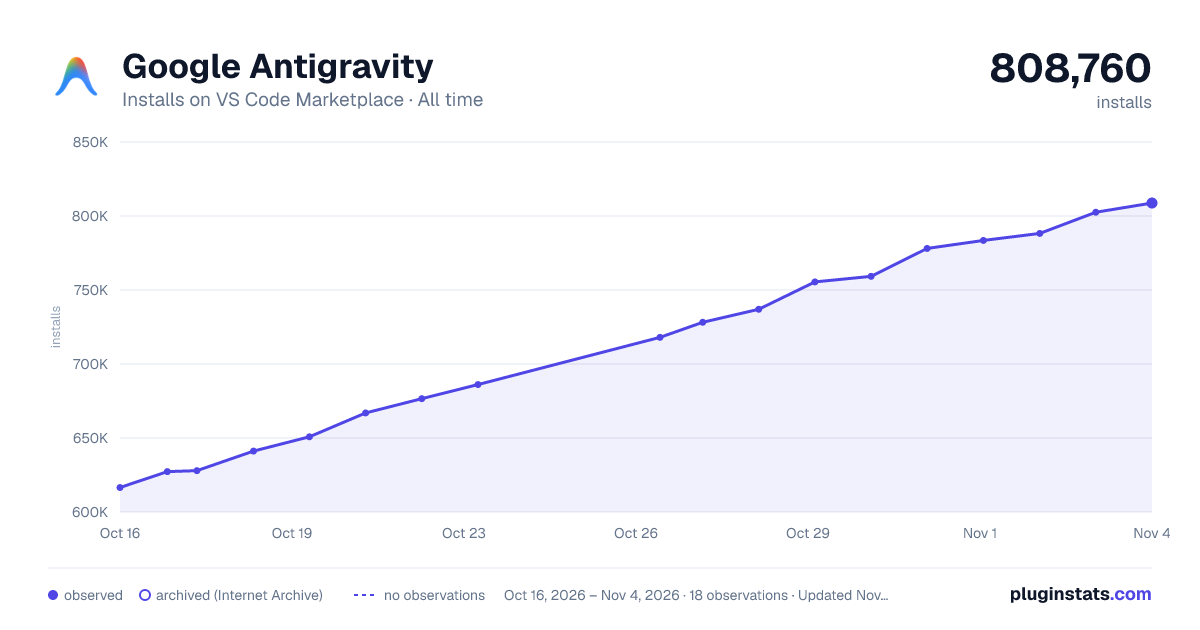

Adoption over time
7/30/90-day growth
Ranking history
Ratings over time
Listing placement
Listing placement
Listing placement
Listing placement
Filled points are observed values; hollow points come from Internet Archive snapshots of the listing page. Dashed segments span periods with no observations — values between points are not interpolated.
Each band is one page of 20. Installs on a linear scale. Placement is projected from installs, so it can differ from the marketplace's own sort order. Hover a dot to see the listing.
Recent observations
Full history (5)Similar VS Code Marketplace Programming Languages plugins
All 20 Google Antigravity alternativesData source
Install counts, average rating, and rating counts come from the public Visual Studio Marketplace gallery API. Installs are cumulative and exclude updates.
Listing: https://marketplace.visualstudio.com/items?itemName=Google.google-antigravity. First seen Oct 16, 2026; last successful collection Oct 20, 2026. See the methodology.