 PluginStats
learn-markdown installs statistics
By Microsoft (224 listings) · VS Code Marketplace · Other
Learn Markdown Extension
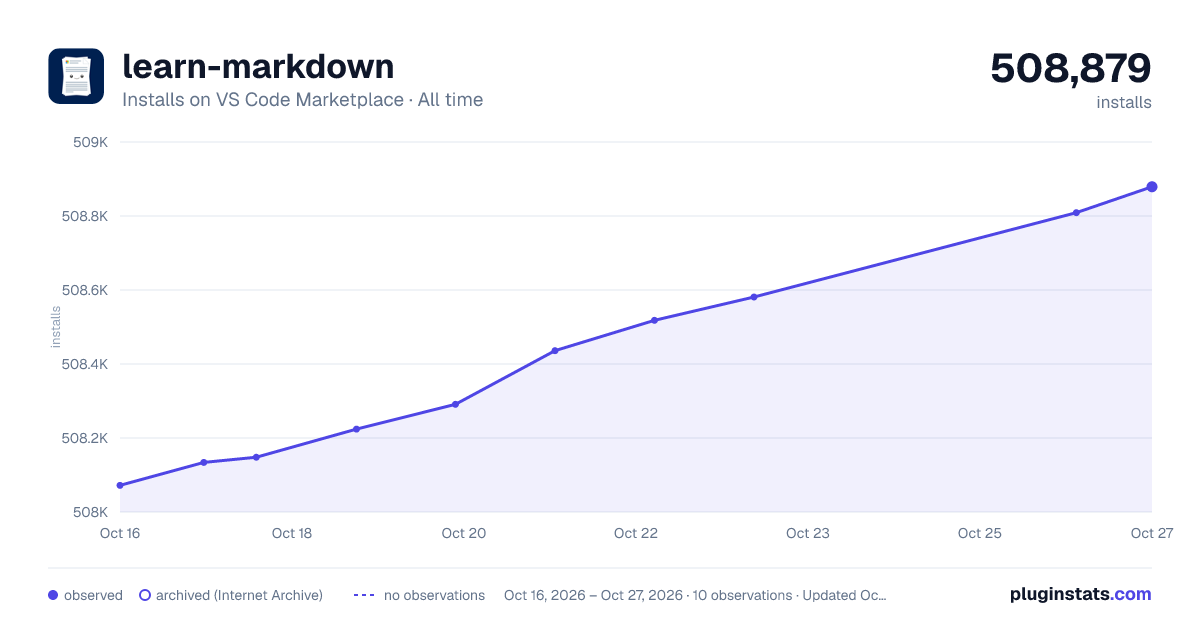
learn-markdown has 508,224 recorded installs on VS Code Marketplace.
It ranks #839 of 2,501 tracked VS Code Marketplace listings by installs.
It is rated 4.0 out of 5 from 8 ratings.
PluginStats has 4 daily observations since Oct 16, 2026; the latest is from Oct 19, 2026.
Rating: 4.00 / 5 from 8 ratings
About learn-markdown
Learn Markdown Extension
Welcome to the Learn Markdown authoring extension! This extension provides Markdown authoring assistance for learn.microsoft.com (Learn) content, including basic Markdown support and support for custom Markdown syntax on Learn. We also now support some YAML authoring commands. Here's a quick demo - the rest of the readme provides details about using the extension. You can also get more details about all of the Learn Authoring Pack features here: Learn Authoring Pack Overview
Prerequisites and assumptions
To accurately insert relative links, images, and other embedded content, you must have your VS Code workspace scoped to the root of your cloned Learn repo.
Some syntax supported by the extension, such as alerts and snippets, are custom Markdown for Learn, and will not render correctly unless published to Learn.
How to use the extension
To access the Learn Markdown menu, type ALT+M. You can click or use up/down arrows to select the function you want, or type to start filtering, then hit ENTER when the function you want is highlighted in the menu.
You can also now access the Learn commands from the VS Code command palette. Hit F1 to open the command palette and start typing to filter. All the Learn commands begin with "Learn".
The following commands are available in Markdown files:
| Command | Description |
| Preview (Alt+DP) | Preview the active topic in a side-by-side window using the Learn Preview extension, if it is installed. | | Search Results Preview | Approximates how your article will look when returned in Google search results. | | Bold (Alt+DB) | Format text bold. | | Italic (Alt+DI) | Format text _italic_. | | Code | If one line or less is selected, formats text as inline code.
If multiple lines are selected, formats them as a fenced code block, and prompts you to select a programming language supported by Learn. | | Alert | Insert a Note, Important, Warning, or Tip.
Select Alert from the menu, then select the alert type. If you have previously selected text, it will be surrounded with the selected alert syntax. If no text is selected, a new alert will be added with placeholder text. | | Numbered list | Insert a new numbered list.
If multiple lines are selected, each will be a list item. To create a nested numbered list, tab from within the parent list. | | Bulleted list | Insert a new bulleted list. | | Table | Insert a Markdown table structure.
After you select the table command, specify the number of columns and rows in the format columns:rows, such as 3:4. Note that the maximum number of columns you can specify via this extension is 5, which is the recommended maximum for readability on learn.microsoft.com. | | Columns | Insert a column-based layout structure, or add a column to an existing structure. Optionally add the span attribute to merge two to four columns together. | | Link | Coose from the following options: - Link to file in repo: Inserts a link to a file in the current repo. - Link to web page: Inserts a link to a web page URI. - Link to heading: Inserts a link to a heading in the current file or another file in the current repo. - Link to XRef: Links to a .NET or UWP API reference article. First, you search for the API, such as System.String.Length. Then you choose a display property: none (just the API name will be displayed as link text, such as "Length"); nameWithType (the API name and its immediate parent will be displayed, such as "String.Length"); fullName (the full API name will be displayed, such as "System.String.Length"). To provide custom link text, select the text first, then use this function to insert the XREF link. - Generate a Link Report: runs the LinkCheckMD extension to find broken links in the current article. | | Non-localizable text | Within the Markdown body of a file, format text as non-localizable (:::no-loc text="string":::). Within the YAML header of a Markdown file, add a metadata array to be populated with strings that should be non-localizable throughout the file ( no-loc: []). | | Image | Insert a standard image, complex image, or icon. For standard and complex images, alternate text is required for accessibility. Either select the alt text before calling the Image command, or add it before you select the image source file. For complex images, type a detailed description between the :::image::: and :::image-end::: tags. You can optionally add the loc-scope attribute to standard and complex images to indicate that the scope of localization is different for the image than for the article or module that contains it. Icons should not have alt text and are not localized, so only the image source file should be specified. | | Include | Find a file in the repo to embed in the current file. | | Snippet | Find a code snippet in the repo to embed in the current file. | | Cleanup | Run one of the Learn Cleanup scripts (see Cleanup scripts below). | | Video | Add an embedded video. | | Template | Insert a Markdown authoring template, if the Learn Article Templates extension is installed. |
The following commands are available in YAML files:
| Command | Description |…
Description from the VS Code Marketplace listing.
- json
- keybindings
- markdown
- snippet
- yaml
Charts
Images: 30d · 1y · all time · 1600×900 dark
Adoption over time
7/30/90-day growth
Ranking history
Ratings over time
Listing placement
Filled points are observed values; hollow points come from Internet Archive snapshots of the listing page. Dashed segments span periods with no observations — values between points are not interpolated.
Each band is one page of 20. Installs on a log scale. Placement is projected from installs, so it can differ from the marketplace's own sort order. Hover a dot to see the listing.
Recent observations
Full history (4)Similar VS Code Marketplace Other plugins
All 20 learn-markdown alternatives




Data source
Install counts, average rating, and rating counts come from the public Visual Studio Marketplace gallery API. Installs are cumulative and exclude updates.
Listing: https://marketplace.visualstudio.com/items?itemName=docsmsft.docs-markdown. First seen Oct 16, 2026; last successful collection Oct 19, 2026. See the methodology.