 PluginStats
Git Stash installs statistics
By Arturo Rodríguez · VS Code Marketplace · Other
Integrate stashes management into your editor. Browse entries, review and extract changes, and more.
Git Stash has 286,902 recorded installs on VS Code Marketplace.
It ranks #1188 of 2,501 tracked VS Code Marketplace listings by installs.
It is rated 4.6 out of 5 from 14 ratings.
PluginStats has 4 daily observations since Oct 16, 2026; the latest is from Oct 19, 2026.
Rating: 4.64 / 5 from 14 ratings
About Git Stash
Git Stash
Seamlessly integration of git stash functionalities into your editor.
Is this extension helpful for you? I kindly ask you to consider supporting me if you're able to, I will mean the world to me ❤️. Regardless, happy coding!
Features
This extension adds a rich set of commands and an interactive explorer tree where you can create, inspect, apply and delete stashes, so managing this data becomes a breeze. It also adds a context menu option on the files listed in the source control view to selectively stash them. Every executed command is logged along its output for peace of mind.
Stashes explorer
• Apply, pop, branch, drop stashes (buttons / context menu) • Diff stashed file changes + alternative diff modes • Apply changes from selected files only • Copy stash information like hash, description, etc to clipboard from the context menu • Configurable explorer displaying (sorted list or tree) • Configurable labels, descriptions, icons, tooltips, decorations, clipboard data • Configurable data loading strategy for files (performance related) • Open project directory
Source control explorer
• Stash selected files... (context menu) To crate a stash only with specified files
Command palette
You don't need to use the explorer buttons, just type gitstash in the command palette. Multi-root supported. • gitstash: Stash... For more stashing options • gitstash: Apply... • gitstash: Branch... • gitstash: Clear... • gitstash: Drop... • gitstash: Drop Multiple... • gitstash: Pop... • gitstash: Quick switch... • gitstash: Quick back... • gitstash: Refresh explorer • gitstash: Toggle explorer
In a multi-root project, the git repository its automatically inferred from the current open document if there's one.
Quick Actions
Quick actions automate some tasks by running two or more git commands, sometimes interactively.
• Quick switch: Save the current branch (session lifetime), stash current changes and checkout the selected branch • Quick back: Checkout the previous branch and pop the latest stash
Installation
Directly available on editors using VSC Marketplace and OpenVSX Registry. vsix file on GitHub. Releases are automatically generated 🤖.
Screenshots
Diff view modes
Stash changes ⟷ Current
This is the main diff mode where the stashed changes are compared to the current state of the file.
Current ⟷ Stash changes
This diff view compares the current state of the file to the staged file, this helps to review how valuable may be the previous (staged) changes considering the latest updates.
Stash source ⟷ Current
This mode compares the original state of the stashed file before being modified. Being able to compare the staged file before changing can be helpful when the current state of the file has changed in a way that the staged changes don't make much cense anymore.
Current ⟷ Stash source
Alternative way to diff the stashed file without its changes.
Commands
| Title | Command | Description
| Stash... | gitstash.stash | Generate a stash with custom options. Use stash only to generate a simple stash. Staged is similar to basic git commit except the state is committed to the stash instead of current branch. Use Keep index to stash but keep all changes added to the index intact (besides stashing them). Use Include untracked if you want to stash also untracked files, leaving the working directory in a very clean state. If you want to stash besides the untracked files, the ignored ones, use the All option instead. WARNING: Using Include untracked (which applies the --include-untracked option) will clean/delete any ignored file, this is not a behavior implemented on the extension but the way some old git versions work. | Pop... | gitstash.pop | Pops a stash w/ or w/o file reindexing, If reindexing selected, every change added to index will be back to that state. this can fail, when you have conflicts (which are stored in the index, where you therefore can no longer apply the changes as they were originally). | Apply... | gitstash.apply | Applies a stash w/ or w/o file reindexing. Reindexing will work the same as Stash Pop with reindex. | Branch... | gitstash.branch | Creates and checks out a new branch starting from the commit at which the stash was originally created, applies the changes recorded in the selected stash to the new working tree and index. If that succeeds the stash will be dropped. | Drop... | gitstash.drop | Drops a stash. | Clear... | gitstash.clear | Removes all the repository stashes. | Refresh explorer | gitstash.explorer.refresh | Reloads the stash explorer tree. | Toggle explorer | gitstash.explorer.toggle | Shows/hides the stash explorer tree.
Extension Settings
| Name | Description |…
Description from the VS Code Marketplace listing.
- diff
- git
- git stash
- multi-root ready
- stash
- stash diff
Where Git Stash sits in the listing
Each band is one page of 20. Installs on a log scale. Placement is projected from installs, so it can differ from the marketplace's own sort order. Hover a dot to see the listing.


Charts
Images: 30d · 1y · all time · 1600×900 dark


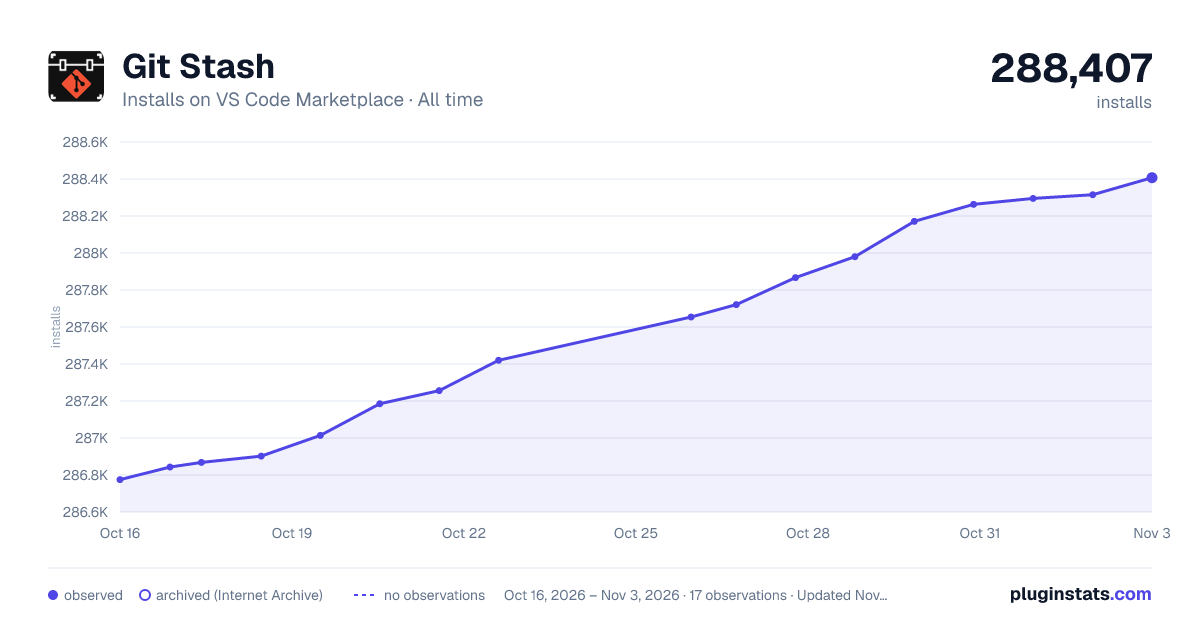

Adoption over time


7/30/90-day growth


Ranking history


Filled points are observed values; hollow points come from Internet Archive snapshots of the listing page. Dashed segments span periods with no observations — values between points are not interpolated.
Recent observations
Full history (4)Similar VS Code Marketplace Other plugins
Data source
Install counts, average rating, and rating counts come from the public Visual Studio Marketplace gallery API. Installs are cumulative and exclude updates.
Listing: https://marketplace.visualstudio.com/items?itemName=arturock.gitstash. First seen Oct 16, 2026; last successful collection Oct 19, 2026. See the methodology.