 PluginStats
CSS Peek installs statistics
By Pranay Prakash · VS Code Marketplace · Programming Languages
Allow peeking to css ID and class strings as definitions from html files to respective CSS. Allows peek and goto definition.
CSS Peek has 8,029,056 recorded installs on VS Code Marketplace, ranking #117 of 2,501 tracked listings.
Rating: 3.69 / 5 from 90 ratings
About CSS Peek
🔍 CSS Peek
This extension adds support for Go To Definition and Go To Symbol in Workspace for css/scss/less classes and IDs found in HTML/React/Vue/Svelte/Pug/ejs/etc.
This was heavily inspired by a similar feature in Brackets called CSS Inline Editors.
The extension supports all the normal capabilities of symbol definition tracking, but does it for css selectors (classes, IDs and HTML tags). This includes:
• Peek: load the css file inline and make quick edits right there. (Ctrl+Shift+F12) • Go To: jump directly to the css file or open it in a new editor (F12) • Hover: show the definition in a hover over the symbol (Ctrl+hover)
In addition, it supports the Symbol Provider so you can quickly jump to the right CSS/SCSS/LESS code if you already know the class or ID name (You need to enter atleast 2 characters for this to work. This command can take a few seconds if you have large stylesheets)
Configuration
• cssPeek.supportTags - Enable Peeking from HTML tags in addition to classnames and IDs. React components are ignored, but it's a good idea to disable this feature when using Angular. • cssPeek.peekFromLanguages - A list of vscode language names where the extension should be used. • cssPeek.peekToExclude - A list of file globs that filters out style files to not look for. By default, node_modules and bower_components
See editor docs for more details
• Visual Studio Code: Goto Definition • Visual Studio Code: Peek • Visual Studio Code: Open Symbol By Name
Contributing
Contributions are greatly appreciated. Please fork the repository and submit a pull request.
Changelog
4.4.0
• upgrade all dependncies
4.3.5
• add vscode.dev support (experimental)
4.3.4
• fix tests
4.3.2
• Improve performance by incrementally caching the stylesheets as and when needed
4.2.0
• Support VSCode Workspace Trust #107
4.1.1
• Add CodeStream Banner
3.0.2
• Use Globs for configuration options instead of RegExp via #61 ❤ @arch-stack
2.2.0
• Initial JSX support via #49 ❤ @ReiMcCl
2.1.1
• (Temporarily) fix bug #19 by handling errors from findDocumentSymbols
2.1.0
• Add support for Symbol Provider #18
2.0.3
• Fix bug #14 that caused CSS Peek to fail after any HTML comments
2.0.2
• Fix bug that limited the language support only to HTML. Now supports all languages provided by "activeLanguages" config
2.0.1
• Fix an error wherby the Overview was missing on the Visual Studio Marketplace
2.0.0
• A complete rewrite featuring the new Language Server Protocol • Added scss support • Added multi definition support (provides all CSS rules matching the selector) • Added support for HTML tag selectors
1.3.3
• New Logo
1.3.0
• Add configuration option to ignore file from CSS lookup
1.2.4
• Crucial bug fix
1.2.3
• Workaround for bug if large number of files exist
1.2.2
• Better recognition of CSS selector word from cursor position • Optimize code for fewer file lookups
1.2.1
• Fix README typo
1.2.0
• Add less support • Configure search file extensions using "css_peek.searchFileExtensions"
1.1.0
• Update Icon
1.0.0
• Shamelessly copied code from https://github.com/abierbaum/vscode-file-peek
Description from the VS Code Marketplace listing.
- completion
- css
- definition
- goto definition
- jump to stylesheet
- less
- multi-root ready
- peek
- peek definition
- sass
- scss
- style
- stylesheet
- workspace symbol
README badge
Show your rank in a README or on your website. The badge updates automatically.
Charts
Images: 30d · 1y · all time · 1600×900 dark


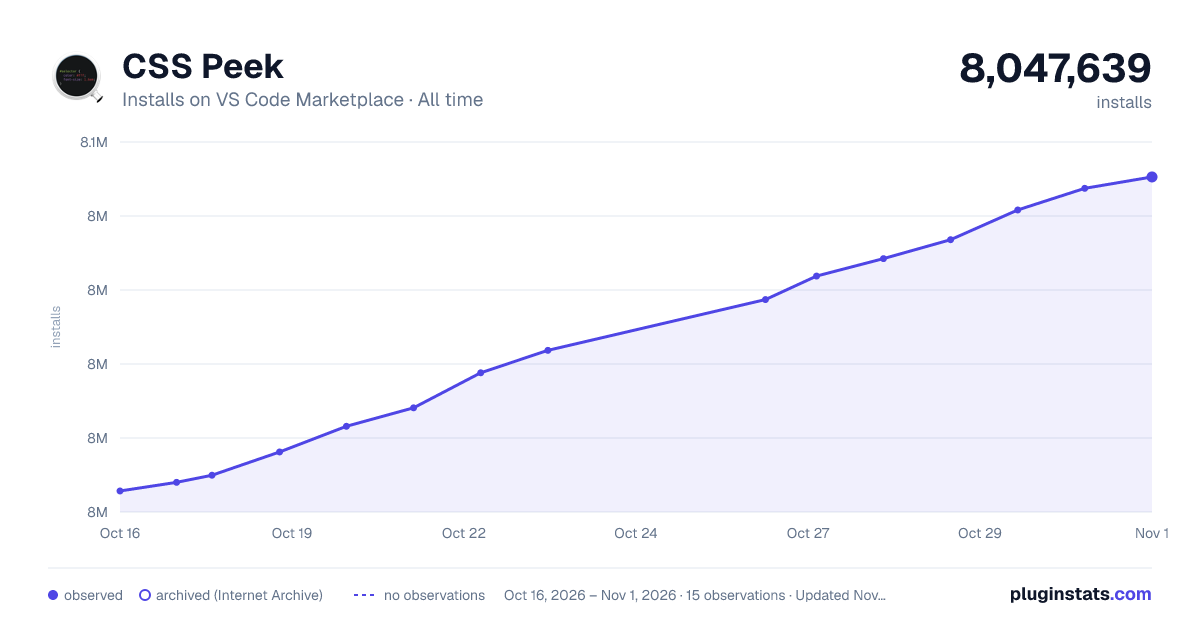

Adoption over time
7/30/90-day growth
Ranking history
Ratings over time
Listing placement
Listing placement
Filled points are observed values; hollow points come from Internet Archive snapshots of the listing page. Dashed segments span periods with no observations — values between points are not interpolated.
Each band is one page of 20. Installs on a linear scale. Placement is projected from installs, so it can differ from the marketplace's own sort order. Hover a dot to see the listing.
Recent observations
Full history (4)Similar VS Code Marketplace Programming Languages plugins
All 20 CSS Peek alternativesData source
Install counts, average rating, and rating counts come from the public Visual Studio Marketplace gallery API. Installs are cumulative and exclude updates.
Listing: https://marketplace.visualstudio.com/items?itemName=pranaygp.vscode-css-peek. First seen Oct 16, 2026; last successful collection Oct 19, 2026. See the methodology.