 PluginStats
#region folding for VS Code installs statistics
By maptz · VS Code Marketplace · Other
Provides folding for text wrapped with #region comments in VS Code.
#region folding for VS Code has 139,908 recorded installs on VS Code Marketplace, ranking #1936 of 2,501 tracked listings.
Rating: 4.24 / 5 from 41 ratings
About #region folding for VS Code
Visual Studio Code Custom Folding Extension
This extension enhances the default code folding abilities of Visual Studio Code editor. Regions of code that you'd like to be folded can be wrapped with #region comments.
The precise format of the comment depends on the language. For instance, for C-Style languages, regions are of the form:
/* #region Main / public static void Main(string args[]) { //Your code goes here } / #endregion */
For HTML style languages, you could define a foldable region with the following tags:
Commands
The extension also installs a command to wrap a region comment around the current selection.
• regionfolder.wrapWithRegion (Ctrl+M Ctrl+R)
Configuration
The extension provides configuration settings, allowing you to provide custom region tags for your language.
To provide a custom folding for your language create a settings in your vscode settings file (either user or workspace) that conforms to the following specification.
"maptz.regionfolder": { "[ahk]": { //Language selector "foldEnd": "; #endregion", //Text inserted at the end of the fold "foldEndRegex": ";[\s]#endregion", //Regex used to find fold end text. "foldStart": "; #region [NAME]", //Text inserted at the start of the fold. //Use the [NAME] placeholder to indicate //where the cursor should be placed after //insertion "foldStartRegex": ";[\s]#region[\s](.)", ////Regex used to find fold start text. "disableFolding": false //Turn off #region folding for this language } }
Installing
You can install the latest version of the extension is available on the Visual Studio Marketplace here.
Alternatively, open Visual Studio code, press Ctrl+P and type:
ext install regionfolder
Features
Feature - Default Folding
A new feature is the notion of default folds. Default folds define regions which will be collapsed whenever the file is opened. In the current preview version, default folds are only collapsed when the regionfolder.collapseDefault command is issued from the command palette.
You can create a default fold by creating a Regex expression which defines the default fold for the language of your choice in your settings file. The Regex is defined in the defaultFoldStartRegex property.
In the following example, defined for the Markdown language, default folds are defined as regions in the following form:
The settings for this default fold are below. You can either put this in your Workspace settings file (.vscode/settings.json) or in your user profile settings file:
You can now use the collapseDefaultRegionsOnOpen setting to determine whether regions are collapsed by default when a new file is opened.
Feature - Per-Language Disabling
You can now turn off custom folding on a per-language basis. To do this, you need to add disableFolding to the settings for the particular language. You will need to restart VS Code for the changes to take effect.
So, for instance, to turn off folding for cpp add the following to your settings file:
Feature - Multiple Fold Definitions Per Language (Preview)
The extension now has preview support for defining multiple fold definitions per language. Secondary folds can be defined in the foldDefinitions property in the settings for each language. By settting the isFoldedByDefault value to true, you can ensure that the folds are collapsed by default when the file opens.
The example below is used to collapse Copyright style headers by default in Javascript files:
The .vscode/settings.json file used to define this behaviour is:
Commands
The commands that this extension provides are listed below:
regionfolder.collapseAllRegions - Collapse all #regions.
Collapses all #regions for the current document.
regionfolder.collapseDefault- Collapse default #regions.
Collapses all default #regions for the current document (i.e. those defined with a defaultFoldStartRegex).
regionfolder.deleteRegion - Delete current #region tags and contents
Deletes the current #region including all the #region tags, and all contents between the tags.
regionfolder.removeCurrentRegionTags - Delete current #region tags
Deletes the current #region tags, leaving the contents between the tags intact.
regionfolder.wrapWithRegion - Wrap selection with #region tag.
Wraps the currently selected text with #region tags.
regionfolder.wrapWithRegionAndComment - Wrap with #region tag and comment.
Wraps the currently seected text with #region tags, and comments the selection out.
regionfolder.selectCurrentRegion - Select current #region.
Selects the whole current #region, including the tags.
regionfolder.selectCurrentRegionContents. - Select current #region contents.
Selects the text within the current #region, not including the tags.
Bugs and Features
The Changelog can be found here.
Please log any bugs on Github here.
If you have a new language that you've supported using the custom configuration, we'd love to incorporate it into the defaults for the extension. Please log an issue or a pull request on the repo here.
Source Code
The source code is available on GitHub here.
Other Extensions
View other extensions from Maptz
Description from the VS Code Marketplace listing.
- keybindings
README badge
Show your rank in a README or on your website. The badge updates automatically.
Charts
Images: 30d · 1y · all time · 1600×900 dark


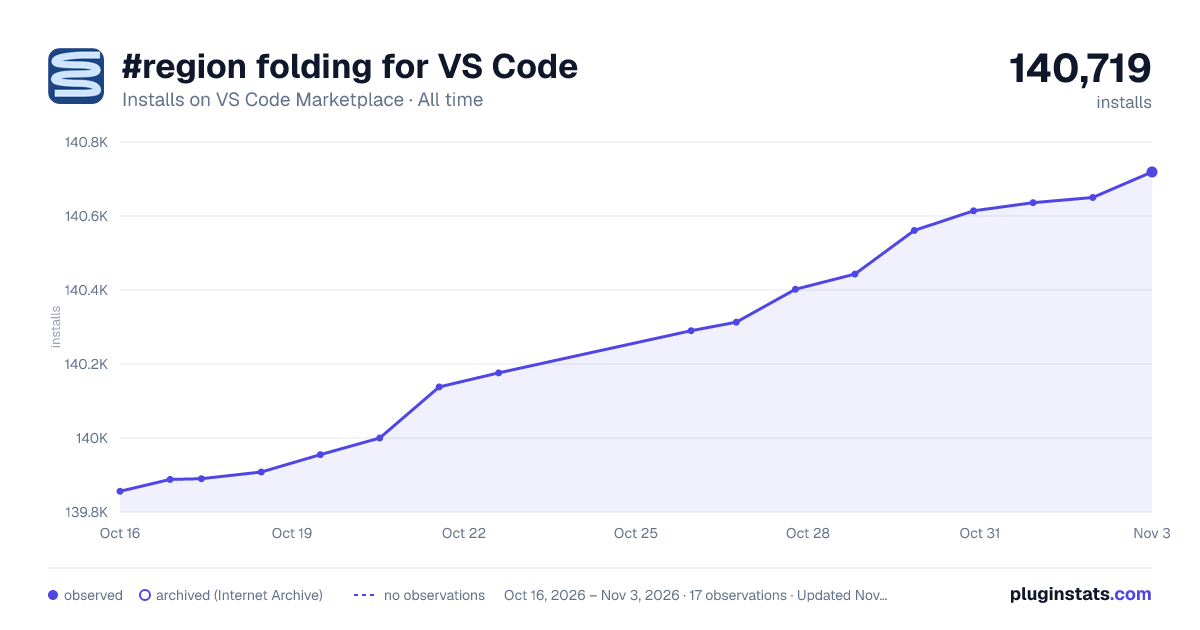

Adoption over time
7/30/90-day growth
Ranking history
Ratings over time
Listing placement
Listing placement
Filled points are observed values; hollow points come from Internet Archive snapshots of the listing page. Dashed segments span periods with no observations — values between points are not interpolated.
Each band is one page of 20. Installs on a linear scale. Placement is projected from installs, so it can differ from the marketplace's own sort order. Hover a dot to see the listing.
Recent observations
Full history (4)Similar VS Code Marketplace Other plugins
All 20 #region folding for VS Code alternativesData source
Install counts, average rating, and rating counts come from the public Visual Studio Marketplace gallery API. Installs are cumulative and exclude updates.
Listing: https://marketplace.visualstudio.com/items?itemName=maptz.regionfolder. First seen Oct 16, 2026; last successful collection Oct 19, 2026. See the methodology.