 PluginStats
Ionic installs statistics
By Ionic · VS Code Marketplace · Other
Official extension for Ionic and Capacitor development
Ionic has 603,516 recorded installs on VS Code Marketplace.
It ranks #758 of 2,500 tracked VS Code Marketplace listings by installs.
It is rated 4.2 out of 5 from 32 ratings.
PluginStats has 3 daily observations since Oct 16, 2026; the latest is from Oct 18, 2026.
Rating: 4.19 / 5 from 32 ratings
About Ionic
Please note that this extension has been deprecated in favor of the WebNative.dev extension and is no longer maintained. If you are experiencing issues with this extension please consider switching to the WebNative.dev extension.
This extension for Visual Studio Code features:
• Create a Project - Start a project for Angular, React or Vue • Run Commands - Such as build, sync, serve and test • Run Apps - Launch on a real or emulated iOS or Android device • Migrate to Capacitor - Actions and recommendations to migrate from Cordova • Find Deprecated Plugins - Identify known end of life or deprecated packages and plugins • Native Projects Settings - Set Bundle id, display name, version number and build number of the native project • Outdated Packages - Provides easy upgrade to the latest version androidmanifest.xml • Minor Updates - Identifies minor dependency updates for one step upgrading • Security Vulnerabilities - Identifies security vulnerabilities in dependencies using npm audit • Capacitor Preview - Preview your web application in Capacitor • Configuration Issues - Recommends changes to config.xml and androidmanifest.xml • Integrate Capacitor into web projects • Run Scripts from package.json • Angular Migrations - Automate Angular version migrations using ng update • Splash Screen and Icons - Generate Splash Screen and Icons assets for iOS and Android projects • Error Assistant - Detect errors in swift, java, typescript, eslint, jasmine and jest • Mono Repo Support for Nx - Support for Capacitor and Ionic Angular/React with Nx and nxtend.dev • Mono Repo Support for npm workspaces - Support for npm workspaces • Mono Repo Support for Folders - Support for multiple apps in folders • Mono Repo Support for Lerna - Support for Lerna • Mono Repo Support for pnpm workspaces - Support for pnpm workspaces • Mono Repo Support for yarn workspaces - Support for Yarn workspaces • Debugging for Web - Support for debugging via browser (Chrome or Edge) • Debugging for Android - Support for debugging for Android devices • Package Managers - Support for npm, Yarn and Pnpm • VS Code Workspaces - Support for Multi-Root VS Code Workspaces • Live Reload with HTTPS - Use HTTPS with your Dev Server
Creating Ionic Projects
• Open an Empty Folder • Choose a starter project • Your project will be created ready to run
Running on Android
• Choose Run On Android • Select the chosen emulator or connected Android device • Changes to source code are instantly updated in the app using Live Reload
Running on iOS
• Choose Run On iOS • Select the chosen simulator or connected iOS device • Changes to source code are instantly updated in the app using Live Reload
Adding Capacitor
• Choose Integrate Capacitor • Required packages and setup will be applied to your web application or SPA
Upgrading Packages
• Select a package from Packages section • Choose to Upgrade or Install • The Info option will launch the packages home page on npm • Select the Light Bulb icon next to a scoped package (eg @capacitor) to allow upgrading of all packages
Upgrade to a particular version
• Find the package to upgrade from the Packages section • Click the ... icon on the right • Choose the version from the selection of released versions
Capacitor Migration
• Migrate a Cordova project to Capacitor • Incompatible plugins are flagged • Equivalent Capacitor plugins are identified and replaced • Plugins that are not required are removed • Video of migration to Capacitor
Native Project Settings
By opening the Configuration item you can set native projects settings:
• Change Display Name, Version Number and Build Number. • A change in settings will be applied to both the iOS and Android project. • Handles when the iOS and Android settings are deliberately different from each other. • Video of Changing Native Project Settings
Angular Migrations
• Angular migrations are now recommended
Follow up with manual steps documented at update.angular.io and run a npm install afterward to verify if there are any dependencies that also need updating to support the version of Angular you are updating to.
Splash Screen and Icons
A splash screen and icon image can be set:
• The package @capacitor/assets will be installed as a dev dependency • Images will be generated by resizing for various iOS and Android sizes • These images will be included as part the native projects • Allows setting of Adaptive Icons which are used by Android
Error Assistant
Detects errors in swift, java, typescript, eslint, jasmine and jest files after operations.
• Opens the place in code where the error occurs • Allows navigation to next and previous errors • Re-runs the operation when you correct the problem and save the file
Capacitor Preview
If you click Run > Web you will notice a QR Code. This can be scanned with this app which will launch and run your application. You now have a running application on your mobile device that will reload if you make a code change and save ("Live Reload").
Note: The App has a limited set of plugins which will work with your application.
Nx Support
Detects a Nx workspace and provides a Nx Project selector for apps. When an Nx project is selected menu options will reflect what the project is capable of (eg running a native iOS or Android app). The scripts section will also include the common Nx commands for build, test, lint and e2e.
Note: The extension only provides support for node package upgrades at the root of your Nx workspace.
• Video of Nx Workspace
Mono Repos in Folders
Detects a workspace where subfolders contain Ionic applications and provides a project selector.
Npm Workspaces Support
Detects when npm workspaces are used as part of a mono repo and provides a workspace selector.
pnpm Workspaces Support
Detects when pnpm workspaces are used as part of a mono repo and provides a workspace selector.
Lerna Support
Detects when Lerna is used as part of a mono repo and provides a workspace selector.…
Description from the VS Code Marketplace listing.
- Android
- Angular
- Capacitor
- Cordova
- Cross Platform
- Flutter
- Ionic
- Ionic Framework
- iOS
- keybindings
- Log
- React
- React Native
- Vue
- Web Native
Where Ionic sits in the listing
Each band is one page of 20. Installs on a log scale. Placement is projected from installs, so it can differ from the marketplace's own sort order. Hover a dot to see the listing.


Charts
Images: 30d · 1y · all time · 1600×900 dark


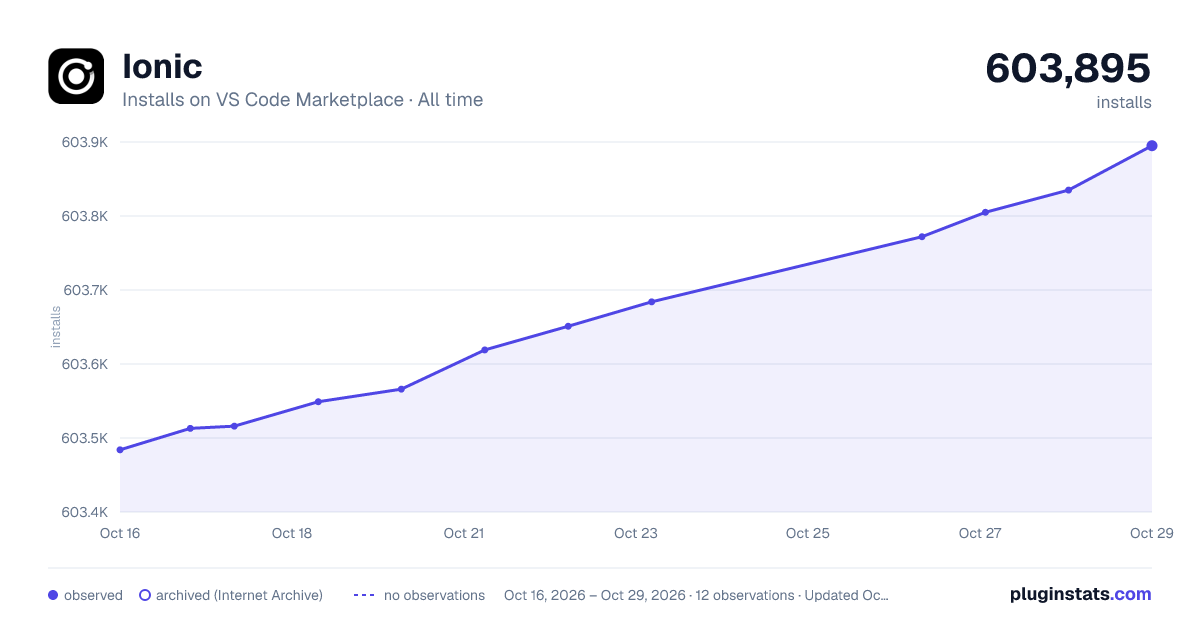

Adoption over time


7/30/90-day growth


Filled points are observed values; hollow points come from Internet Archive snapshots of the listing page. Dashed segments span periods with no observations — values between points are not interpolated.
Recent observations
Full history (3)Similar VS Code Marketplace Other plugins
Data source
Install counts, average rating, and rating counts come from the public Visual Studio Marketplace gallery API. Installs are cumulative and exclude updates.
Listing: https://marketplace.visualstudio.com/items?itemName=ionic.ionic. First seen Oct 16, 2026; last successful collection Oct 18, 2026. See the methodology.