 PluginStats
Agentforce DX installs statistics
By Salesforce (33 listings) · VS Code Marketplace · Extension Packs
Provides a suite of tools to iteratively build, preview, and test agents right in your IDE.
Agentforce DX has 241,556 recorded installs on VS Code Marketplace, ranking #1329 of 2,501 tracked listings.
Rating: 5.00 / 5 from 1 ratings
About Agentforce DX
Agentforce DX for Visual Studio Code
Agentforce DX brings powerful agent development capabilities directly into Visual Studio Code. Build, preview, test, and debug Salesforce agents with an integrated development experience that includes:
- Interactive Preview: Chat with your agents to test their responses and behavior.
- Conversation Tracer: Deep-dive into how your agent processes requests, makes decisions, and executes actions.
- Integrated Testing: Run and manage agent test suites with full visibility into test results.
- Agent Management: Open agents in Agent Builder and activate/deactivate them directly from VS Code.
Prerequisites
-
Install the Salesforce Extension Pack from the VS Code Marketplace. If you prefer to use an open-source registry, you can also install it from the Open VSX Registry.
The Salesforce Extension Pack includes Agentforce Vibes.
-
Install Salesforce CLI.
How to Use this Extension
Here are the high-level features of this extension:
Preview Agents
Chat with your agents directly in VS Code to test how they respond to user inputs. The Agent Preview panel lets you have interactive conversations with agents using their Agent Script file or with active agents in your org. Previewing agents helps you validate their behavior before deployment.
You can use these two modes when previewing an agent from its Agent Script file:
- Simulated mode: Uses only the Agent Script file to converse, and it simulates (or mocks) all the actions. This mode is particularly useful if the Apex classes, flows, or prompt templates that implement the actions aren't yet available.
- Live mode: Uses the actual Apex classes, flows, and prompt templates in your development org in the agent preview. You can use the Apex Replay Debugger to debug your Apex classes when using live mode.
See Preview and Debug an Agent for details.

Trace Agent Conversations
Understand exactly how your agent processes each conversation with the built-in Conversation Tracer. The tracer provides a detailed, step-by-step view of the agent's decision-making process, including:
- How the agent interprets user utterances.
- Which actions the agent selects and why.
- API calls and data transformations.
- Response generation and output formatting.
Use the tracer to troubleshoot unexpected behavior, optimize agent performance, and gain insights into your agent's reasoning.

Test Agents
Run and manage your agent test suites from the Agent Testing Panel. View test definitions and individual test cases, run tests with a single click, and get detailed results for each test execution. The testing panel integrates with VS Code's native testing UI, providing a familiar experience for running and debugging agent tests.
See Test an Agent for details.

Documentation
For details about the features in this VS Code extension, and generally more information about Agentforce DX, see the Build Agents with Agentforce DX section of the Agentforce Developer Guide.
Bugs and Feedback
To report issues with this Agentforce DX extension, open a bug on GitHub. To suggest a new feature, start a GitHub discussion.
Description from the VS Code Marketplace listing.
- afdx-log
README badge
Show your rank in a README or on your website. The badge updates automatically.
Charts
Images: 30d · 1y · all time · 1600×900 dark


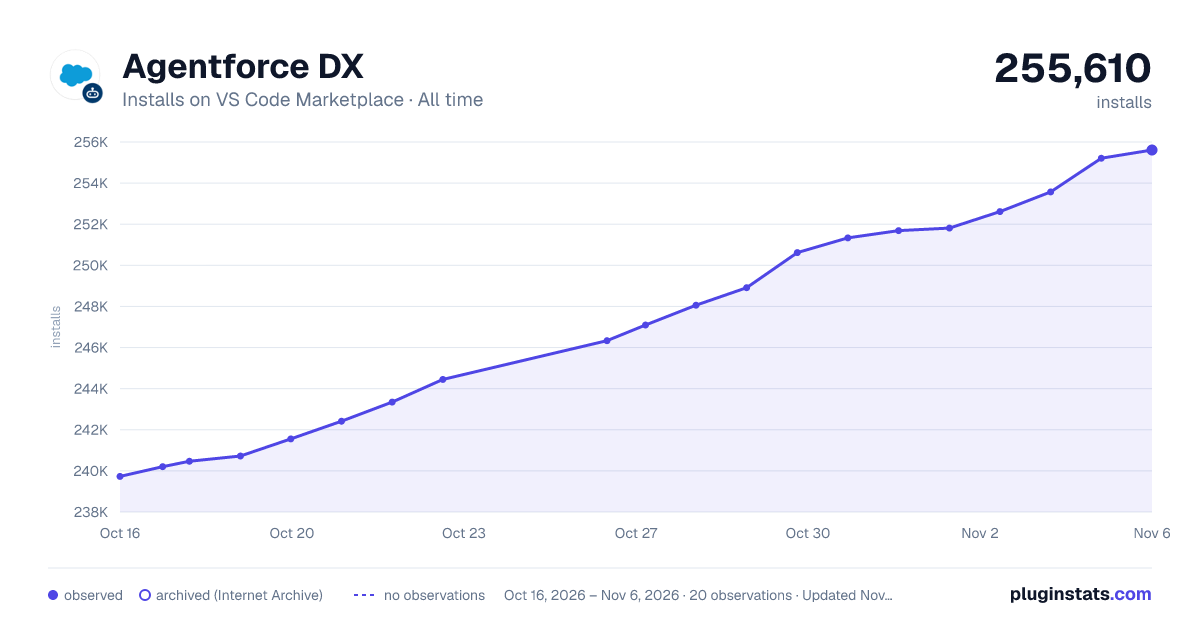

Adoption over time
7/30/90-day growth
Ranking history
Ratings over time
Listing placement
Listing placement
Filled points are observed values; hollow points come from Internet Archive snapshots of the listing page. Dashed segments span periods with no observations — values between points are not interpolated.
Each band is one page of 20. Installs on a linear scale. Placement is projected from installs, so it can differ from the marketplace's own sort order. Hover a dot to see the listing.
Recent observations
Full history (5)Similar VS Code Marketplace Extension Packs plugins
All 20 Agentforce DX alternativesData source
Install counts, average rating, and rating counts come from the public Visual Studio Marketplace gallery API. Installs are cumulative and exclude updates.
Listing: https://marketplace.visualstudio.com/items?itemName=salesforce.salesforcedx-vscode-agents. First seen Oct 16, 2026; last successful collection Oct 20, 2026. See the methodology.