 PluginStats
REST API installs statistics
By Marcel J. Kloubert (2 listings) · VS Code Marketplace · Other
Extension that provides a REST API to control your editor.
REST API has 101,924 recorded installs on VS Code Marketplace.
It ranks #2340 of 2,501 tracked VS Code Marketplace listings by installs.
PluginStats has 4 daily observations since Oct 16, 2026; the latest is from Oct 19, 2026.
About REST API
vs-rest-api
A Visual Studio Code (VS Code) extension that provides a REST API to control your editor.
Table of contents
1. Install 2. How to use • Settings • Users • HTTPs • Build-in endpoints • Custom endpoints • Commands 3. Documentation
Install [↑]
Launch VS Code Quick Open (Ctrl+P), paste the following command, and press enter:
Or search for things like vs-rest-api in your editor:
How to use [↑]
Settings [↑]
Open (or create) your settings.json in your .vscode subfolder of your workspace.
Add a deploy section:
This example will run the host on port 1781 on startup and opens the URL https://localhost:1781/ in your default application, like your browser.
Users [↑]
By default anyone can access the API with read-only access.
You can define one or more users, that can access the API via Basic Authentification:
By default any user (and guest) have read-only access.
HTTPs [↑]
For secure access, you can define a SSL certificate:
Build-in endpoints [↑]
Visit the wiki to get more information about build-in endpoints.
| Name | Description |
| /api/appglobals | Accesses permanent data for all users outside the current workspace. | | /api/appstate | Accesses permanent data for the current user / guest outside the current workspace. | | /api/commands | Accesses commands. | | /api/cron | Accesses cron jobs. | | /api/deploy | Accesses features to deploy files. | | /api/editor | Accesses resources of the active editor (tab). | | /api/editors | Accesses resources of all opened editors. | | /api/extensions | Accesses resources of all known extensions. | | /api/files | Accesses resources for handling file operations. | | /api/globals | Accesses permanent data for all users. | | /api/html | Accesses resources for handling HTML documents. | | /api/languages | Accesses resources of all known languages. | | /api/outputs | Accesses resources of output channels handled by the extension. | | /api/popups | Accesses resources for handling popup messages. | | /api/state | Accesses permanent data for the current user / guest. | | /api/whiteboard | Accesses resources for handling a virtual whiteboard. | | /api/workspace | Accesses or manipulates resources, like files or folders, inside the current workspace. |
Custom endpoints [↑]
Detailed information can be found at the wiki. Otherwise...
You can define custom endpoints that are executed via script.
Define one ore more regular expressions in your settings and the scripts that should be executed, if a pattern matches:
The ./my-endpoint.js must contain a public function with the name of the current HTTP request method (upper case).
For example if you want to make a simple GET request
your script should look like this:
The args parameter of the function uses the ApiMethodArguments interface.
You can return a Promise for async executions or nothing for sync executions (as in this example).
You are also able to define functions for other request methods, like POST or DELETE, which are supported by http / https modules of Node.js:
HINT: Custom endpoints will always overwrite build-in ones!
Commands [↑]
Press F1 to open the list of commands and select one of the following commands:
| Name | Description | ID |
| REST API: Starts or stops the api server | Toggles the state of the API's HTTP server. | extension.restApi.toggleHostState | | REST API: (Re)start the api server | (Re-)Starts the API's HTTP server. | extension.restApi.startHost | | REST API: Stop the api server | Stops the API. | extension.restApi.stopHost |
Documentation [↑]
The full documentation of the extension's API can be found here.
Detailed information on how to use the extension, can be found at the wiki.
Description from the VS Code Marketplace listing.
- API
- Editor
- HTTP
- Remote
- REST
Where REST API sits in the listing
Each band is one page of 20. Installs on a log scale. Placement is projected from installs, so it can differ from the marketplace's own sort order. Hover a dot to see the listing.


Charts
Images: 30d · 1y · all time · 1600×900 dark


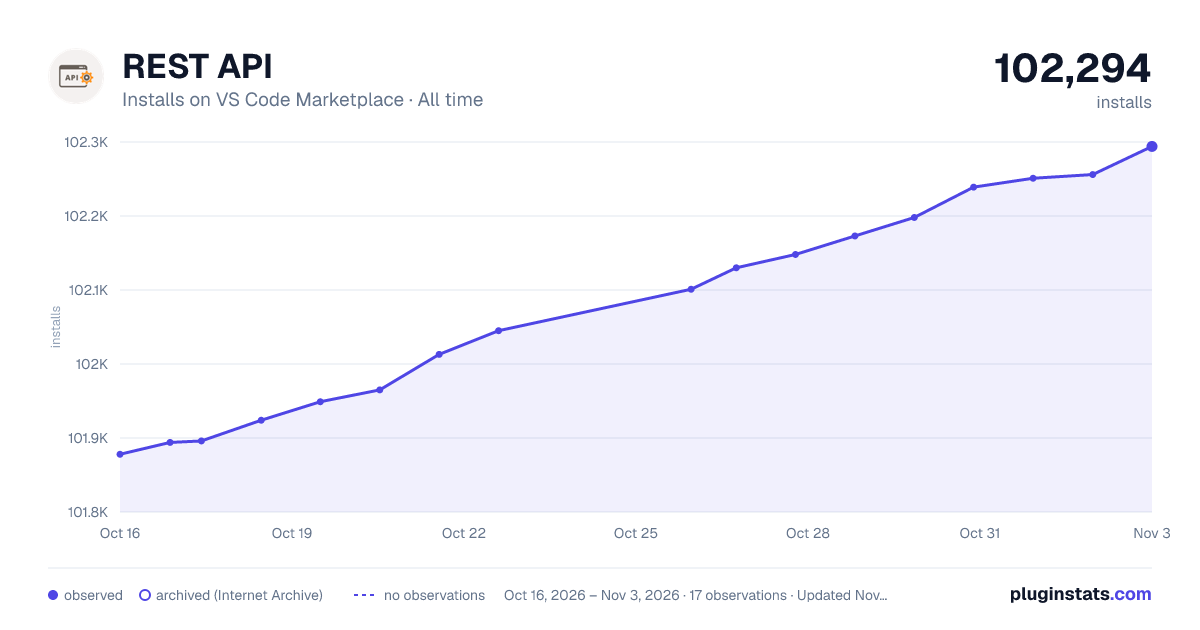

Adoption over time


7/30/90-day growth


Filled points are observed values; hollow points come from Internet Archive snapshots of the listing page. Dashed segments span periods with no observations — values between points are not interpolated.
Recent observations
Full history (4)Similar VS Code Marketplace Other plugins
Data source
Install counts, average rating, and rating counts come from the public Visual Studio Marketplace gallery API. Installs are cumulative and exclude updates.
Listing: https://marketplace.visualstudio.com/items?itemName=mkloubert.vs-rest-api. First seen Oct 16, 2026; last successful collection Oct 19, 2026. See the methodology.