 PluginStats
Unity Code Snippets installs statistics
By Kleber Silva · VS Code Marketplace · Snippets
All snippets you need for Unity3D development
Unity Code Snippets has 1,880,557 recorded installs on VS Code Marketplace.
It ranks #358 of 2,501 tracked VS Code Marketplace listings by installs.
It is rated 4.9 out of 5 from 32 ratings.
PluginStats has 4 daily observations since Oct 16, 2026; the latest is from Oct 19, 2026.
Rating: 4.94 / 5 from 32 ratings
About Unity Code Snippets
Unity Code Snippets
Create Unity classes and methods easily.
Features
2.0.0: Support to style configuration. Now you can use K&R and Allman (C#/Unity default) styles! More at Configuration section.
All the Unity code snippets you need. This extension intends to be the complete collection of Unity snippets for Visual Studio Code.
It takes advantage of latest Visual Studio Code snippets features to create the code faster for you.
MonoBehaviour
Create game classes like MonoBehaviours, NetworkBehaviours and StateMachineBehaviours easily. Also create common methods like Start(), Update() or OnTriggerEnter2D() and log calls.
Editor
Create Editor classes like Editor, EditorWindow and PropertyDrawer as easy as it can be.
ScriptableObject
You never remember the property that goes with the ScriptableObject to create it via Unity create menu? Not a problem.
Installation
As in any Visual Studio Code Extension you have several options to install:
• Enter the Visual Studio Code Marketplace, search for _Unity Code Snippets_ (or enter directly on the extension page) and click on _Install_ button. • Inside Visual Studio Code, enter in the Extensios panel, search for _Unity Code Snippets_ and click on _Install_ button • Run the following command in the Command Palette:
Configuration
Starting at version 2.0.0 the extension is configurable.
To configure the extension, open VSCode Settings and search for "Unity Code Snippets". Note that after changing any of the settings, you need to restart VSCode to apply them to the snippets.
Style
The indentation style for the snippets. For now you can choose between K&R (the default for 1.x version) and Allman (default to C#/Unity). If you need a different one, please leave an issue or upvote an existing one at the project issues bord. Default: K&R.
K&R style
Allman style
Use Private Keyword
Adds the private accessor keyword to private members. Default: true.
No private keyword
Auto Complete: Classes
Auto complete classes like MonoBehaviour and Editor.
Auto Complete: Methods
Auto complete methods like Start and OnCollisionEnter.
Auto Complete: Calls
Auto complete utility calls like Debug.Log and Debug.DrawLine.
Auto Complete: Attributes
Auto complete attributes like [SerializeField] and [RequireComponent] (just these two for now).
Auto Complete: Experimental Attributes
Auto complete all other attributes like [HideInInspector] and [ContextMenu]. There are a lot o attributes and this can pollute your Intellisense popup.
All the snippets
Start typing the names to create the corresponding snippet. Some of them have a special snippet to not mess up with the default Intellisense behavior.
Snippets are devided in categories, all of them can be enabled/disabled in the options.
• Classes: • Game Classes: • MonoBehaviour • StateMachineBehaviour • NetworkBehaviour • ScriptableObject • Editor Classes: • Editor • EditorWithReorderableList • EditorWindow • PropertyDrawer • ScriptableWizard • Standard Classes: • class • interface • MonoBehaviour Methods: • Awake() • FixedUpdate() • LateUpdate() • OnAnimatorIK() • OnAnimatorMove() • OnApplicationFocus() • OnApplicationPause() • OnApplicationQuit() • OnAudioFilterRead() • OnBecameInvisible() • OnBecameVisible() • OnCollisionEnter() • OnCollisionEnter2D() • OnCollisionExit() • OnCollisionExit2D() • OnCollisionStay() • OnCollisionStay2D() • OnConnectedToServer() • OnControllerColliderHit() • OnDestroy() • OnDisable() • OnDisconnectedFromServer() • OnDrawGizmos() • OnDrawGizmosSelected() • OnEnable() • OnFailedToConnect() • OnFailedToConnectToMasterServer() • OnFocus() • OnGUI() • OnHierarchyChange() • OnInspectorUpdate() • OnJointBreak() • OnJointBreak2D() • OnLostFocus() • OnMasterServerEvent() • OnMouseDown() • OnMouseDrag() • OnMouseEnter() • OnMouseExit() • OnMouseOver() • OnMouseUp() • OnMouseUpAsButton() • OnNetworkInstantiate() • OnParticleCollision() • OnParticleSystemStopped() • OnParticleTrigger() • OnPlayerConnected() • OnPlayerDisconnected() • OnPostRender() • OnPreCull() • OnPreRender() • OnProjectChange() • OnRenderImage() • OnRenderObject() • OnSceneGUI() • OnSelectionChange() • OnSerializeNetworkView() • OnServerInitialized() • OnStateEnter() • OnStateExit() • OnStateIK() • OnStateMove() • OnStateUpdate() • OnTransformChildrenChanged() • OnTransformParentChanged() • OnTriggerEnter() • OnTriggerEnter2D() • OnTriggerExit() • OnTriggerExit2D() • OnTriggerStay() • OnTriggerStay2D() • OnValidate() • OnWillRenderObject() • OnWizardCreate() • OnWizardOtherButton() • OnWizardUpdate() • Reset() • Start() • Update() • Calls: • Debug.Log() (type _log_) • Debug.LogError() (type _logerror_) • Debug.LogException() (type _logexception_) • Debug.LogWarning() (type _logwarning_) • Debug.LogFormat() (type _logformat_) • Debug.LogErrorFormat() (type _logerrorformat_) • Debug.LogWarningFormat() (type _logwarningformat_) • Debug.DrawLine() (type _drawline_) • Debug.DrawRay() (type _drawray_) • Attributes: • [SerializeField] (type _sfield_) • [RequireComponent] • Experimental snippets: • [AddComponentMenu] • [AssemblyIsEditorAssembly] • [BeforeRenderOrder] • [CanEditMultipleObjects] • [ColorUsage] • [ContextMenu] • [ContextMenuItem] • [CreateAssetMenu] • [CustomEditor] • [CustomEditorForRenderPipeline] • [CustomGridBrush] • [CustomPreview] • [CustomPropertyDrawer] • [Delayed] • [DisallowMultipleComponent] • [DrawGizmo] • [EditorWindowTitle] • [ExcludeFromObjectFactory] • [ExcludeFromPreset] • [ExecuteAlways] • [ExecuteInEditMode] • [FilePath] • [GradientUsage] • [GUITarget] • [Header] • [HelpURL] • [HideInCallstack] • [HideInInspector] • [Icon] • [ImageEffectAfterScale] • [ImageEffectAllowedInSceneView] • [ImageEffectOpaque] • [ImageEffectTransformsToLDR] • [ImageEffectUsesCommandBuffer] • [InitializeOnEnterPlayMode] • [InitializeOnLoad] • [InitializeOnLoadMethod] • [InspectorName] • [InspectorOrder] • [LightingExplorerExtension] • [Localization] • [MenuItem] • [Min] • [Multiline] • [NonReorderable] •…
Description from the VS Code Marketplace listing.
- allman
- configurable
- csharp
- gamedev
- k&r
- monobehaviour
- snippet
- unity
Where Unity Code Snippets sits in the listing
Each band is one page of 20. Installs on a log scale. Placement is projected from installs, so it can differ from the marketplace's own sort order. Hover a dot to see the listing.


Charts
Images: 30d · 1y · all time · 1600×900 dark


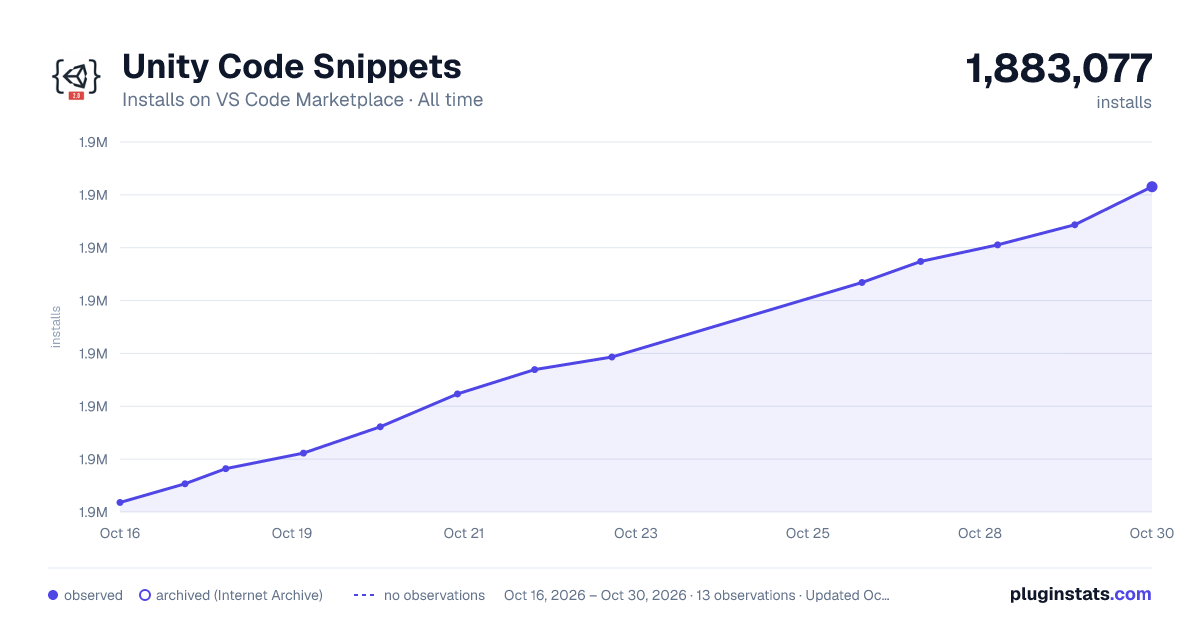

Adoption over time


7/30/90-day growth


Ranking history


Filled points are observed values; hollow points come from Internet Archive snapshots of the listing page. Dashed segments span periods with no observations — values between points are not interpolated.
Recent observations
Full history (4)Similar VS Code Marketplace Snippets plugins
Data source
Install counts, average rating, and rating counts come from the public Visual Studio Marketplace gallery API. Installs are cumulative and exclude updates.
Listing: https://marketplace.visualstudio.com/items?itemName=kleber-swf.unity-code-snippets. First seen Oct 16, 2026; last successful collection Oct 19, 2026. See the methodology.