 PluginStats
vscode-pydata-viewer installs statistics
By Percy (3 listings) · VS Code Marketplace · Other
Display PyData files (.npz .npy .pkl .pth) in VSCode.
vscode-pydata-viewer has 125,991 recorded installs on VS Code Marketplace, ranking #2071 of 2,501 tracked listings.
Rating: 5.00 / 5 from 3 ratings
About vscode-pydata-viewer
PyData Viewer
Display Python data files in VSCode.
Supported File Types
• Numpy Files: .npz .npy • Pickle Files: .pkl .pck .pickle .pkl.gz • PyTorch Files: .pth .pt .ckpt
Quick Start
- Install the extension from VS Code marketplace 2. Open any supported data file in VS Code 3. The file will automatically display with formatted content
Requirements
:pushpin: Python interpreter is required. Add Python to your system PATH or configure a custom Python path in the extension settings.
Configuration
Extension Settings
• vscode-pydata-viewer.pythonPath: Path to Python interpreter (default: "default") • vscode-pydata-viewer.scriptPath: Path to custom processing script (default: "default")
Python Path Setup
- Open VS Code Settings (Cmd+, or Ctrl+,) 2. Search for "pydata viewer" 3. Set Python Path: • System Python: Leave as "default" • Virtual Environment: /path/to/venv/bin/python • Conda Environment: /path/to/conda/envs/myenv/bin/python
Handling Local Imports
If your pickle files contain custom classes from your project, you have these options:
Option 1: Custom Processing Script
Create a custom script that imports your modules:
Then set the script path in VS Code settings:
Option 2: Project Environment
Configure the extension to use your project's Python environment:
Option 3: Workspace Settings
For project-specific configuration, create .vscode/settings.json:
Common Issues
"No module named 'your_module'" Error • Use a custom script with proper imports • Set Python path to your project environment • Ensure your virtual environment contains required dependencies
"Python not found" Error • Check Python installation • Set full path to Python executable in settings • Restart VS Code after changing settings
Examples
Basic Usage
Simply open any .npy, .pkl, or .pth file in VS Code.
Custom Objects
Change Log
Please refer to CHANGELOG.md.
Related Extensions
If you don't have Python available but need to view numpy files, try vscode-numpy-viewer.
Description from the VS Code Marketplace listing.
README badge
Show your rank in a README or on your website. The badge updates automatically.
Charts
Images: 30d · 1y · all time · 1600×900 dark


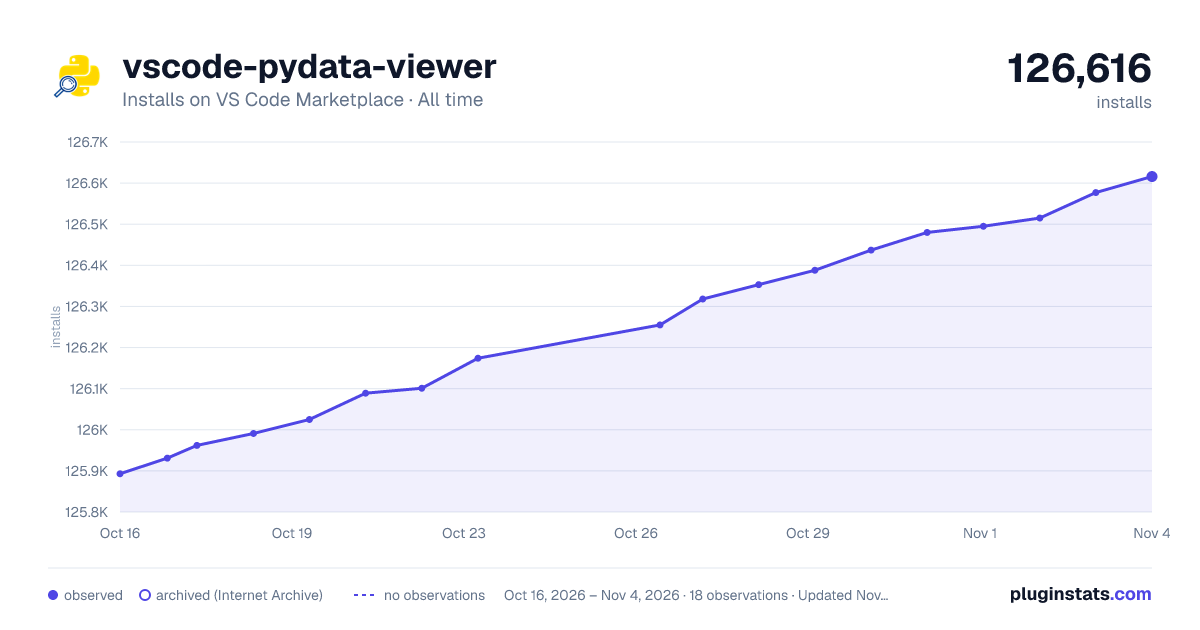

Adoption over time
7/30/90-day growth
Ranking history
Ratings over time
Listing placement
Listing placement
Filled points are observed values; hollow points come from Internet Archive snapshots of the listing page. Dashed segments span periods with no observations — values between points are not interpolated.
Each band is one page of 20. Installs on a linear scale. Placement is projected from installs, so it can differ from the marketplace's own sort order. Hover a dot to see the listing.
Recent observations
Full history (4)Similar VS Code Marketplace Other plugins
All 20 vscode-pydata-viewer alternativesData source
Install counts, average rating, and rating counts come from the public Visual Studio Marketplace gallery API. Installs are cumulative and exclude updates.
Listing: https://marketplace.visualstudio.com/items?itemName=Percy.vscode-pydata-viewer. First seen Oct 16, 2026; last successful collection Oct 19, 2026. See the methodology.