 PluginStats
Sort lines installs statistics
By Daniel Imms (6 listings) · VS Code Marketplace · Other
Sorts lines of text
Sort lines has 1,196,135 recorded installs on VS Code Marketplace, ranking #489 of 2,501 tracked listings.
Rating: 4.97 / 5 from 68 ratings
About Sort lines
Functionality
Sort lines of text in Visual Studio Code. The following types of sorting are supported:
| Command | Title | Comments |
|---|---|---|
| sortLines.sortLines | Sort lines (ascending, case sensitive) | Keybound to F9* |
| sortLines.sortLinesCaseInsensitive | Sort lines (ascending, case insensitive) | |
| sortLines.sortLinesCaseInsensitiveUnique | Sort lines (unique ascending, case insensitive) | |
| sortLines.sortLinesReverse | Sort lines (descending, case sensitive) | Reverse character code based sort |
| sortLines.sortLinesLineLength | Sort lines (line length ascending) | |
| sortLines.sortLinesLineLengthReverse | Sort lines (line length descending) | |
| sortLines.sortLinesVariableLength | Sort lines (variable length ascending) | |
| sortLines.sortLinesVariableLengthReverse | Sort lines (variable length descending) | |
| sortLines.sortLinesNatural | Sort lines (natural) | Sorts alphabetically but groups multi-digit numbers (Wikipedia) |
| sortLines.sortLinesUnique | Sort lines (unique ascending, case sensitive) | Regular character code keeping only unique items |
| sortLines.sortLinesShuffle | Sort lines (shuffle) | |
| sortLines.removeDuplicateLines | Sort lines (remove duplicate lines) | |
| sortLines.keepOnlyDuplicateLines | Sort lines (keep only duplicate lines) |
* Note that this overrides the toggle breakpoint keybinding, you can unbind it by adding this to your keybindings.json file:
`{ "key": "f9", "command": "-sortLines.sortLines", "when": "editorTextFocus" }`
Settings
| Name | Description | Default |
|---|---|---|
| sortLines.filterBlankLines | (boolean) Filter out blank (empty or whitespace-only) lines. | false |
| sortLines.sortEntireFile | (boolean) Sort entire file if no selection is active. | false |
Install
- Open VS Code
- Press F1
- Type "install"
- Select "Extensions: Install Extension".
- Select sort-lines from the list

Usage
Select the lines to sort, press F1 type sort and select the desired sort. The regular sort has the default hotkey F9.

Description from the VS Code Marketplace listing.
- keybindings
README badge
Show your rank in a README or on your website. The badge updates automatically.
Charts
Images: 30d · 1y · all time · 1600×900 dark


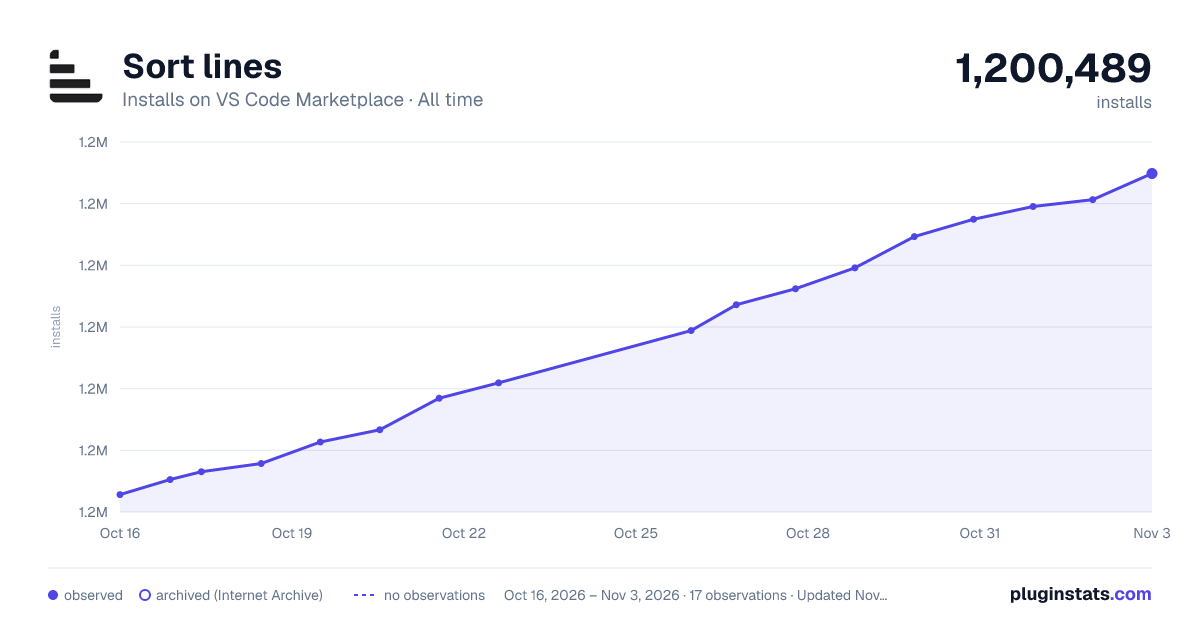

Adoption over time
7/30/90-day growth
Ranking history
Ratings over time
Listing placement
Listing placement
Filled points are observed values; hollow points come from Internet Archive snapshots of the listing page. Dashed segments span periods with no observations — values between points are not interpolated.
Each band is one page of 20. Installs on a linear scale. Placement is projected from installs, so it can differ from the marketplace's own sort order. Hover a dot to see the listing.
Recent observations
Full history (5)Similar VS Code Marketplace Other plugins
All 20 Sort lines alternativesData source
Install counts, average rating, and rating counts come from the public Visual Studio Marketplace gallery API. Installs are cumulative and exclude updates.
Listing: https://marketplace.visualstudio.com/items?itemName=Tyriar.sort-lines. First seen Oct 16, 2026; last successful collection Oct 20, 2026. See the methodology.