 PluginStats
Markdown Table installs statistics
By Takumi Ishii · VS Code Marketplace · Other
Add features to edit markdown table.
Markdown Table has 262,538 recorded installs on VS Code Marketplace, ranking #1264 of 2,502 tracked listings.
Rating: 4.93 / 5 from 30 ratings
About Markdown Table
Markdown Table
Add features to edit markdown table.
1. Features
| Title | Command | Keybinding | In the Editor Right Click Menu |
|---|---|---|---|
| Navigate to next cell. | markdowntable.nextCell | Tab | No |
| Navigate to previous cell. | markdowntable.prevCell | Shift + Tab | No |
| Navigate to next cell (w/o format). | markdowntable.nextCellWithoutFormat | No | |
| Navigate to previous cell (w/o format). | markdowntable.prevCellWithoutFormat | No | |
| Format all tables. | markdowntable.format | Yes (*1) | |
| Convert TSV to table. | markdowntable.tsvToTable | Yes (only when selecting range) (*1) | |
| Convert CSV to table. | markdowntable.csvToTable | No (only when selecting range) (*1) | |
| Insert column in the right. | markdowntable.insertRight | Yes (*1) | |
| Insert column in the left. | markdowntable.insertLeft | Yes (*1) | |
| Align to Left. | markdowntable.alignLeft | Yes (*1) | |
| Align to Center. | markdowntable.alignCenter | Yes (*1) | |
| Align to Right. | markdowntable.alignRight | Yes (*1) | |
| Move to Left. | markdowntable.moveLeft | Yes (*1) | |
| Move to Right. | markdowntable.moveRight | Yes (*1) |
(*1) By using configuration, you can switch show or hide menu item.
2. Demo
2.1. Navigate to next cell (with auto format & auto insert row)
Key binding to Tab.
- Auto navigate to next cell when pressing Tab key in table.
- When out of table, vscode's default "tab" behavior is operated.
- Auto insert new row, when the cursor is in last row in table.
- with auto format

2.1.1. If you want to use it without auto format
- Use markdowntable.nextCellWithoutFormat command
- If you want, you need to assign this command to some key binding by yourself.
2.2. Navigate to prev cell
Key binding to Shift+Tab.
- Auto navigate to prev cell when pressing Shift+Tab key in table.
- When out of table, vscode's default "outdent" behavior is operated.
- with auto format

2.2.1. If you want to use it without auto format
- Use markdowntable.prevCellWithoutFormat command
- If you want, you need to assign this command to some key binding by yourself.
2.3. Convert from text to table
- Convert from TSV
- Tips: This feature is supposed to make table from excel cells.

- Convert from CSV
- Note: This menu item is hidden in default. You can show it by setting markdowntable.showMenu.csvToTable configuration as true.

2.4. Insert column
- Add context menu to insert column

2.6. Move column/columns
- Move selected multi columns at once.

2.5. Align column/columns
-
Align column to left/center/right.
-
Align selected multi columns at once.


2.7. Format table
- Auto format column width of all tables in current document
- Align data and column header (can be disabled by configuration)

3. Extension Configurations…
Description from the VS Code Marketplace listing.
- keybindings
- markdown
- mdx
- quarto
README badge
Show your rank in a README or on your website. The badge updates automatically.
Charts
Images: 30d · 1y · all time · 1600×900 dark


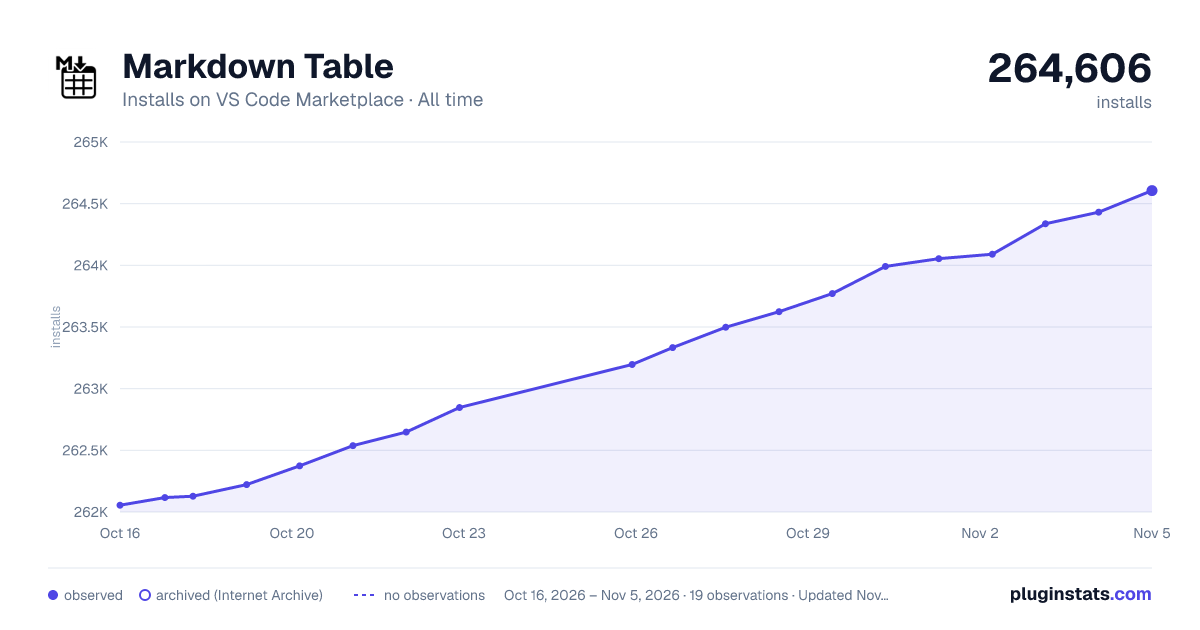

Adoption over time
7/30/90-day growth
Ranking history
Ratings over time
Listing placement
Listing placement
Filled points are observed values; hollow points come from Internet Archive snapshots of the listing page. Dashed segments span periods with no observations — values between points are not interpolated.
Each band is one page of 20. Installs on a linear scale. Placement is projected from installs, so it can differ from the marketplace's own sort order. Hover a dot to see the listing.
Recent observations
Full history (6)Similar VS Code Marketplace Other plugins
All 20 Markdown Table alternativesData source
Install counts, average rating, and rating counts come from the public Visual Studio Marketplace gallery API. Installs are cumulative and exclude updates.
Listing: https://marketplace.visualstudio.com/items?itemName=TakumiI.markdowntable. First seen Oct 16, 2026; last successful collection Oct 21, 2026. See the methodology.