 PluginStats
learn-preview installs statistics
By Microsoft (224 listings) · VS Code Marketplace · Snippets
Learn Markdown Preview Extension
learn-preview has 265,676 recorded installs on VS Code Marketplace.
It ranks #1249 of 2,501 tracked VS Code Marketplace listings by installs.
It is rated 3.3 out of 5 from 3 ratings.
PluginStats has 4 daily observations since Oct 16, 2026; the latest is from Oct 19, 2026.
Rating: 3.33 / 5 from 3 ratings
About learn-preview
Learn Preview Extension
This extension uses the learn.microsoft.com CSS to provide more accurate preview for Markdown published to Learn via the Open Publishing System (OPS). This includes all Markdown as supported by the CommonMark specification, as well as custom Markdown syntax for Learn, such as:
• Alerts (note, tip, important, caution, and warning). • Embedded code snippets. • Tabbed content.
There are a few options for how to see Learn Preview:
1. Hit F1 to open the VS Code command palette. 1. Start typing to filter the list of commands. 1. Select Learn: Preview. The preview will open side-by-side.
You can also use the default keyboard shortcut, Alt+DP.
NEW: Learn Preview now also includes Search Results Preview, which uses publicly available information from Google to approximate how your article will look when returned in Google search. This helps validate that your title, description, and other information will be helpful for users trying to find the right technical information. See Search Results Preview below for more information.
Theme Support
The learn-preview extension supports light, dark and high contrast themes. You can select a default theme by going to File => Preferences => Settings => Extensions => Learn Preview Extension Configuration and choosing a theme. A toast notification will show after a theme is selected to prompt the user to reload the VS Code for the settings to take effect.
If you also have the Learn Markdown extension installed, you can access preview from the Learn Markdown menu:
1. Type Alt+M to open the menu. 1. Select Preview.
To install both Learn Preview and Learn Markdown, along with other useful extensions for authoring Markdown for learn.microsoft.com, install the Learn Authoring Pack.
Search Results Preview
Using publicly available information from Google, Search Results Preview generates an approximation of what your article will look like when returned in Google search on Chrome with default font settings. This is the most common way people find content on Learn, accounting for more than half of all page hits. Because much of Google's algorithm is secret, the preview might not match exactly. But it gives you an idea of how your title will be truncated and what description users will see when they find your article via search. Use it to make sure you're providing the most helpful, relevant information.
To use Search Results Preview:
1. In VS Code with Learn Preview installed, click Alt + M to open the Learn menu or F1 to open the command palette. 1. Select Search Results Preview from the Learn menu or filter to find Learn: Search Results Preview from the command palette. 1. A simple preview opens in a side-by-side window, approximating how your article will look in Google search results.
Known Issues
Learn Preview doesn't support all Learn custom Markdown. In some cases, custom Markdown renders as plain text. In rare cases, unsupported Markdown causes preview to break. For example, lightboxed images aren't supported and breaks preview. We're investigating switching to a more accurate preview based on Learn Build, but for now these edge cases are low priority to fix.
Operations & support
| I want to… | Go to |
| Operate / fix a live issue | docs/runbooks/runbook-learn-preview.md | | Know where it runs (topology, pipelines, telemetry) | docs/ENVIRONMENTS.md | | Understand the alerts | docs/monitor-alerts.md | | Run the tests | docs/How to run tests.md |
Description from the VS Code Marketplace listing.
- commonmark
- dfm
- docfx
- markdown
- yaml
Where learn-preview sits in the listing
Each band is one page of 20. Installs on a log scale. Placement is projected from installs, so it can differ from the marketplace's own sort order. Hover a dot to see the listing.


Charts
Images: 30d · 1y · all time · 1600×900 dark


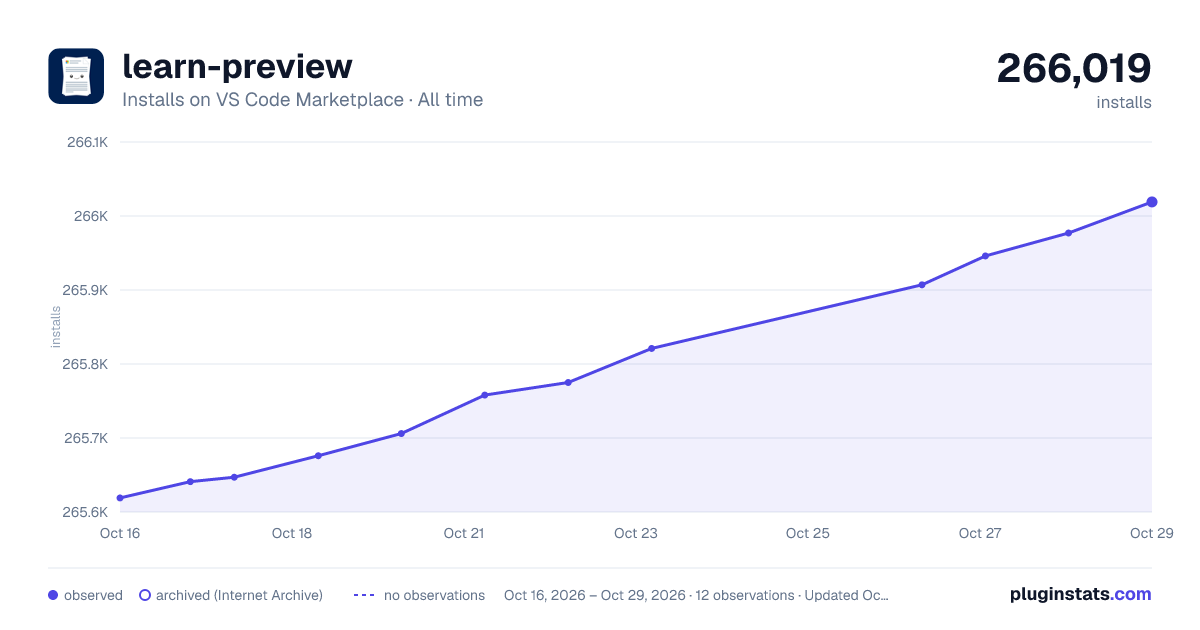

Adoption over time


7/30/90-day growth


Ranking history


Filled points are observed values; hollow points come from Internet Archive snapshots of the listing page. Dashed segments span periods with no observations — values between points are not interpolated.
Recent observations
Full history (4)Similar VS Code Marketplace Snippets plugins
Data source
Install counts, average rating, and rating counts come from the public Visual Studio Marketplace gallery API. Installs are cumulative and exclude updates.
Listing: https://marketplace.visualstudio.com/items?itemName=docsmsft.docs-preview. First seen Oct 16, 2026; last successful collection Oct 19, 2026. See the methodology.