 PluginStats
Fix JSON installs statistics
By Oliver Sturm · VS Code Marketplace · Formatters
Fix JSON content using jsonic
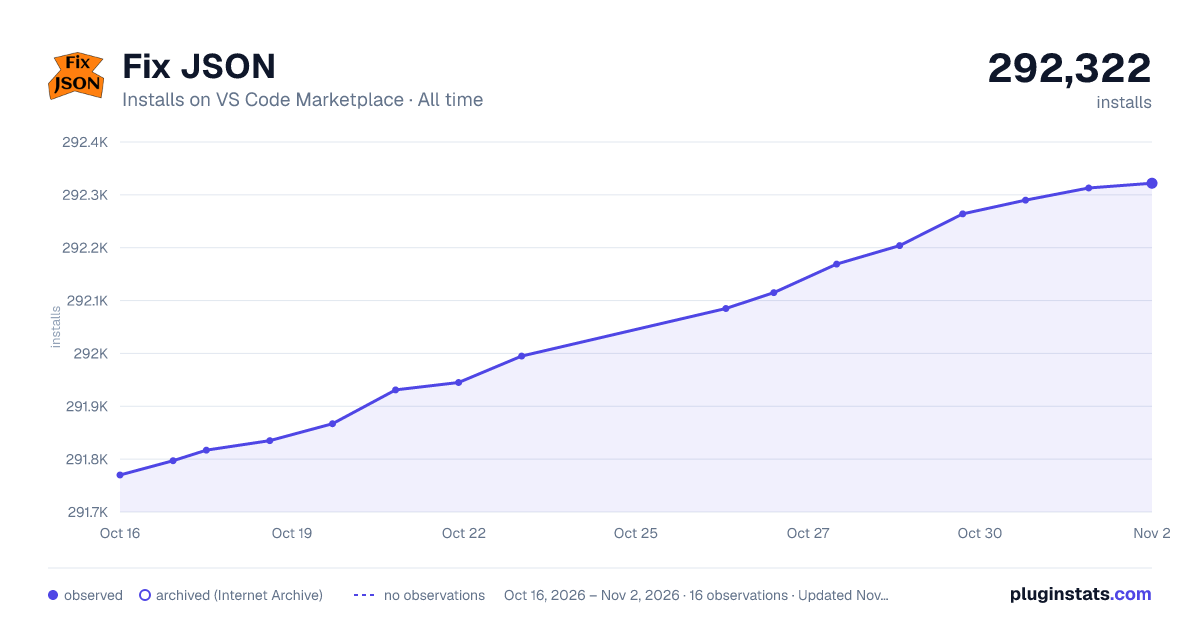
Fix JSON has 291,835 recorded installs on VS Code Marketplace.
It ranks #1179 of 2,501 tracked VS Code Marketplace listings by installs.
It is rated 5.0 out of 5 from 30 ratings.
PluginStats has 4 daily observations since Oct 16, 2026; the latest is from Oct 19, 2026.
Rating: 4.97 / 5 from 30 ratings
About Fix JSON
fix-json
fix-json uses jsonic to parse JSON data in the current editor, then reformats the content using JSON.stringify.
You can enter JSON data using the relaxed rules supported by jsonic. For instance, quotes around property names and many string values are not required. This makes it much easier to type JSON, or to convert JavaScript objects into valid JSON.
Features
• Fix JSON command: Run the Fix JSON command to fix either the selected content in the active editor or the whole document if there is no selection. • Format Document integration: Use the standard VS Code "Format Document" action on JSON files to apply the same fixing/formatting logic.
Error detection
If errors are encountered during parsing, they are shown as editor diagnostics (squiggles) with a message in the status bar.
Indentation
The extension indents the generated JSON using a default number of spaces as configured in your editor.tabSize setting. You can use the setting fixJson.indentationSpaces to override the number specifically for this extension.
No effort is made to provide formatting beyond the standard output from JSON.stringify(text, null, indentation). I recommend using Prettier.
Notes
• Currently this extension targets JSON only. JSON with comments (JSONC) is not supported by the parser in use at this time.
Installation
• VS Marketplace: https://marketplace.visualstudio.com/items?itemName=oliversturm.fix-json • Open VSX: https://open-vsx.org/extension/oliversturm/fix-json • Manual: Download a .vsix from the GitHub Releases page and install via the command palette (Extensions: Install from VSIX...).
Usage
• Run the Fix JSON command from the Command Palette. • Or use "Format Document" on a JSON file. On first use, select "Fix JSON" as the default formatter for JSON if prompted.
Extension Settings
This extension contributes the following settings:
• fixJson.indentationSpaces: Number of spaces to use for indentation of formatted JSON output. If not set, your editor.tabSize setting is used.
Development
• Run & debug: F5 (launches an Extension Development Host). • Tests: npm test (Mocha unit tests of the core logic in lib/fixText.js). • Lint: npm run lint (ESLint v9 flat config). • Package: npm run package (produces a .vsix).
CI/CD & Releases
• CI (.github/workflows/ci.yml) runs on pushes/PRs to the default branch: installs, lints, tests, and packages the extension; uploads the .vsix artifact. • Releases (.github/workflows/release.yml) run on tags matching v*.*.* or via manual dispatch. Publish steps require repository secrets: • VSCE_PAT for VS Marketplace • OVSX_PAT for Open VSX
See CHANGELOG.md for notable changes.
Description from the VS Code Marketplace listing.
- fix
- format
- JSON
Charts
Images: 30d · 1y · all time · 1600×900 dark



Adoption over time


7/30/90-day growth


Ratings over time


Listing placement


Filled points are observed values; hollow points come from Internet Archive snapshots of the listing page. Dashed segments span periods with no observations — values between points are not interpolated.
Each band is one page of 20. Installs on a log scale. Placement is projected from installs, so it can differ from the marketplace's own sort order. Hover a dot to see the listing.
Recent observations
Full history (4)Similar VS Code Marketplace Formatters plugins
All 20 Fix JSON alternativesData source
Install counts, average rating, and rating counts come from the public Visual Studio Marketplace gallery API. Installs are cumulative and exclude updates.
Listing: https://marketplace.visualstudio.com/items?itemName=oliversturm.fix-json. First seen Oct 16, 2026; last successful collection Oct 19, 2026. See the methodology.