 PluginStats
Diff & Merge installs statistics
By MoshFeu (2 listings) · VS Code Marketplace · Other
Show diffs and merge
Diff & Merge has 143,091 recorded installs on VS Code Marketplace.
It ranks #1910 of 2,501 tracked VS Code Marketplace listings by installs.
It is rated 5.0 out of 5 from 16 ratings.
PluginStats has 4 daily observations since Oct 16, 2026; the latest is from Oct 19, 2026.
Rating: 5.00 / 5 from 16 ratings
About Diff & Merge
Diff & Merge!
Show diffs and allow mergeing from left side to right side.
✋ This extension is maintained on my free time. I'm only fixing / developing features requested by the community.
🧙♂️ Notice that I (and seems that many others) couldn't find an easy way to implement such feature. Therefor, the user experience may not be perfect. The colors, fonts, icons, shortcuts and other UI elements may not be the same as vscode's.
👂I would love to hear your feedback to improve this tool
Found a bug? Have an extra ordinary idea? Please create an issue
Features
1. Diff and merge - file against file
Or
File against selected file (#40)
How to use?
1. Right click on a file [1] in _explorer_ panel or on an editor tab 2. Click [Diff & Merge] Select file to compare 3. Right click on another file or an editor tab 4. Click [Diff & Merge] Compare file with selected file
2. Diff and merge - file against clipboard (#25)
How to use?
1. Right click on a file [1] in _explorer_ panel 2. Click [Diff & Merge] Choose a file to merge 3. Choose a file [1] to compare
3. Diff and merge - git - file against older version
How to use?
1. Right click on a file [1] in the source control panel under Changes (staged files are not editable anyway) 1. Click on [Diff & Merge] Open Changes
4. Diff and merge - svn - changes (tested with the svg extension)
1. Right click on a file [1] in the source control panel under Changes (staged files are not editable anyway) 1. Click on [Diff & Merge] Open Changes
4. Diff and merge - from scratch
How to use?
1. Open commmand palette (Command / Ctrl + Shift + P) 1. Search for [Diff & Merge] Blank diff view 2. An empty diff view will opened. Paste a code in both sides and compare
[1] - Make sure that the file is text based (not images, binaries, pdfs etc.)
To Do
• [ ] Add save button next to the diff navigator buttons • [ ] Add "Go to original file" next to the save button • [ ] Allow to change the "save" key binding • [ ] Focus the tab when asking to compare a file that already open • [ ] Add option to ignore files by pattern (?)
Known issues
• Context menu shows up for non text based files (binary etc.) • Diff editors theme has different look & feel than current theme (monaco is not fully competiable with vscode theme) • Left editor can be edited (to allow copy/paste for example) but can't saved • When first comparing, the theme configuration file appearing for a moment - meant to retrive theme variables for the diff view theme • [API limitation] For single comparing - left editor is not editable • [API limitation] Draft indication is next to the "x" icon but not on top of it • [API limitation] Save is only with ctrl / cmd + s. There is no API to listen to "Save" event or getting the current save key binding • [API limitation] File > Save is disabled • [API limitation] When moving from dark to light theme, opened windows doesn't refreshed
Development
Hit F5
To run the diff view directly in the browser
1. yarn webview:watch 2. yarn monaco (in different terminal) 3. Go to http://localhost:12345/wrapper.html
Credits
Icons made by Pixel perfect from www.flaticon.com
Thanks
@evilrix
@bedge
@evilrix
I would love to have you in this list :)
Description from the VS Code Marketplace listing.
- compare
- diff
- diff-merge
- keybindings
Charts
Images: 30d · 1y · all time · 1600×900 dark


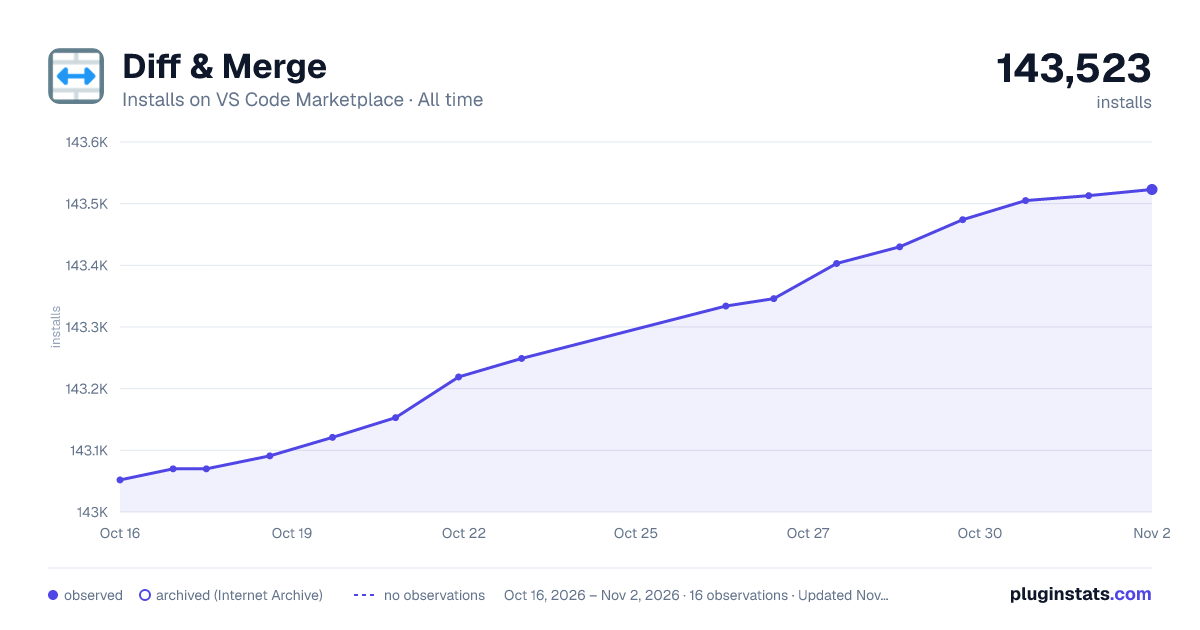

Adoption over time


7/30/90-day growth


Ranking history


Ratings over time


Listing placement


Filled points are observed values; hollow points come from Internet Archive snapshots of the listing page. Dashed segments span periods with no observations — values between points are not interpolated.
Each band is one page of 20. Installs on a log scale. Placement is projected from installs, so it can differ from the marketplace's own sort order. Hover a dot to see the listing.
Recent observations
Full history (4)Similar VS Code Marketplace Other plugins
All 20 Diff & Merge alternativesData source
Install counts, average rating, and rating counts come from the public Visual Studio Marketplace gallery API. Installs are cumulative and exclude updates.
Listing: https://marketplace.visualstudio.com/items?itemName=moshfeu.diff-merge. First seen Oct 16, 2026; last successful collection Oct 19, 2026. See the methodology.