 PluginStats
MSYS2/Cygwin/MinGW/Clang support installs statistics
By Oleg A. Khlybov · VS Code Marketplace · Other
VS Code extension to set and retrieve MSYS2/Cygwin/MinGW/Clang configuration
MSYS2/Cygwin/MinGW/Clang support has 354,751 recorded installs on VS Code Marketplace, ranking #1040 of 2,501 tracked listings.
Rating: 5.00 / 5 from 1 ratings
About MSYS2/Cygwin/MinGW/Clang support
MSYS2/Cygwin/MinGW/Clang support extension for Visual Studio Code
This extension brings in configuration and usage of the MSYS2, Cygwin, MinGW and Clang toolchains to the Visual Studio Code and its OSS builds like VSCodium.
Technically the extension provides a set of commands for use with the ${command:...} substitution feature used throughout the VS Code and its extensions to enhance their configurability. These commands return full paths to the respective toolchain-specific executables such as the CMake itself, generators, compilers etc.
Features
• CMakeTools integration • 32/64-bit MSYS2/Cygwin/MinGW/Clang toolchain configurations • CppTools integration • Cross-language debugging with GDB • Code navigation with IntelliSense • Isolated operation where no global PATH modification is neccessary • Support for MSVCRT-based and UCRT-based MinGW toolchains provided by MSYS2
Setup & Configuration
This extension is primarily designed to work with the CMakeTools extension although it is possible to make use of it with any build system which utilizes the command substitution capability.
The following steps are to be performed in order to configure a minimal usable MSYS2, Cygwin, MinGW/Clang and Visual Studio Code environments.
Hint the VS Code canonic Ctrl+Shift+P command palette shortcut extensively used below has a very convenient F1 alias.
Per user Visual Studio Code extensions
The following extensions are to be installed
by opening the Visual Studio Code extensions panel with the Ctrl+Shift+X keyboard shortcut and pasting the above line into the entry, then installing each of highlighted extensions individually.
Next come optional yet recommended extensions which enhance the usage experience
which provide the CMake and Fortran file syntax highlighting, respectively.
Per user VSCodium extensions
Unfortunately there are not all extensions available from alternative OpenVSX extension repository used by OSS builds of Visual Studio Code such as VSCoduim. This specifically means no out-of-the-box launch/debugging support. The avaliable extensions are installed as follows:
The following extensions are to be installed
by opening the Visual Studio Code extensions panel with the Ctrl+Shift+X keyboard shortcut and pasting the above line into the entry, then installing each of highlighted extensions individually.
Per user Visual Studio Code configuration
Currently the MSYS2 extension provides no means of auto-detecting the supported toolchain locations.
Instead, it is configured manually via the per user configuration settings specified in the settings.json configuration file. These settings can be set either via the UI or by direct editing the settings.json file in the form of raw JSON data. In either case, the settings are accessible via the Ctrl+, keyboard shortcut.
MSYS2 configuration
The (64-bit only) MSYS2 location is specified by the msys2.root configuration setting in the settings.json file which is set to c:\msys64 by default as it is the default location proposed by the MSYS2 installer. This specifically means that no manual configuration is required when MSYS2 is installed into default location.
Cygwin configuration
The 32/64-bit Cygwin locations are specified by the cygwin32.root and cygwin64.root configuration settings in the settings.json file which are set to c:\cygwin and c:\cygwin64 by default, respectively, as they are the default locations proposed by the Cygwin installers. This specifically means that no manual configuration is required when Cygwins are installed into default locations
MinGW configuration
The 32/64-bit MinGW locations are specified by the respective mingw32.root and mingw64.root configuration settings. If not set, their values will be computed according to the msys2.root value, hence there is no need to coupe with them in order to use the MSYS2-provided MinGW installations.
Note that in order to use the Cygwin-provided MinGW toolchains the mingw??.root configuration settings are to be set manually.
MinGW selection
The MSYS2 extension offers selection of the source the MinGW toolchain comes from.
There are three implemented MinGW providers:
• MSYS2 • Cygwin • Standalone MinGW
The MinGW selection logics works as follows. If the mingw??.root configuration setting is set, it is used to determine the root path to the standalone MinGW installation such as MinGW-W64 or TDM-GCC. Otherwise, the mingw??.provider configuration setting is used to determine the MinGW provider. There are four possible values for it: msys2, cygwin32, cygwin64 and anything else with msys2 taken as the default. If it is set to anything but the first three, the selector falls back to the above mingw??.root case. 32/64-bit MinGW installations are determined separately with the respective configuration settings.
MinGW runtimes
There are currently two different C runtimes supported by the MinGW: the traditional MSVCRT-based runtime and the Microsoft's new universal C runtime.
Modern MSYS2 provides support for both of them. Moreover, both versions do happily coexist within the MSYS2 installation inside {msys2.root}/mingw?? and {msys2.root}/ucrt64 directories, respectively.
This MSYS2 extension allows to select particular MinGW kit for use by the CMakeTools: the MSVCRT-based builds are accessible via the MinGW32 and MinGW64 kits and the 64-bit UCRT-based build is accessible via the UCRT64 kit (note that there is no 32-bit UCRT).
As the UCRT-based build is bound to the MSYS2 installation there is no particular configuration for it.
Clang configuration
The MSYS2 extension provides support for the MSYS2-based 32/64-bit Clang toolchains in the same way as for the UCRT. As such, there is no configuration needed aside from installing the Clang toolchain itself which is expected to reside in the {msys2.root}/clang?? directories. After that, the Clang toolchains are accessible via the Clang32 and Clang64 kits within the CMakeTools.
CMake & generator configuration…
Description from the VS Code Marketplace listing.
- build
- clang
- cmake
- cygwin
- mingw
- msys2
- win32
- windows
README badge
Show your rank in a README or on your website. The badge updates automatically.
Charts
Images: 30d · 1y · all time · 1600×900 dark


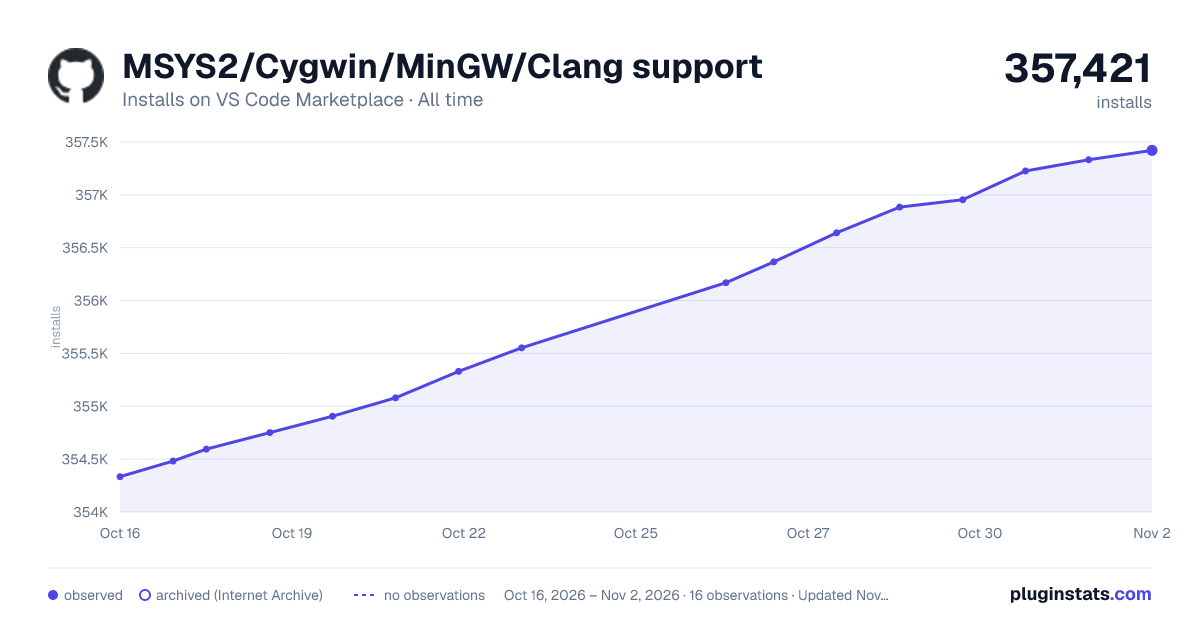

Adoption over time
7/30/90-day growth
Ranking history
Ratings over time
Listing placement
Listing placement
Filled points are observed values; hollow points come from Internet Archive snapshots of the listing page. Dashed segments span periods with no observations — values between points are not interpolated.
Each band is one page of 20. Installs on a linear scale. Placement is projected from installs, so it can differ from the marketplace's own sort order. Hover a dot to see the listing.
Recent observations
Full history (4)Similar VS Code Marketplace Other plugins
All 20 MSYS2/Cygwin/MinGW/Clang support alternativesData source
Install counts, average rating, and rating counts come from the public Visual Studio Marketplace gallery API. Installs are cumulative and exclude updates.
Listing: https://marketplace.visualstudio.com/items?itemName=fougas.msys2. First seen Oct 16, 2026; last successful collection Oct 19, 2026. See the methodology.