 PluginStats
All Autocomplete installs statistics
By Atishay Jain · VS Code Marketplace · Other
Create autocomplete items from open files in VSCode.
All Autocomplete has 644,356 recorded installs on VS Code Marketplace, ranking #729 of 2,501 tracked listings.
Rating: 4.38 / 5 from 32 ratings
About All Autocomplete
VSCode All Autocomplete
Provides autocompletion in Visual Studio Code items based on all open editors.
Features
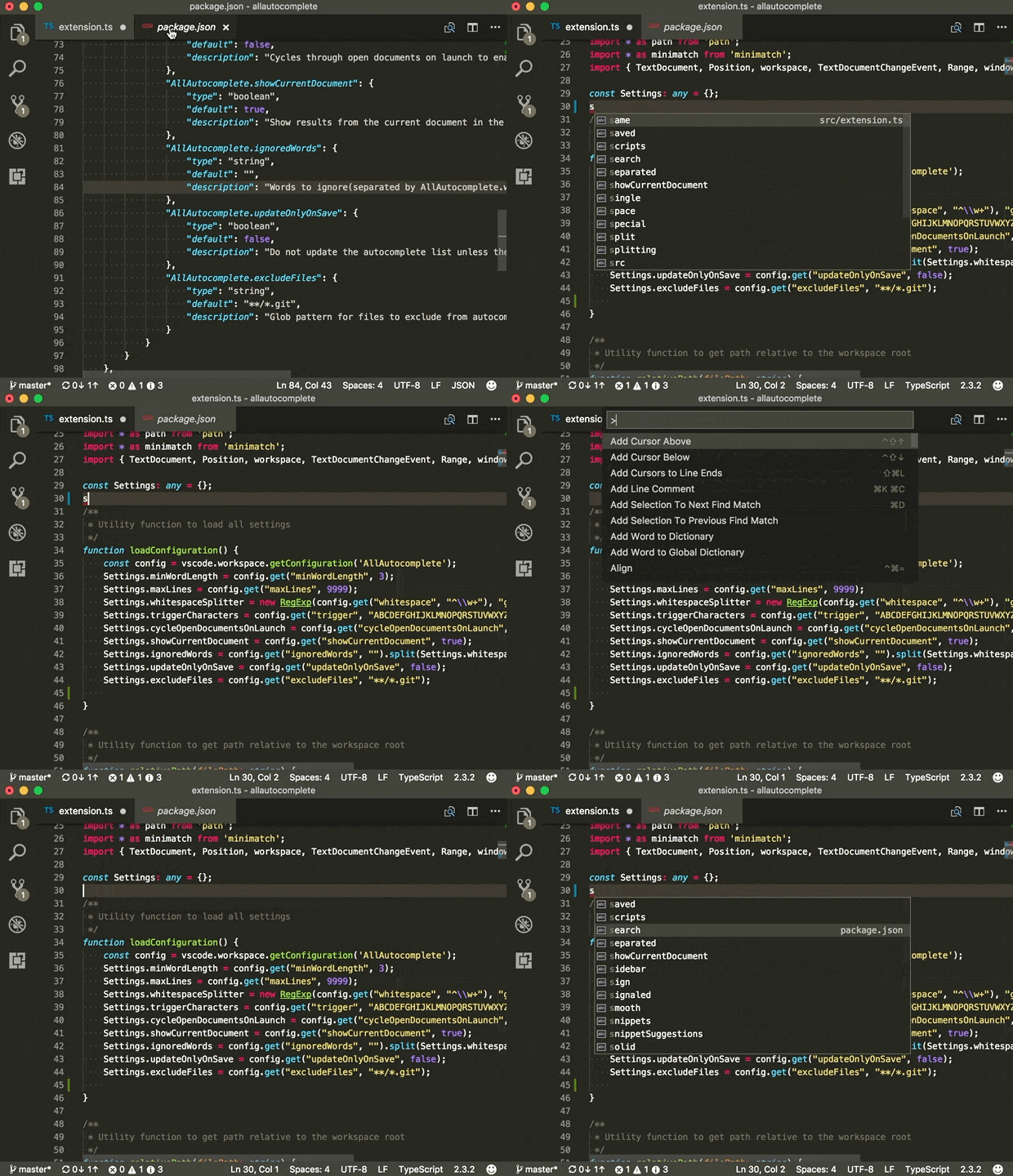
Native VSCode
Use editor.wordBasedSuggestionsMode setting and set this to allDocuments to have VSCode to support most of this natively.
Items in the Cmd+P Menu
Toggle Suggestions From The Current File
Extension Settings
This extension has the following settings:
AllAutocomplete.minWordLength: Minimum word length to keep in autocomplete list.AllAutocomplete.maxLines: Maximum number of lines to read from a file.AllAutocomplete.maxItemsInSingleList: Maximum number of items sent to autocomplete in a single API call (Autocomplete might not complete more items than this in a call).AllAutocomplete.whitespace: Regex to use for splitting whitespace.AllAutocomplete.showCurrentDocument: Show results from the current document in the autocomplete results.AllAutocomplete.ignoredWords: Words to ignore(separated by AllAutocomplete.whitespace) from autocomplete.AllAutocomplete.updateOnlyOnSave: Do not update the autocomplete list unless the document is saved.AllAutocomplete.excludeFiles: Glob pattern for files to exclude from autocomplete search.AllAutocomplete.languageWhitespace: Regex for splitting whitespace (Language specific). Specify as a map with a language ID and regex.AllAutocomplete.languageSpecialCharacters: Regex for finding special characters that languages treat differently in autocomplete. For example,.in CSS.AllAutocomplete.wordListFiles: Array of strings that represent path to files that behave as if they are always open. These can be used as stores for headers, word lists etc. for autocomplete. Absolute paths can be used here or relative paths to the folder(s) which form the workspace root.AllAutocomplete.nonContributingLanguagesList of languages that do not contribute words but can consume words from the autocomplete list.AllAutocomplete.nonContributingToSelfLanguagesList of languages that do not supply word lists to the files of the same language but can consume words from All Autocomplete as well as supply word lists to other files.AllAutocomplete.dontContributeToSelfDisables supplying word lists to files of the same language. Equivalent to putting all languages inAllAutocomplete.nonContributingToSelfLanguages.
Suggestions in comments/strings
- Autocomplete can provide suggestions within suggestions/strings. To get those, please enable the following settings:
  // Controls whether suggestions should automatically show up while typing.
  "editor.quickSuggestions": {
    "other": true,
    "comments": true,
    "strings": true
  }
Needs Suggestions
If you feel that the whitespace splitter is wrong in some language, please report a github issue or better a pull request with the correct regex in package.json.
Known Issues
Emmet collision
The emmet plugin takes over the special character # in CSS and therefore that cannot be auto-completed.
Performance Impact
CPU
- When using real-time mode by setting
AllAutocomplete.showCurrentDocument=true, the plugin tries to update the index on each addition/deletion. - When
AllAutocomplete.showCurrentDocument=false, the index updates itself on each change to focussed editor. - When
AllAutocomplete.updateOnlyOnSave=true, the index is updated only on save and open/close of documents.
RAM
AllAutocomplete.maxItemsInSingleListcontrols the number of items populating the autocomplete list.AllAutocomplete.maxLinescontrol the number of lines to read in a document. Longer documents can be ignored.
Enjoy!
Description from the VS Code Marketplace listing.
- all autocomplete
- autocomplete
- code completion
- intellisense
- intellisense from open files
README badge
Show your rank in a README or on your website. The badge updates automatically.
Charts
Images: 30d · 1y · all time · 1600×900 dark


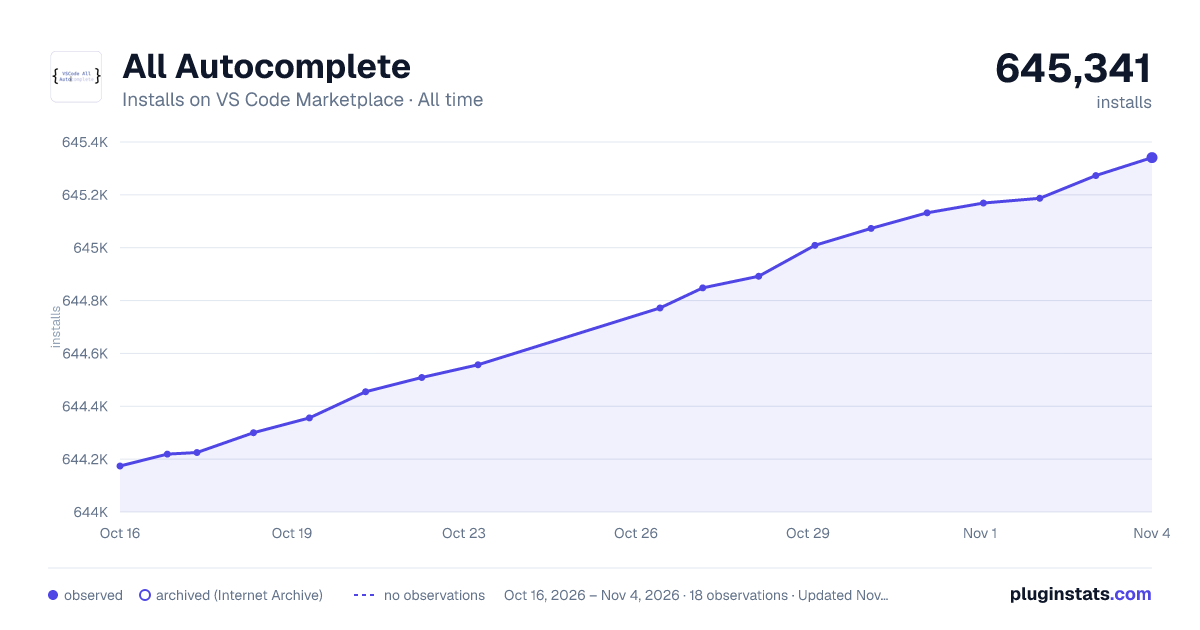

Adoption over time
7/30/90-day growth
Ranking history
Ratings over time
Listing placement
Listing placement
Filled points are observed values; hollow points come from Internet Archive snapshots of the listing page. Dashed segments span periods with no observations — values between points are not interpolated.
Each band is one page of 20. Installs on a linear scale. Placement is projected from installs, so it can differ from the marketplace's own sort order. Hover a dot to see the listing.
Recent observations
Full history (5)Similar VS Code Marketplace Other plugins
All 20 All Autocomplete alternativesData source
Install counts, average rating, and rating counts come from the public Visual Studio Marketplace gallery API. Installs are cumulative and exclude updates.
Listing: https://marketplace.visualstudio.com/items?itemName=Atishay-Jain.All-Autocomplete. First seen Oct 16, 2026; last successful collection Oct 20, 2026. See the methodology.