 PluginStats
Postman Runner installs statistics
By Miguel Ángel Domínguez Coloma · VS Code Marketplace · Other
Run Postman tests directly from your VSCode
Postman Runner has 111,866 recorded installs on VS Code Marketplace, ranking #2215 of 2,501 tracked listings.
Rating: 5.00 / 5 from 1 ratings
About Postman Runner
Postman Runner for VSCode
Run Postman collections directly from VSCode, powered by Newman. Postman Runner scans your workspace for exported collection, environment, and data files, asks a few quick questions, and runs your requests and tests without leaving the editor.
Because everything lives as plain files in your workspace, your requests are version-control friendly: commit the exported JSON and every teammate gets the same tests with a git clone / git pull. See Storing requests in your repository.
Quick start
- Export your Postman collections and environments into a folder (see Exporting from Postman), or use the copy-pasteable files in Try it in two minutes. 2. Open that folder (or any parent workspace) in VSCode. 3. Open the Command Palette and choose Postman: Run > Question Mode (Ctrl+Q on Windows/Linux, Cmd+R on macOS). 4. Answer the prompts. Results stream into the Postman Results output window and open as an HTML report.
Features
• Question Mode (Ctrl+Q / Cmd+R): a guided set of prompts to configure and run a collection. Each step is described in Question Mode walkthrough. • Collection format support: runs collections exported as v1, v2.0, and v2.1. • Automatic file discovery: recursively finds *.postman_collection.json, *.postman_environment.json, and .csv / .json data files in the workspace (node_modules is ignored). • Folder selection: run an entire collection or just one folder inside it. • Environments: pick an exported environment file, or run with none. • Iterations and delay: repeat a run N times and add a delay between requests. • Data-driven runs: feed a .csv / .json data file so Newman runs once per row. • Global variables: inject key=value pairs at run time (e.g. token=abc123; host=https://example.com) without editing an environment file. • Extra Newman arguments: a checkbox list to toggle --insecure (disable SSL validation, e.g. for self-signed certificates), --bail, --ignore-redirects, and --verbose. Your selection is remembered per workspace between runs. • Working directory: control the base path used to resolve relative file references (uploads, data files) in your requests. • Live results: assertions, requests, headers, and folder structure stream into the Postman Results output window and the status-bar toolbar as the run progresses. • HTML report: a formatted results document opens automatically when the run finishes.
Question Mode walkthrough
Running Postman: Run > Question Mode asks the following, in order. Steps are skipped when they don't apply (for example, the folder step is skipped for collections without folders, and the environment / data steps are skipped when no such files are found):
| Prompt | What it does |
| Collection | The *.postman_collection.json file to run. Required. | | Folder | Run - ALL - requests or a single folder from the collection. | | Environment | An exported *.postman_environment.json file, or - NONE -. | | Iterations | How many times to run (default from postman.testDefaultIterations). | | Delay | Milliseconds to wait between requests (default from postman.testDefaultDelay). | | Data file | A .csv / .json file for data-driven runs, or - NONE -. | | Working directory | Base path for relative file references (default from postman.workingDirectory). | | Global variables | key=value pairs separated by ;, injected at run time. Leave empty for none. | | Extra arguments | Checkbox list: --insecure, --bail, --ignore-redirects, --verbose. Remembered per workspace. |
Results appear live in the output window:
...and as an HTML document when the run completes:
Storing requests in your repository
Postman Runner does not use any cloud sync or proprietary store: it reads the exported Postman JSON files that live in your workspace. That makes sharing requests with a team a matter of committing those files to git.
A common layout:
Commit the postman/ folder, and after a git clone / git pull every developer opens the workspace and runs the exact same requests and tests via Question Mode. No accounts, no export of settings, no extra tooling. This is the recommended way to share API tests across a team (#22).
Try it in two minutes
You don't need Postman to try the extension. Create a folder, drop the two files below into it, open the folder in VSCode, and run Postman: Run > Question Mode. Both target the public Postman Echo service, so no credentials or local server are needed (just an internet connection).
example.postman_collection.json — a Collection Format v2.1 collection with one request and three assertions:
example.postman_environment.json — supplies the {{baseUrl}} variable used above:
At the prompts, pick example.postman_collection.json as the Collection, example.postman_environment.json as the Environment, and accept the defaults for the rest. Every request has assertions, so the Postman Results output shows real passes. To watch a failure render, change 'bar1' to 'bar2' in the test and run again.
Injecting global variables
You can supply values at run time instead of hard-coding them in an environment. Change the URL above to use {{token}} (for example {{baseUrl}}/get?token={{token}}), then at the Global variables prompt enter:
Separate multiple pairs with ;, for example token=abc123; host=https://example.com. The value is substituted wherever {{token}} appears, without editing any environment file.
Data-driven runs
Save a data file (.csv or .json) in the same folder and Question Mode offers it at the Data file prompt. Newman runs the collection once per row. For example, data.json:
Reference {{username}} / {{role}} in your requests and set Iterations to 3 to send a different pair each run.
More examples on GitHub. The repository's examples/ folder has larger ready-to-run collections covering Basic Auth, multipart form-data, and v1 / v2.0 format compatibility, with step-by-step notes.
Settings
Personalize the extension with the following settings (shown with their defaults):…
Description from the VS Code Marketplace listing.
- api
- keybindings
- newman
- postman
- runner
- test
README badge
Show your rank in a README or on your website. The badge updates automatically.
Charts
Images: 30d · 1y · all time · 1600×900 dark


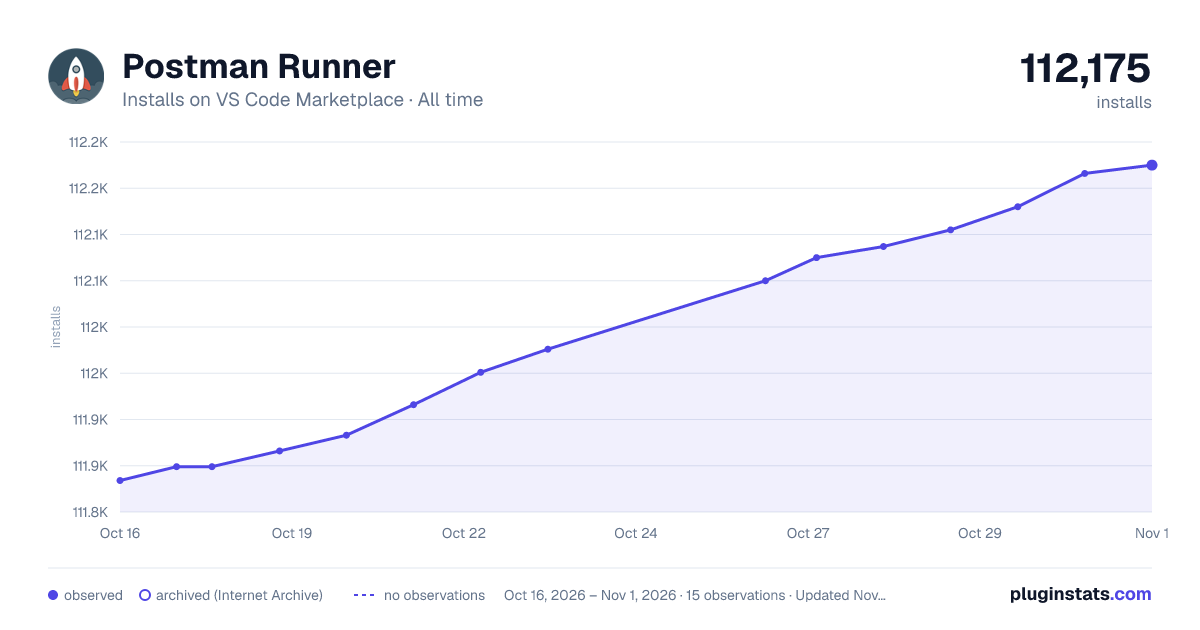

Adoption over time
7/30/90-day growth
Ranking history
Ratings over time
Listing placement
Listing placement
Filled points are observed values; hollow points come from Internet Archive snapshots of the listing page. Dashed segments span periods with no observations — values between points are not interpolated.
Each band is one page of 20. Installs on a linear scale. Placement is projected from installs, so it can differ from the marketplace's own sort order. Hover a dot to see the listing.
Recent observations
Full history (4)Similar VS Code Marketplace Other plugins
All 20 Postman Runner alternativesData source
Install counts, average rating, and rating counts come from the public Visual Studio Marketplace gallery API. Installs are cumulative and exclude updates.
Listing: https://marketplace.visualstudio.com/items?itemName=eridem.vscode-postman. First seen Oct 16, 2026; last successful collection Oct 19, 2026. See the methodology.