 PluginStats
TODO Highlight installs statistics
By Wayou Liu (2 listings) · VS Code Marketplace · Other
highlight TODOs, FIXMEs, and any keywords, annotations...
TODO Highlight has 6,170,488 recorded installs on VS Code Marketplace.
It ranks #153 of 2,501 tracked VS Code Marketplace listings by installs.
It is rated 4.5 out of 5 from 117 ratings.
PluginStats has 4 daily observations since Oct 16, 2026; the latest is from Oct 19, 2026.
Rating: 4.52 / 5 from 117 ratings
About TODO Highlight
VSCODE-TODO-HIGHLIGHT ===
Highlight TODO, FIXME and other annotations within your code.
Sometimes you forget to review the TODOs you've added while coding before you publish the code to production. So I've been wanting an extension for a long time that highlights them and reminds me that there are notes or things not done yet.
Hope this extension helps you as well.
*NOTICE*
Many report that the List highlighted annotations command is not working, make sure you have the file types included via todohighlight.include.
Preview
• with material night color theme: • with material night eighties color theme:
Config
TODO:,FIXME: are built-in keywords. You can override the look by customizing the setting.
To customize the keywords and other stuff, command + , (Windows / Linux: File -> Preferences -> User Settings) open the vscode file settings.json.
| | type | default | description |
| todohighlight.isEnable | boolean | true | Toggle the highlight, default is true. | | todohighlight.isCaseSensitive | boolean | true | Whether the keywords are case sensitive or not. | | todohighlight.keywords | array | N/A | An array of keywords that will be hilighted. You can also specify the style for each keywords here. See example below for more infomation. | | todohighlight.keywordsPattern | string | N/A | Specify keywords via RegExp instead of todohighlight.keywords one by one. NOTE that if this presents, todohighlight.keywords will be ignored. And REMEMBER to escapse the back slash if there's any in your regexp (using \\ instead of signle back slash). | | todohighlight.defaultStyle | object | N/A | Specify the default style for custom keywords, if not specified, build in default style will be applied. See all available properties on VSCode doc DecorationRenderOptions section | | todohighlight.include | array | [ "/*.js", "/*.jsx", "/*.ts", "/*.tsx", "/*.html", "/*.php", "/*.css", "/*.scss" ] | Glob patterns that defines the files to search for. Only include files you need, DO NOT USE {/*.*} for both permormance and avoiding binary files reason. For backwards compatability, a string combine all the patterns is also valid "{/*.js,/*.jsx,/*.ts,/*.tsx,/*.html,/*.php,/*.css,**/*.scss}" | | todohighlight.exclude | array | [ "/node_modules/", "/dist/", "/bower_components/", "/build/", "/.vscode/", "/.github/", "/_output/", "/*.min.*", "/*.map" ] | Glob pattern that defines files and folders to exclude while listing annotations. For backwards compatability, a string combine all the patterns is also valid "{/node_modules/,/bower_components/,/dist/,/build/,/.vscode/,/_output/,/*.min.*,/*.map}" | | todohighlight.maxFilesForSearch | number | 5120 | Max files for searching, mostly you don't need to configure this. | | todohighlight.toggleURI | boolean | false | If the file path within the output channel not clickable, set this to true to toggle the path patten between # and ::. |
an example of customizing configuration:
Commands
This extension contributes the following commands to the Command palette.
• Toggle highlight : turn on/off the highlight • List highlighted annotations : list annotations and reveal from corresponding file
Known issue
The clickable file pattern within the output channel differs from OS platform(# for Mac/Windows and :: for Linux, for details see this issue ).
Basically the extension auto detects the OS platform.
If you find that the file path is not clickable, set todohighlight.toggleURI to true to toggle the file pattern.
Description from the VS Code Marketplace listing.
- annotation
- fixme
- highlight
- keyword
- todo
Where TODO Highlight sits in the listing
Each band is one page of 20. Installs on a log scale. Placement is projected from installs, so it can differ from the marketplace's own sort order. Hover a dot to see the listing.


Charts
Images: 30d · 1y · all time · 1600×900 dark


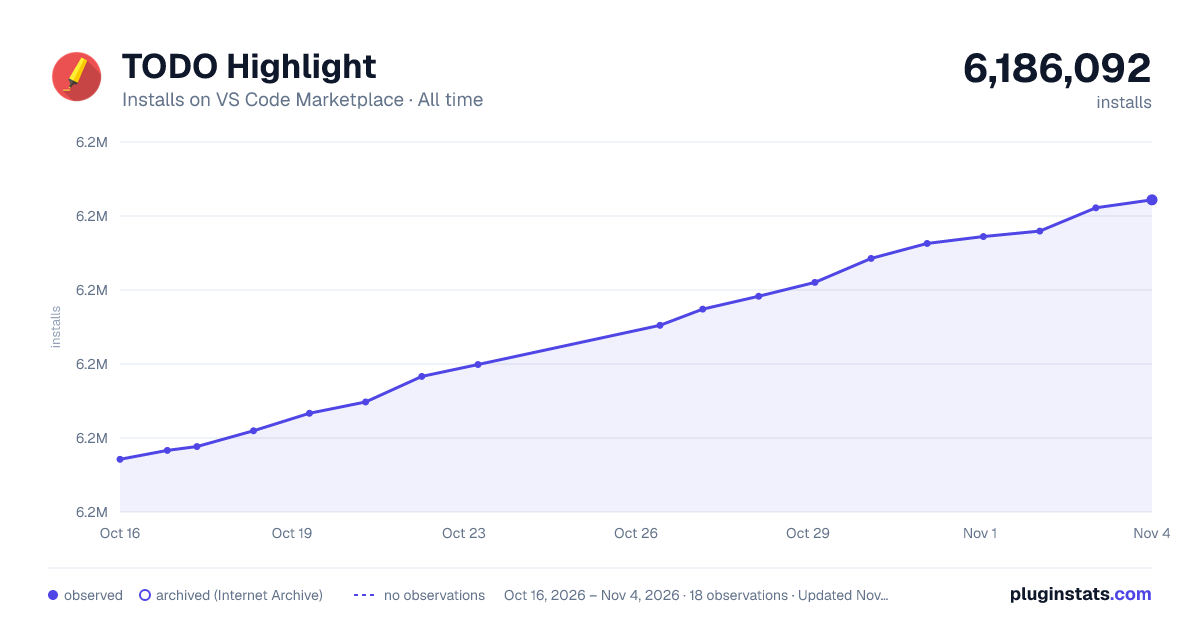

Adoption over time


7/30/90-day growth


Ranking history


Filled points are observed values; hollow points come from Internet Archive snapshots of the listing page. Dashed segments span periods with no observations — values between points are not interpolated.
Recent observations
Full history (4)Similar VS Code Marketplace Other plugins
Data source
Install counts, average rating, and rating counts come from the public Visual Studio Marketplace gallery API. Installs are cumulative and exclude updates.
Listing: https://marketplace.visualstudio.com/items?itemName=wayou.vscode-todo-highlight. First seen Oct 16, 2026; last successful collection Oct 19, 2026. See the methodology.