 PluginStats
TSLint Vue installs statistics
By prograhammer · VS Code Marketplace · Programming Languages
TSLint for Vue.js
TSLint Vue has 164,291 recorded installs on VS Code Marketplace, ranking #1757 of 2,502 tracked listings.
Rating: 5.00 / 5 from 5 ratings
About TSLint Vue
vscode-tslint-vue
VSCode extension for tslint with added support for .vue files (single file component) and compiler/typechecker level linting. This is a fork of vscode-tslint.
Note: See Quick Setup section further down for turning typeCheck on...

Quick Setup
Set Script lang
For linting to work in .vue files, you need to ensure your script tag's language attribute is set
to ts or tsx (also make sure you include the .vue extension in all your import statements as shown below):
<script lang="ts">
import Hello from '@/components/hello.vue'

// ...

</script>
Enable typeCheck
You can turn on linting at the typechecker level by setting the typeCheck tslint option to true in your settings.json (File > Preferences > Settings - Workspace):
// .vscode/settings.json
{
  // ...

  "tslint.typeCheck": true,

  // ...
}
Important: Importing vue modules (ie. import Hello from 'Hello.vue') will work fully within other .vue files (type information is retrieved)
without the need for a declaration file .d.ts. However, .ts modules that import .vue modules (ie. main.ts, hello.spec.ts) still require a declaration file:
// vue.d.ts
declare module "*.vue" {
    import Vue from "vue"  // <-- this is not ideal, looking for solution to this in future version.
    export default Vue
}
The above will give the type as vue which is not ideal and defeats the purpose of TypeScript (your Vue modules extend Vue with more type information
that you have added on your module).
I'm currently looking for a solution to this. In the meantime, you can double check yourself (if you have any places you import vue into ts) using the
Webpack plugin fork-ts-checker-webpack-plugin. See Webpack section further down below. Also remember that you will still need declaration files for
any non-ts/non-vue imports otherwise TypeScript does not know how to work with them.
Setup tsconfig.json
This extension assumes you have a tsconfig.json file located at the root of your current project/workspace. In your tsconfig file, ensure you don't exclude .vue files and also provide the wildcard path alias @ so that it points to src:
// tsconfig.json
{
  "include": [
    "src/**/*.ts",
    "src/**/*.vue"
  ],
  "exclude": [
      "node_modules"
  ],
  "compilerOptions": {

    // ...

    "baseUrl": ".",
    "paths": {
      "@/*": [
        "src/*"
      ]
    }
  }
}
Setup tslint.json
Add a tslint.json file. For a quick set of rules you can use the Javascript Standard Style
with npm install tslint-config-standard --save-dev and add it to the extends section as shown below:
{
    "defaultSeverity": "error",
    "extends": [
        "tslint-config-standard" // <-- Don't forget to npm install this package.
    ],
    "jsRules": {},
    "rules": {},
    "rulesDirectory": []
}
Webpack
If you are using Webpack you will mostly likely need a way to perform linting in your build process as well. Check out the
fast fork-ts-checker-webpack-plugin (which works with ts-loader set to transpileOnly) where I currently have a pull-request for adding
Vue functionality. You can try it out early and read more at this issue here.
VNext
This is a fork of vscode-tslint so you can find more information there. In upcoming
v2.0.0 release
I will update this code to fork from the newer, improved extension TSLint (vnext) vscode-ts-tslint. Please refer to the tslint documentation for how to configure the linting rules.
Prerequisites
The extension requires that the tslint and typescript modules are installed either locally or globally. The extension will use the tslint module that is installed closest to the linted file. You can switch
the typescript version at the bottom right of the status bar to use the workspace/local version (will update your settings.json).
To install tslint and typescript globally you can run npm install -g tslint typescript
FAQ
How can I use tslint rules that require type information?
- Turn on typecheck in your VSCode settings.json (File > Preferences > Settings):
"tslint.typeCheck": true.
Linting does not seem to work what can I do?
- Click on the
TSlintstatus bar item at the bottom left of the status bar to see the output from the vscode-tslint-vue extension. You can enable more tracing output by adding the setting "tslint.trace.server" with a value of "verbose" or "messages". If this doesn't help then please file an issue and include the trace output produced when running with the setting "tslint.trace.server" set to "verbose". This is a fork of vscode-tslint so the issue may be need to be resolved their.
Configuration options
Notice this configuration settings allow you to configure the behaviour of the vscode-tslint extension. To configure rules and tslint options you should use the tslint.json file.…
Description from the VS Code Marketplace listing.
- javascript
- javascriptreact
- json
- typescript
- typescriptreact
- vue
README badge
Show your rank in a README or on your website. The badge updates automatically.
Charts
Images: 30d · 1y · all time · 1600×900 dark


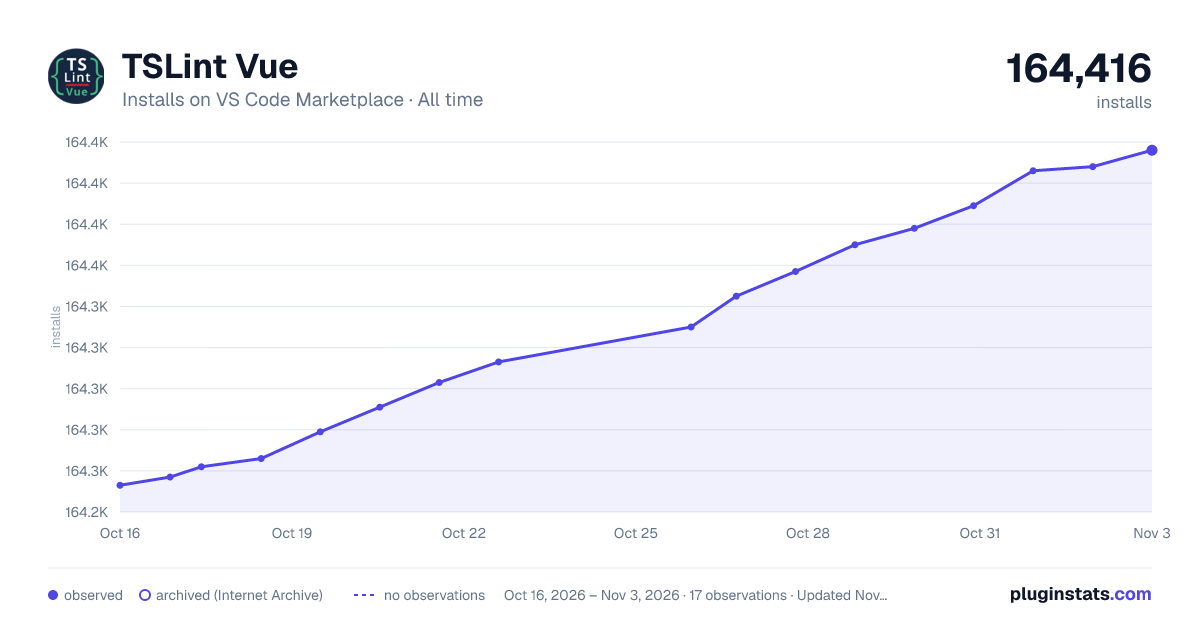

Adoption over time
7/30/90-day growth
Ranking history
Ratings over time
Listing placement
Listing placement
Listing placement
Filled points are observed values; hollow points come from Internet Archive snapshots of the listing page. Dashed segments span periods with no observations — values between points are not interpolated.
Each band is one page of 20. Installs on a linear scale. Placement is projected from installs, so it can differ from the marketplace's own sort order. Hover a dot to see the listing.
Recent observations
Full history (6)Similar VS Code Marketplace Programming Languages plugins
All 20 TSLint Vue alternativesData source
Install counts, average rating, and rating counts come from the public Visual Studio Marketplace gallery API. Installs are cumulative and exclude updates.
Listing: https://marketplace.visualstudio.com/items?itemName=prograhammer.tslint-vue. First seen Oct 16, 2026; last successful collection Oct 21, 2026. See the methodology.