 PluginStats
Robot Framework Intellisense installs statistics
By Tomi Turtiainen · VS Code Marketplace · Programming Languages
Robot Framework Intellisense
Robot Framework Intellisense has 273,015 recorded installs on VS Code Marketplace, ranking #1228 of 2,502 tracked listings.
Rating: 4.70 / 5 from 10 ratings
About Robot Framework Intellisense
Robot Framework Intellisense
A Visual Studio Code extension that supports Robot Framework development.
Features
Syntax highlighting
- Supports
.robotand.resourcefiles - Can be added for
.txtfiles using thefiles.associationssetting:
"files.associations": {
    "*.txt": "robot"
}
Goto definition
- For variables
- For user keywords
F12on Mac, Linux and Windows
Find all references
- For user keywords
⇧F12on Mac,Shift+F12on Linux and Windows
List file symbols
- Shows variables, keywords and test cases
⇧⌘Oon Mac,Ctrl+Shift+Oon Linux and Windows
List workspace symbols
- Shows variables, keywords and test cases
⌘Ton Mac,Ctrl+Ton Linux and Windows
Highlight All Occurrences of a Symbol in a Document
- Highlights all occurrences of a variable, keyword or setting
- Move the cursor to a variable, keyword or setting
Show Code Completion Proposals
- Suggests user keywords and variables
⌃Spaceon Mac,Ctrl+Spaceon Linux and Windows
Code Completion for Standard Library Keywords
- Code completion for keywords in the standard libraries, like
BuiltInandString - Requires configuration for which libraries are suggested with
rfLanguageServer.librariessetting. E.g.
"rfLanguageServer.libraries": [
  "BuiltIn-3.0.4"
]
- See a list of all available libraries here
Code Completion for Any 3rd Party Library
Support for python keywords
- Keywords defined in
.pyfiles are also included - Requires that the
.pyfiles are included withrfLanguageServer.includePathssetting. E.g.
"rfLanguageServer.includePaths": [
  "**/*.robot",
  "**/*.py"
]
Configuration
By default all .robot and .resource files are parsed. This can be configured using parameters. (see Code > Preferences > Workspace Settings).
| param | description |
|---|---|
rfLanguageServer.includePaths | Array of glob patterns for files to be included` |
rfLanguageServer.excludePaths | Array of glob patterns for files to be excluded |
rfLanguageServer.logLevel | What information of the language server is logged in the Output. Possible values off, errors, info, debug |
rfLanguageServer.trace.server | what information of the communication between VSCode and the rfLanguageServer is logged to the Output. Possible values off, messages, verbose |
rfLanguageServer.libraries | What libraries' keywords are suggested with code completion. Can be a name of a standard library (see Supported standard libraries) or a library definition (see defining 3rd party libraries) or a combination of them. |
The includePaths and excludePaths properties take a list of glob-like file patterns. Even though any files can be matched this way, only files with supported extensions are included (i.e. .robot, .resource, .txt, and .py).
If the includePaths is left unspecified, the parser defaults to including all .robot and .resource files in the containing directory and subdirectories except those excluded using the excludePaths property.
Supported standard libraries
BuiltIn-2.7.7BuiltIn-2.8.7BuiltIn-2.9.2BuiltIn-3.0.4Collections-2.7.7Collections-2.8.7Collections-2.9.2Collections-3.0.4DateTime-2.8.7DateTime-2.9.2DateTime-3.0.4Dialogs-2.7.7Dialogs-2.8.7Dialogs-2.9.2Dialogs-3.0.4OperatingSystem-2.7.7OperatingSystem-2.8.7OperatingSystem-2.9.2OperatingSystem-3.0.4Process-2.8.7Process-2.9.2Process-3.0.4Screenshot-2.7.7Screenshot-2.8.7Screenshot-2.9.2Screenshot-3.0.4Selenium2Library-1.8.0Selenium2Library-3.0.0SeleniumLibrary-3.2.0String-2.7.7String-2.8.7String-2.9.2String-3.0.4Telnet-2.7.7Telnet-2.8.7Telnet-2.9.2Telnet-3.0.4XML-2.8.7XML-2.9.2XML-3.0.4
Defining 3rd party libraries
3rd party libraries can be defined inline in the rfLanguageServer.libraries configuration block. For example:
"rfLanguageServer.libraries": [
  {
    "name": "MyLibrary",
    "version": "1.0.0",
    "keywords": [
      { "name": "My Keyword 1", "args": ["arg1"], "doc": "documentation" },
      { "name": "My Keyword 2", "args": [],       "doc": "documentation" }
    ]
  }
]
Known issues
Can be found here
Changelog
Can be found here.
Bugs
Report them here.
Contributing
All contributions are welcomed! Please see the contributing guide for more details.
License
Acknowledgements
This project is a grateful recipient of the Futurice Open Source sponsorship program. ♥
Syntax highlighting grammar is built on top of work by Jussi Malinen.
Description from the VS Code Marketplace listing.
- code-completion
- intellisense
- RF
- robot
- Robot Framework
- RobotFramework
README badge
Show your rank in a README or on your website. The badge updates automatically.
Charts
Images: 30d · 1y · all time · 1600×900 dark


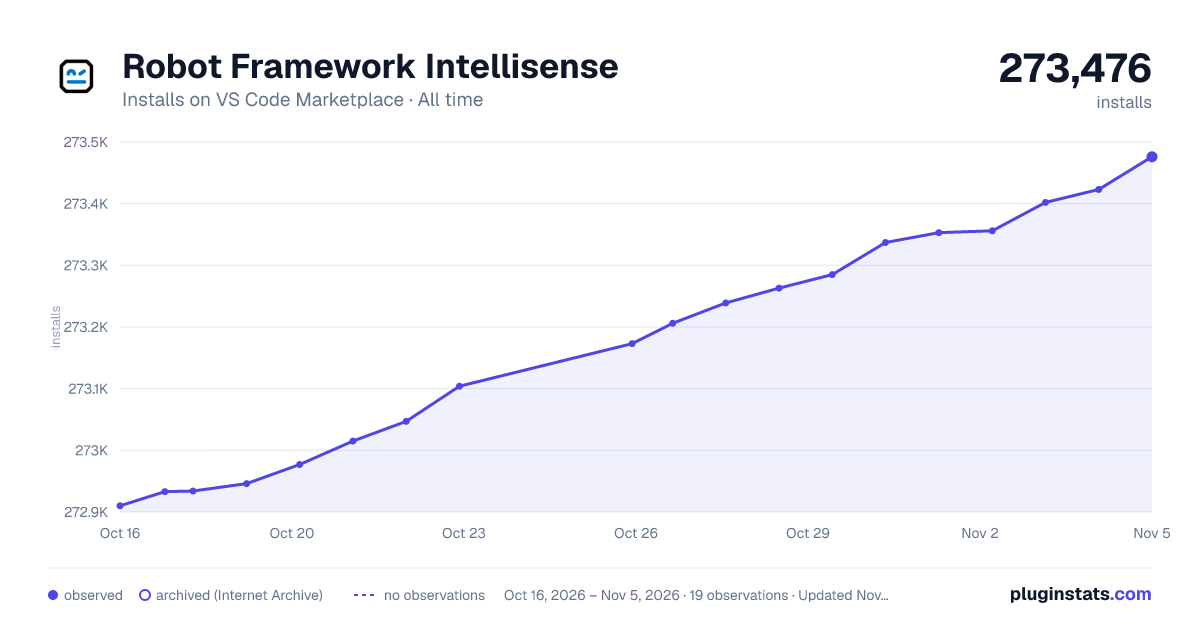

Adoption over time
7/30/90-day growth
Ranking history
Ratings over time
Listing placement
Listing placement
Filled points are observed values; hollow points come from Internet Archive snapshots of the listing page. Dashed segments span periods with no observations — values between points are not interpolated.
Each band is one page of 20. Installs on a linear scale. Placement is projected from installs, so it can differ from the marketplace's own sort order. Hover a dot to see the listing.
Recent observations
Full history (6)Similar VS Code Marketplace Programming Languages plugins
All 20 Robot Framework Intellisense alternativesData source
Install counts, average rating, and rating counts come from the public Visual Studio Marketplace gallery API. Installs are cumulative and exclude updates.
Listing: https://marketplace.visualstudio.com/items?itemName=TomiTurtiainen.rf-intellisense. First seen Oct 16, 2026; last successful collection Oct 21, 2026. See the methodology.